NETGEAR is aware of a growing number of phone and online scams. To learn how to stay safe click here.
Forum Discussion

EmperorVinay
Apr 29, 2018Aspirant
ProSafe FVS318G not setup correctly
Hello Experts,
I am a novice trying to connect the FVS318G - VPN device with AT&T given Modem and Router combo 5268AC, and I dnt even know the right wiring connections.
i) My wiring is
...
EmperorVinay
Apr 29, 2018Aspirant
- JohnC_VMay 01, 2018NETGEAR Employee Retired
Hi EmperorVinay,
Welcome to our community!
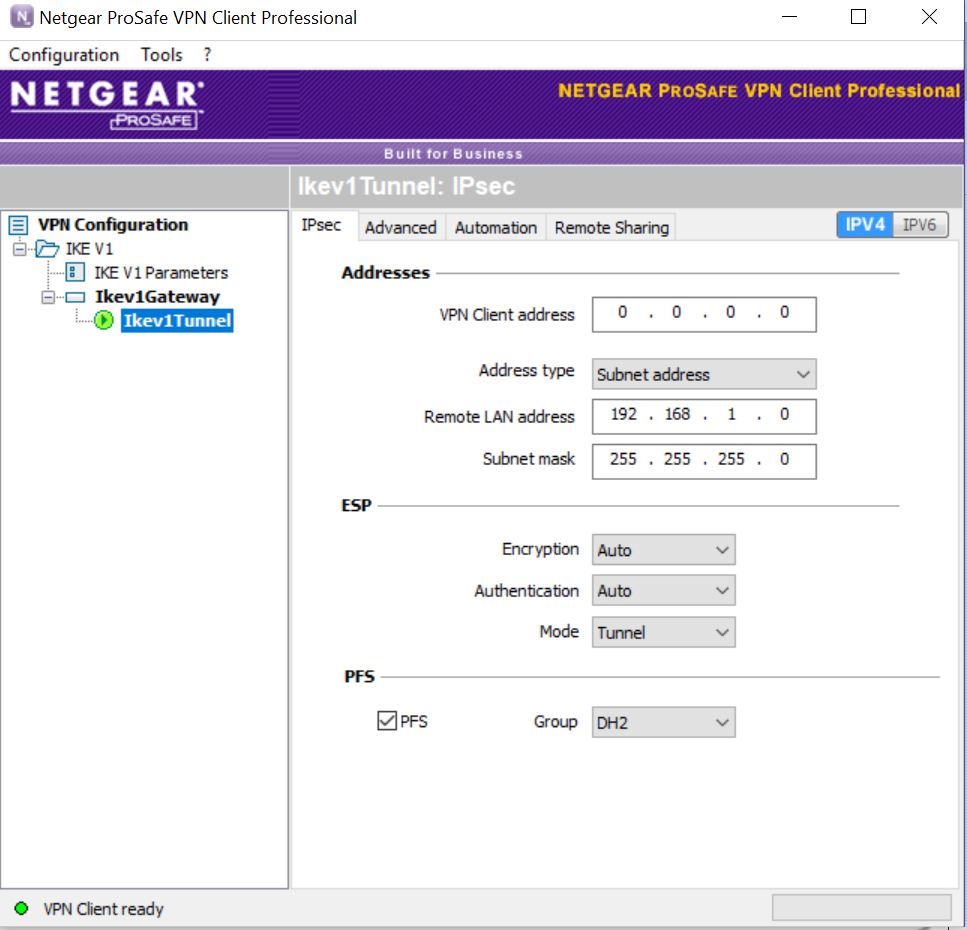
I found out that the Remote LAN Address of the VPN Client is the same as the LAN IP of the VPN server. Please change the Remote LAN address to a different subnet and test if you can now ping the other network.
If ever your concern has been addressed or resolved, I encourage you to mark the appropriate reply as the “Accepted Solution” so others can be confident in benefiting from the solution. The NETGEAR Community looks forward to hearing from you and being a helpful resource in the future!
Regards,
- JohnC_VMay 08, 2018NETGEAR Employee Retired
I would like to have a follow up on this thread. Please let us know if everything is ok now or you still need further assistance.
Regards,

Related Content
NETGEAR Academy

Boost your skills with the Netgear Academy - Get trained, certified and stay ahead with the latest Netgear technology!
Join Us!