NETGEAR is aware of a growing number of phone and online scams. To learn how to stay safe click here.
Forum Discussion

snosnk
Jan 11, 2017Aspirant
How does one get an SRX5308 to pass GRE packet to the internal network?
How does one get an SRX5308 to pass GRE packet to the internal network?

DaneA
Jan 11, 2017NETGEAR Employee Retired
Hi snosnk,
Welcome to the community! :)
It seems that you wanted to set up PPTP VPN. Let me share this article.
Hope it helps.
Regards,
DaneA
NETGEAR Community Team

snosnk
Jan 11, 2017Aspirant
If I wanted a VPN that authenticated to my router, that might work, But I need to authenticate by Active Directory. I read through that entire page, and no where did I see anything about GRE. Does the SRX5308 even pass GRE? A simple yes or no will suffice.
- DaneAJan 11, 2017NETGEAR Employee Retired
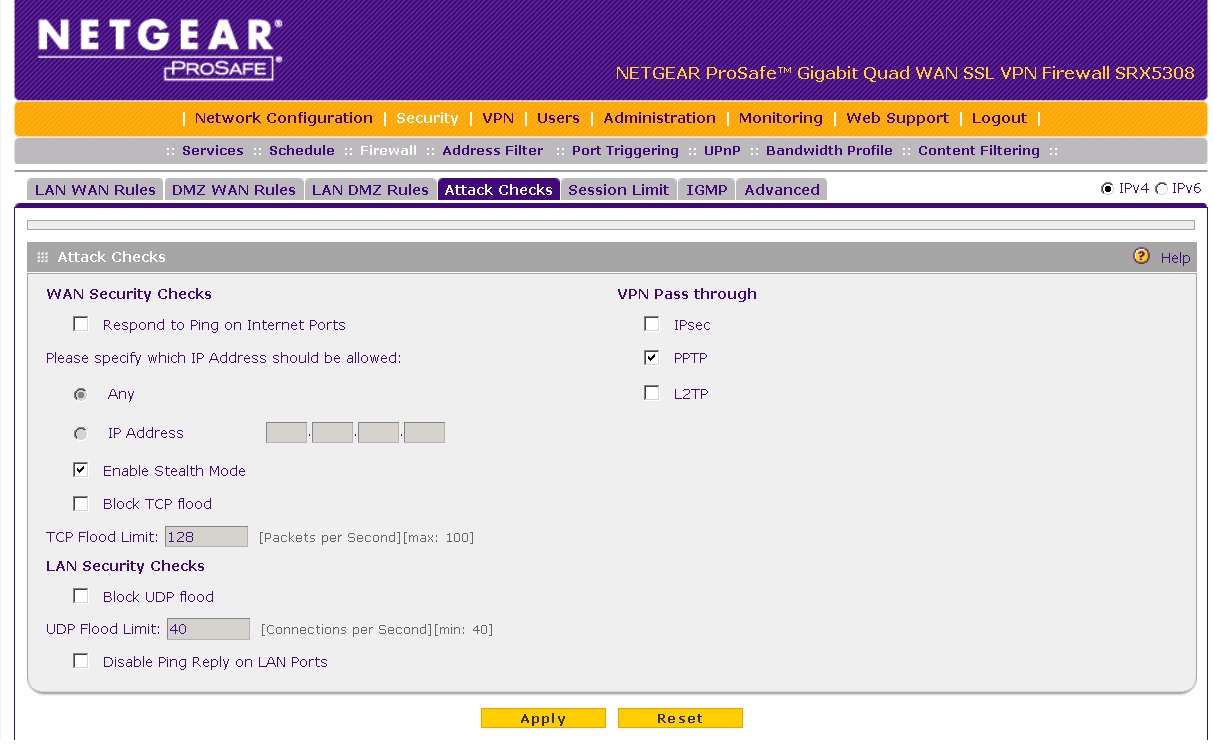
I believe it should. Have you already enabled PPTP VPN Pass through on your SRX5308? Refer to the image below:

Regards,
DaneA
NETGEAR Community Team
- snosnkJan 11, 2017Aspirant
- DaneAJan 12, 2017NETGEAR Employee Retired
Here are my questions below:
a. Do you have a static Public WAN IP Address registered to the SRX5308 or are you using DDNS?
b. Have you tried to open ports 500 (TCP/UDP) and 1723 (TCP) on the SRX5308 pointing to the IP address of the Active Directory? If yes, kindly test the ports it if its really open via this link: http://www.canyouseeme.org/
c. Have you encountered an error message when the PPTP client fails to connect? If yes, kindly post a screenshot of it.
d. What is the current firmware version of the SRX5308?
Regards,
DaneA
NETGEAR Community Team
Related Content
NETGEAR Academy

Boost your skills with the Netgear Academy - Get trained, certified and stay ahead with the latest Netgear technology!
Join Us!
