NETGEAR is aware of a growing number of phone and online scams. To learn how to stay safe click here.
Forum Discussion

bruceUK
Nov 16, 2016Aspirant
SRX5308 Wan access to webserver
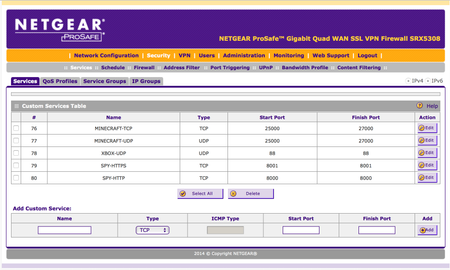
Hi, I am having difficulty setting up access to a SecuritySpy webserver for my cameras from the internet for remote viewing. I'm sure i must be missing something - but i cant see what! The se...
- Nov 18, 2016
Hi bruceUK,
See if there will be any improvements after the firmware update. I don't see a reason why they would not work.
Thanks,
bruceUK
Nov 16, 2016Aspirant
Hi,
Thanks for getting back to me, in answer to your questions -
1. Yes, The cameras are all accessible locally. They connect to the SecuritySpy server and all cameras can be viewed through the SecuritySpy built in webserver by http://192.168.1.101:8000 or https://192.168.1.101:8001
2. No, I am using a wireless internet connection that connect directly to the SRX5308 via a CAT5 cable, and the SRX5308 handles the authenification to the service provider
3. 4.3.3-5
4. They are the ports used to accces the SecuritySpy webserver
Thanks in advance
Bruce

JohnRo
Nov 16, 2016NETGEAR Employee Retired
Hi bruceUK,
Regarding number 2, does the wireless internet connection use 4G/LTE? Does it give a public IP to the SRX?
Thanks,
- bruceUKNov 16, 2016Aspirant
Hi,
Heres some more info here -
http://www.thinkingwisp.co.uk/how-it-works/
Essentially it works the same as a cable broadband connnection - albeit with wireless between the mast and my receiver, which then connects to the SRX via CAT5
and yes it does provide a public IP address to the SRX
Regards
Bruce
- JohnRoNov 17, 2016NETGEAR Employee Retired
Hi bruceUK,
I see. It works like a regular internet connection. Can you check the ports using this link.
Thanks,
- bruceUKNov 17, 2016Aspirant
Hi,
Interestingly it tells me 8000 is closed, but 8001 is open. Both are setup in exactly the same way, so I cant see why 8000 does not appear open
Related Content
NETGEAR Academy

Boost your skills with the Netgear Academy - Get trained, certified and stay ahead with the latest Netgear technology!
Join Us!
