NETGEAR is aware of a growing number of phone and online scams. To learn how to stay safe click here.
Forum Discussion

deanwatson
Dec 11, 2017Aspirant
VPN Access from different LAN segment.
I have a working IPSec VPN to a remote site, that requires a configuration with a single IP Address at my end. I want to be able to access the host sytems at the remote site from a number of devices,...

DaneA
Dec 13, 2017NETGEAR Employee Retired
HI @deanwatson,
I believe you have a client-to-box IPsec VPN to the FVS336Gv3. I suggest you to create VLANs instead of using the Multi-Homing feature. Refer to the diagram below as an example:

Once you got the client-to-box VPN working between the FVS336Gv3 and the remote PC, in order to access the VLANs through the VPN tunnel, it is needed to edit the VPN Policy on the FVS336Gv3. Change the Local LAN to the Supernet 192.168.0.0/16 which includes all VLANs: 192.168.1.0/24, 192.168.50.0/24, 192.168.100.0/24 and 192.168.150.0/24. Refer to the image below:

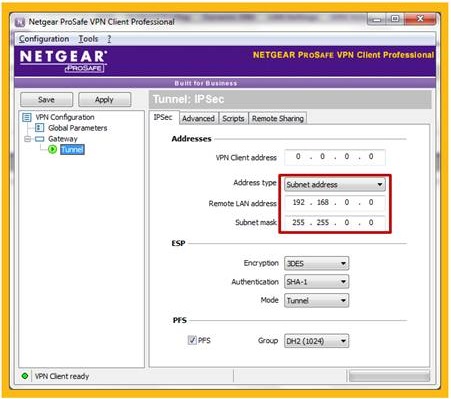
Then, on the NETGEAR VPN Client Professional software, it is needed to set the Remote LAN Address to the Supernet 192.168.0.0/16. Refer to the image below:
Regards,
DaneA
NETGEAR Community Team
- DaneAJan 02, 2018NETGEAR Employee Retired
Just a follow-up on this. I have re-read this forum thread. Correct me if I'm wrong. As I understand, there is a LAN Multi-homing already setup on the remote site wherein the service is deployed that you want to access via the site-to-site VPN. I'm afraid that it is not possible to access the service that you want because of the LAN Multi-homing setup. Still, the best suggestion is to configure the remote site with VLANs. Refer to the diagram below as an example:
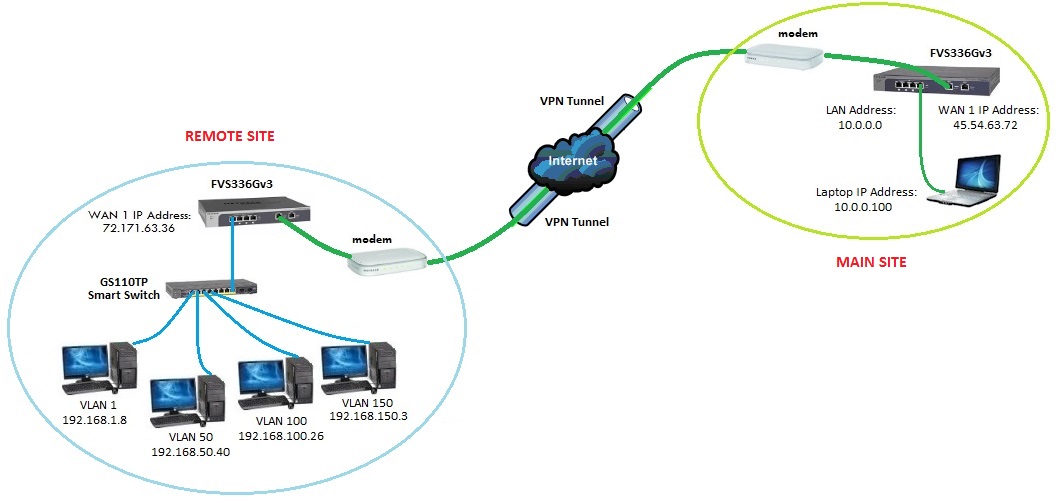
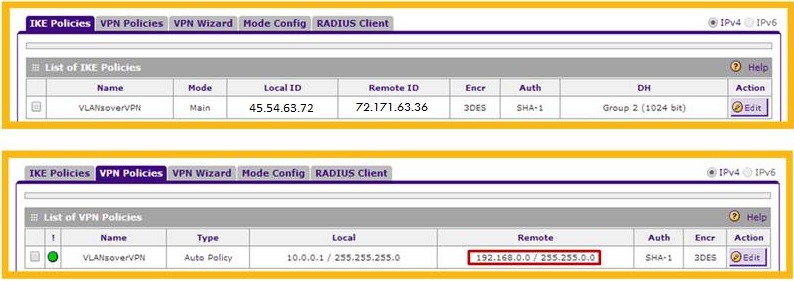
Just like in my initial response to you, in order to access the VLANs through the Site-to-Site VPN tunnel, it is needed to edit the VPN Policy of the Local Network on the FVS336Gv3 at the Remote Site. Change the Local LAN to the Supernet 192.168.0.0/16 which includes all VLANs: 192.168.1.0/24, 192.168.50.0/24, 192.168.100.0/24 and 192.168.150.0/24. This will result to the image below:

Then on the FVS336Gv3 of the Main Site, set the Remote LAN to the Supernet 192.168.0.0/16 which includes all VLANs when running the VPN Wizard. It will result to the image below:
Regards,
DaneA
NETGEAR Community Team
Related Content
NETGEAR Academy

Boost your skills with the Netgear Academy - Get trained, certified and stay ahead with the latest Netgear technology!
Join Us!
