NETGEAR is aware of a growing number of phone and online scams. To learn how to stay safe click here.
Forum Discussion

ExpTechs
Jul 30, 2015Aspirant
NETGEAR ProSafe Router
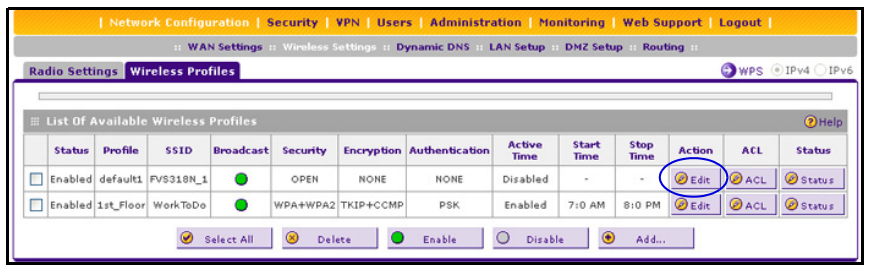
I purchased the Netgear ProSafe FVS318N VPN Router for our company to help with pop-ups on our network. When trying to configure it, I found out that it does not allow spaces in the SSID? We have w...
- Jul 31, 2015
Hello ExpTechs,
Yes, you can disable the wireless function of the FVS318N or you can just turn off the SSID broadcast. There is this thread here where some users talked about disabling the wireless fuinction totally, you can probably get some ideas. Here's where you will change the settings of the wireless network -also has the option to totally disable it.
Click here for the reference manual, you can find the wireless configuration starting page 4.
What kind of pop-ups do you get by the way? Can you tell me a little bit more about your network diagram? How is everything connected as of the moment?
I'll look forward to your response.
Thanks,
ExpTechs
Jul 31, 2015Aspirant
Hello JohnRo,
Thanks for your replies. I was able to disable wireless in the ProSafe and continue to use the wireless from the other netgear so all is well.
No more pop-ups and re-directs. I have it connected sa follows: Internet Modem to ProSafe to Existing Netgear router to 24-port switch.. I thought I would have to disable DHCP in current
Netgear router but I didn't have to. Thanks again and have a great day.
Rick

JohnRo
Aug 03, 2015NETGEAR Employee Retired
Hi ExpTechs,
I'm glad that the pop-up's and redirects went away, you can also setup web filtering on your FVS318N. On your current setup, you may have to use DMZ in case you'll hva to forward ports in the future.
Have a great day!
Thanks,
- gobroncos7Sep 16, 2015Aspirant
Hello, I and others are getting lots of popups on devices when they connect to our home wireless network that's provided by our Netgear wireless router. Say anyone else visiting connects to it- they are going to get popups. They disappear when my phone disconnects and goes to using mobile data, but another person's iPhone still gets them. Someone else visiting gets popups on her iPad just from being logged onto our WiFi. The computer is connected to the router with an Ethernet cable and it also gets the popups. I have tried fixing the problem with the internet provider but have not had success. Why do the popups happen on devices connected to our router and what can we do to stop them? This forum post is the only one I have found that mentions people getting popups only when connected to the router.
- JohnRoSep 16, 2015NETGEAR Employee Retired
Hello gobroncos7,
Welcome to the community!
It may or may not be related to the post above, but for your case I would like to to get some information:
1. What kind of pop-ups do you get? It ads or network notification pop-ups?
2. What is the model number of your router?
3. Does the pop ups show up when using wired connection?
4. What is the security type that you are using?
5. Please provide screenshots of the pop-ups if you have one.
I look forward to your response.
Thanks,
Related Content
NETGEAR Academy

Boost your skills with the Netgear Academy - Get trained, certified and stay ahead with the latest Netgear technology!
Join Us!
