NETGEAR is aware of a growing number of phone and online scams. To learn how to stay safe click here.
Forum Discussion

DDT3
Nov 04, 2023Aspirant
VLAN settings keep changing all the time
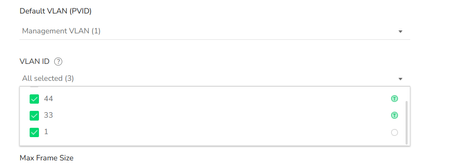
I have 2*GC110P and 1*GC110 connected to my Insight Premium account. Yesterday I added 2 new WIFI AP's that have a specific VLAN for SSID Guest and IoT:VLAN33 (Guest) and VLAN44(IoT). It sounds s...

schumaku
Nov 05, 2023Guru - Experienced User
Does the Insight CLOUD Portal magically hide or suppress the untagged VLAN 1 (for the PVID), too? Guess this is the one you use for simplicity for providing the Internet uplink for the cloud access.
DDT3
Nov 05, 2023Aspirant
As described Insight indeed lost connection. And yes that was because Vlan1 was no longer selected for the "uplink port"
- schumakuNov 06, 2023Guru - Experienced User
DDT3 wrote:
...and yes that was because Vlan1 was no longer selected for the "uplink port"In my understanding, this is "uplink port" not configurable. Instead, the uplink port is marked automatically to where the switch does expect the uplink, e.g. toward the Internet, including the Insight cloud.
Still unclear to me why your switch does abandon the untagged network when adding two tagged VLAN ports.
- DDT3Nov 06, 2023Aspirant
Indeed the uplink port is not configurable: that is why I put it in between quotes in my original mail, so " Uplink port" is shorthand for "the port that is connected to my router, that is connected to the internet".
Must admit that at first I of course doubted myself ("did I make a mistake when saving the settings"). So I started making sure to check and double-check all the settings before pressing save. And still saw strange behavior. And when it happened even after a " factory reset" I am quite sure: this is not me. And I already knew not to mix setting from App and setting from web because of this.
Actually, now that everything is working I am very reluctant to make more changes. Especially as it appears you can lock yourself out: on the GC110 a factory reset can only be performed using the web interface.....
- schumakuNov 06, 2023Guru - Experienced User
DDT3 wrote:
Must admit that at first I of course doubted myself ("did I make a mistake when saving the settings"). So I started making sure to check and double-check all the settings before pressing save. And still saw strange behavior
Nothing obvious, as it appears the port was intended to become untagged and PVID for VLAN 1, along with the additional tagged VLANs.
DDT3 wrote:
Especially as it appears you can lock yourself out: on the GC110 a factory reset can only be performed using the web interface.....
Can't follow your logic here. If a switch does have a wrong config defined in the cloud and deployed from the cloud, it will always receive the same config again from the cloud .- permitting it is able to establish the cloud connectivity following the factory reset, regardless if the factory reset was done from the local Web, the Insight cloud (App or Web portal), or by using the reset button.
Related Content
NETGEAR Academy

Boost your skills with the Netgear Academy - Get trained, certified and stay ahead with the latest Netgear technology!
Join Us!
