NETGEAR is aware of a growing number of phone and online scams. To learn how to stay safe click here.
Forum Discussion

tehBob
Jun 03, 2023Aspirant
Wrong IPs being given out
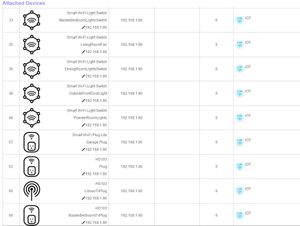
I have a SXR80 modem as well as a SXS80 satellite mesh system. Everything was working fine until a slight power outage happened and all of my IoT devices restarted. Of my 30 light switches, 3 conne...
tehBob
Jun 04, 2023Aspirant
CrimpOn wrote:Could any settings on the VLAN Profile for IoT(30) have been changed?
(page 82 of the user manual)
I don't believe any of the settings for that VLAN have been changed.
MrJoshW
Jun 05, 2023NETGEAR Employee Retired
Reviewing the comments it sounds like the issue is only happening on VLAN 30 correct? When connecting your phone to the SSID it did not receive an IP address when connecting to it. Try this for me:
-Can you disable the DHCP on VLAN 30/LAN 3 and re-enable? I want to see if restarting the DHCP on the this VLAN has any change.
-Also looking at your screenshot I see a starting IP range of 120-254. Are you able to change it to 1-254 and then connect with your phone? Does it now obtain an IP address from the DHCP?
- tehBobJun 05, 2023Aspirant
MrJoshW wrote:Reviewing the comments it sounds like the issue is only happening on VLAN 30 correct?
Yes, that is correct. Only VLAN 30 is having this problem.
MrJoshW wrote:-Can you disable the DHCP on VLAN 30/LAN 3 and re-enable? I want to see if restarting the DHCP on the this VLAN has any change.
I tried this yesterday...or day before yesterday. I can't even remember at this point. "I've tried every different combination of disabling network, disabling DHCP, removing IP addresses from the pool...you name it, no luck."
MrJoshW wrote:
-Also looking at your screenshot I see a starting IP range of 120-254. Are you able to change it to 1-254 and then connect with your phone? Does it now obtain an IP address from the DHCP?Yes, I reset it back to 1-254 with the same results. No DHCP being handed out. My phone and laptop failed to get IP addresses. If i join LAN1 or LAN2, or LAN4 they join without a problem.
- tehBobJun 05, 2023Aspirant
I have an LCD info screen that has been trying to connect to this VLAN for two hours. The MAC address is set to a static IP, so it shouldn't even be trying to DHCP. This is just one device. Many other IoT items are trying to connect and fail.
Spoiler[DHCP IP: 192.168.30.101] to MAC address xx:xx:xx:xx:xx:xx Monday 6/5/2023 2023 14:10:39 [DHCP IP: 192.168.30.101] to MAC address xx:xx:xx:xx:xx:xx Monday 6/5/2023 2023 14:09:17 [DHCP IP: 192.168.30.101] to MAC address xx:xx:xx:xx:xx:xx Monday 6/5/2023 2023 14:08:40 [DHCP IP: 192.168.30.101] to MAC address xx:xx:xx:xx:xx:xx Monday 6/5/2023 2023 14:08:23 [DHCP IP: 192.168.30.101] to MAC address xx:xx:xx:xx:xx:xx Monday 6/5/2023 2023 14:08:21 [DHCP IP: 192.168.30.101] to MAC address xx:xx:xx:xx:xx:xx Monday 6/5/2023 2023 14:07:30 [DHCP IP: 192.168.30.101] to MAC address xx:xx:xx:xx:xx:xx Monday 6/5/2023 2023 14:06:07 [DHCP IP: 192.168.30.101] to MAC address xx:xx:xx:xx:xx:xx Monday 6/5/2023 2023 14:05:29 [DHCP IP: 192.168.30.101] to MAC address xx:xx:xx:xx:xx:xx Monday 6/5/2023 2023 14:04:15 [DHCP IP: 192.168.30.101] to MAC address xx:xx:xx:xx:xx:xx Monday 6/5/2023 2023 14:03:38 [DHCP IP: 192.168.30.101] to MAC address xx:xx:xx:xx:xx:xx Monday 6/5/2023 2023 14:01:50 [DHCP IP: 192.168.30.101] to MAC address xx:xx:xx:xx:xx:xx Monday 6/5/2023 2023 14:01:42 [DHCP IP: 192.168.30.101] to MAC address xx:xx:xx:xx:xx:xx Monday 6/5/2023 2023 14:01:33 [DHCP IP: 192.168.30.101] to MAC address xx:xx:xx:xx:xx:xx Monday 6/5/2023 2023 13:59:33 [DHCP IP: 192.168.30.101] to MAC address xx:xx:xx:xx:xx:xx Monday 6/5/2023 2023 13:58:55 [DHCP IP: 192.168.30.101] to MAC address xx:xx:xx:xx:xx:xx Monday 6/5/2023 2023 13:57:12 [DHCP IP: 192.168.30.101] to MAC address xx:xx:xx:xx:xx:xx Monday 6/5/2023 2023 13:56:27 [DHCP IP: 192.168.30.101] to MAC address xx:xx:xx:xx:xx:xx Monday 6/5/2023 2023 13:56:21 [DHCP IP: 192.168.30.101] to MAC address xx:xx:xx:xx:xx:xx Monday 6/5/2023 2023 13:56:17 [DHCP IP: 192.168.30.101] to MAC address xx:xx:xx:xx:xx:xx Monday 6/5/2023 2023 13:56:16 [DHCP IP: 192.168.30.101] to MAC address xx:xx:xx:xx:xx:xx Monday 6/5/2023 2023 13:55:39 [DHCP IP: 192.168.30.101] to MAC address xx:xx:xx:xx:xx:xx Monday 6/5/2023 2023 13:55:23 [DHCP IP: 192.168.30.101] to MAC address xx:xx:xx:xx:xx:xx Monday 6/5/2023 2023 13:54:16 [DHCP IP: 192.168.30.101] to MAC address xx:xx:xx:xx:xx:xx Monday 6/5/2023 2023 13:53:39 [DHCP IP: 192.168.30.101] to MAC address xx:xx:xx:xx:xx:xx Monday 6/5/2023 2023 13:52:24 [DHCP IP: 192.168.30.101] to MAC address xx:xx:xx:xx:xx:xx Monday 6/5/2023 2023 13:51:01 [DHCP IP: 192.168.30.101] to MAC address xx:xx:xx:xx:xx:xx Monday 6/5/2023 2023 13:50:25 [DHCP IP: 192.168.30.101] to MAC address xx:xx:xx:xx:xx:xx Monday 6/5/2023 2023 13:49:02 [DHCP IP: 192.168.30.101] to MAC address xx:xx:xx:xx:xx:xx Monday 6/5/2023 2023 13:48:24 [DHCP IP: 192.168.30.101] to MAC address xx:xx:xx:xx:xx:xx Monday 6/5/2023 2023 13:47:01 [DHCP IP: 192.168.30.101] to MAC address xx:xx:xx:xx:xx:xx Monday 6/5/2023 2023 13:46:01 [DHCP IP: 192.168.30.101] to MAC address xx:xx:xx:xx:xx:xx Monday 6/5/2023 2023 13:45:37 [DHCP IP: 192.168.30.101] to MAC address xx:xx:xx:xx:xx:xx Monday 6/5/2023 2023 13:45:33 [DHCP IP: 192.168.30.101] to MAC address xx:xx:xx:xx:xx:xx Monday 6/5/2023 2023 13:45:31 [DHCP IP: 192.168.30.101] to MAC address xx:xx:xx:xx:xx:xx Monday 6/5/2023 2023 13:44:38 [DHCP IP: 192.168.30.101] to MAC address xx:xx:xx:xx:xx:xx Monday 6/5/2023 2023 13:44:01 [DHCP IP: 192.168.30.101] to MAC address xx:xx:xx:xx:xx:xx Monday 6/5/2023 2023 13:42:00 [DHCP IP: 192.168.30.101] to MAC address xx:xx:xx:xx:xx:xx Monday 6/5/2023 2023 13:41:23 [DHCP IP: 192.168.30.101] to MAC address xx:xx:xx:xx:xx:xx Monday 6/5/2023 2023 13:40:00 [DHCP IP: 192.168.30.101] to MAC address xx:xx:xx:xx:xx:xx Monday 6/5/2023 2023 13:39:23 [DHCP IP: 192.168.30.101] to MAC address xx:xx:xx:xx:xx:xx Monday 6/5/2023 2023 13:38:45 [DHCP IP: 192.168.30.101] to MAC address xx:xx:xx:xx:xx:xx Monday 6/5/2023 2023 13:38:01 [DHCP IP: 192.168.30.101] to MAC address xx:xx:xx:xx:xx:xx Monday 6/5/2023 2023 13:37:23 [DHCP IP: 192.168.30.101] to MAC address xx:xx:xx:xx:xx:xx Monday 6/5/2023 2023 13:36:01 [DHCP IP: 192.168.30.101] to MAC address xx:xx:xx:xx:xx:xx Monday 6/5/2023 2023 13:35:23 [DHCP IP: 192.168.30.101] to MAC address xx:xx:xx:xx:xx:xx Monday 6/5/2023 2023 13:34:12 [DHCP IP: 192.168.30.101] to MAC address xx:xx:xx:xx:xx:xx Monday 6/5/2023 2023 13:33:44 [DHCP IP: 192.168.30.101] to MAC address xx:xx:xx:xx:xx:xx Monday 6/5/2023 2023 13:33:36 [DHCP IP: 192.168.30.101] to MAC address xx:xx:xx:xx:xx:xx Monday 6/5/2023 2023 13:33:30 [DHCP IP: 192.168.30.101] to MAC address xx:xx:xx:xx:xx:xx Monday 6/5/2023 2023 13:32:57 [DHCP IP: 192.168.30.101] to MAC address xx:xx:xx:xx:xx:xx Monday 6/5/2023 2023 13:32:20 [DHCP IP: 192.168.30.101] to MAC address xx:xx:xx:xx:xx:xx Monday 6/5/2023 2023 13:31:43 [DHCP IP: 192.168.30.101] to MAC address xx:xx:xx:xx:xx:xx Monday 6/5/2023 2023 13:31:06 [DHCP IP: 192.168.30.101] to MAC address xx:xx:xx:xx:xx:xx Monday 6/5/2023 2023 13:29:39 [DHCP IP: 192.168.30.101] to MAC address xx:xx:xx:xx:xx:xx Monday 6/5/2023 2023 13:29:01 [DHCP IP: 192.168.30.101] to MAC address xx:xx:xx:xx:xx:xx Monday 6/5/2023 2023 13:28:59 [DHCP IP: 192.168.30.101] to MAC address xx:xx:xx:xx:xx:xx Monday 6/5/2023 2023 13:26:58 [DHCP IP: 192.168.30.101] to MAC address xx:xx:xx:xx:xx:xx Monday 6/5/2023 2023 13:25:34 [DHCP IP: 192.168.30.101] to MAC address xx:xx:xx:xx:xx:xx Monday 6/5/2023 2023 13:24:57 [DHCP IP: 192.168.30.101] to MAC address xx:xx:xx:xx:xx:xx Monday 6/5/2023 2023 13:24:19 [DHCP IP: 192.168.30.101] to MAC address xx:xx:xx:xx:xx:xx Monday 6/5/2023 2023 13:24:04 [DHCP IP: 192.168.30.101] to MAC address xx:xx:xx:xx:xx:xx Monday 6/5/2023 2023 13:23:24 [DHCP IP: 192.168.30.101] to MAC address xx:xx:xx:xx:xx:xx Monday 6/5/2023 2023 13:23:23 [DHCP IP: 192.168.30.101] to MAC address xx:xx:xx:xx:xx:xx Monday 6/5/2023 2023 13:23:07 [DHCP IP: 192.168.30.101] to MAC address xx:xx:xx:xx:xx:xx Monday 6/5/2023 2023 13:21:33 [DHCP IP: 192.168.30.101] to MAC address xx:xx:xx:xx:xx:xx Monday 6/5/2023 2023 13:21:25 [DHCP IP: 192.168.30.101] to MAC address xx:xx:xx:xx:xx:xx Monday 6/5/2023 2023 13:21:21 [DHCP IP: 192.168.30.101] to MAC address xx:xx:xx:xx:xx:xx Monday 6/5/2023 2023 13:21:20 [DHCP IP: 192.168.30.101] to MAC address xx:xx:xx:xx:xx:xx Monday 6/5/2023 2023 13:21:10 [DHCP IP: 192.168.30.101] to MAC address xx:xx:xx:xx:xx:xx Monday 6/5/2023 2023 13:19:48 [DHCP IP: 192.168.30.101] to MAC address xx:xx:xx:xx:xx:xx Monday 6/5/2023 2023 13:19:11 [DHCP IP: 192.168.30.101] to MAC address xx:xx:xx:xx:xx:xx Monday 6/5/2023 2023 13:18:34 [DHCP IP: 192.168.30.101] to MAC address xx:xx:xx:xx:xx:xx Monday 6/5/2023 2023 13:17:11 [DHCP IP: 192.168.30.101] to MAC address xx:xx:xx:xx:xx:xx Monday 6/5/2023 2023 13:16:32 [DHCP IP: 192.168.30.101] to MAC address xx:xx:xx:xx:xx:xx Monday 6/5/2023 2023 13:15:59 [DHCP IP: 192.168.30.101] to MAC address xx:xx:xx:xx:xx:xx Monday 6/5/2023 2023 13:14:36 [DHCP IP: 192.168.30.101] to MAC address xx:xx:xx:xx:xx:xx Monday 6/5/2023 2023 13:14:35 I removed the static reservation and reboot the router again. The same item tried to connect a few times and failed. This time there was no date/time in the logs. But I can assure you, it was about 2 minutes after the reboot I grabbed the logs.
Spoiler[DHCP IP: 192.168.30.29] to MAC address xx:xx:xx:xx:xx:xx [DHCP IP: 192.168.30.29] to MAC address xx:xx:xx:xx:xx:xx [DHCP IP: 192.168.30.29] to MAC address xx:xx:xx:xx:xx:xx [DHCP IP: 192.168.30.29] to MAC address xx:xx:xx:xx:xx:xx - CrimpOnJun 05, 2023Guru - Experienced User
I have an LCD info screen that has been trying to connect to this VLAN for two hours. The MAC address is set to a static IP, so it shouldn't even be trying to DHCP. This is just one device. Many other IoT items are trying to connect and fail.
Would it be correct to assume that all of those log entries display the MAC address of the LCD screen? (I understand the paranoia about revealing private information, although the MAC address of some IoT device would seem to be on the low end of the security scale.)
My understanding matches yours: When a device is set with a static IP on the device itself, it is not supposed to issue a DHCP request.
This is not one of those devices that randomize the hardware MAC address when connecting to WiFi networks?
When everything else fails, the last resort is the horrid Factory Reset. The theory being that flushing the system will eliminate whatever garbage has crept in. We all hate doing this. (In my case, a full setup from scratch takes over two hours of tedious - and error prone - data entry.)
An alternative that has actually worked for me is a soft Factory Reset:
- Save a copy of the configuration
- Power off the satellites
- Get out the paperclip and reset to factory.
- Using a computer connected to the router, begin the setup.
- Ignore all attempts to get you to do anything:
- Ignore the advice to use the Orbi 'app'
Select that tiny note at the bottom of the screen, "I do not have a smart phone."
i.e. Lie. What I do is mutter, "I Do have a f***&( smartphone and I'm not going to use it." - Do not enable Parental Controls
- Do not enable Armor
- When it jumps off to Netgear to register the product, go back to the Orbi web interface.
- Ignore the advice to use the Orbi 'app'
- Definitely to not change the WiFi credentials from the default.
- You may have to change the web admin password because it won't let you past that step unless you do.
- Finally, reach a page that offers the choice:
- Continue manual set up, or
- Load a saved configuration.
- Load the saved configuration
- The router will reboot
- In two minutes, power on the satellites
- Everything comes back (except maybe the garbage).
I have done this entire process (including the swearing) in less than 15 minutes. On at least one occasion, the issue disappeared.
- tehBobJun 05, 2023Aspirant
CrimpOn wrote:Would it be correct to assume that all of those log entries display the MAC address of the LCD screen? (I understand the paranoia about revealing private information, although the MAC address of some IoT device would seem to be on the low end of the security scale.)
Yes, you are correct. It does show the MAC address, I did remove them.
CrimpOn wrote:This is not one of those devices that randomize the hardware MAC address when connecting to WiFi networks?
No, its the same MAC address. As with other devices who are having the same problem. Trying over and over and over again to connect, only to fail even though the GUI shows it being connected with an IP address.
CrimpOn wrote:When everything else fails, the last resort is the horrid Factory Reset. The theory being that flushing the system will eliminate whatever garbage has crept in. We all hate doing this. (In my case, a full setup from scratch takes over two hours of tedious - and error prone - data entry.)
An alternative that has actually worked for me is a soft Factory Reset:
This might be my last resort and will need to happen over a weekend. Thank you for all of your help up to this point.
- CrimpOnJun 05, 2023Guru - Experienced User
tehBob wrote:
No, its the same MAC address. As with other devices who are having the same problem. Trying over and over and over again to connect, only to fail even though the GUI shows it being connected with an IP address.Not random in the sense of changing every DHCP attempt, but random in the sense that it is not the same as the physical hardware MAC address.
I am still grappling with the issue of what would cause a device set to a static IP (plus subnet mask, gateway IP, DNS IP) to issue dhcp requests and then persist in ignoring them.

Related Content
NETGEAR Academy

Boost your skills with the Netgear Academy - Get trained, certified and stay ahead with the latest Netgear technology!
Join Us!
