NETGEAR is aware of a growing number of phone and online scams. To learn how to stay safe click here.
Forum Discussion

Olivier_C
Dec 09, 2020Aspirant
VLAN Issue on Orbi Pro Wifi 6 Sattelite
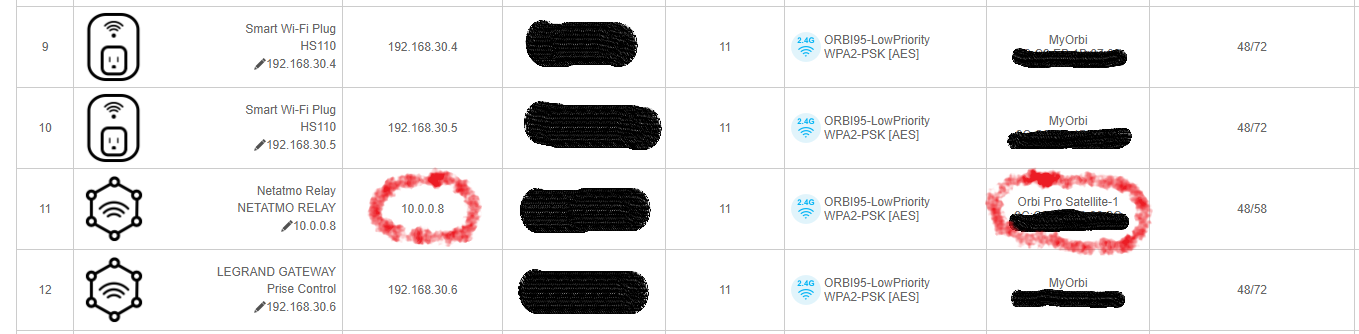
Correct model: not available on the Model list: SXS80 – Orbi Pro AX6000 Wifi 6 Hi, I've got a VLAN issue on my Orbi Pro AX6000 Wifi 6, regarding configuration replication between router and satt...

schumaku
Dec 09, 2020Guru - Experienced User
Salut Olivier,
Not sure - lack or practical Orbi Pro WiFI 6 experience - so wild guessing only.
Different from the consumer Orbi and the Orbi Pro (802.11ax) which does use MAC addresses (L2 handling) for isolating the different networks on each individual component, the Orbi Pro WiFi 6 is VLAN based (on popular demand, for interoperability).
Are we talking about a satellite connected using the wireless backhaul? If yes, it's clearly a bug.
If we talk about a wired backhaul with direct wired connection between the SXR80 and the SXS80, each port used for a backhaul link must be set to trunk mode. Reference: Orbi Pro WiFi 6 User Manual , p.112 "Manage the VLANs".
If we talk of a wired backhaul going over a managed network, on top of the above trunk setting, the VLANs must be configured accordingly, and the trunk ports (connecting to the router and satellite trunk port as indicated above) requires tagging the VLANs. Not sure about the Base VLAN or first LAN/VLAN however, this most likely be untagged, and run on PVID 1 or whatever the LAN 1 VLAN is set to. The issue here does kind of confirm this btw. Querying YeZ FMI.
Said that - without the trunk config on the backhaul por(s), all outgoing traffic will be untagged, so the DHCP does end on the wrong VLAN (LAN 1), just like all the traffic.
Olivier_C
Dec 09, 2020Aspirant
Thanks schumaku for this quick answer.
You are right, I frogot to mention that the stellite is running with the wireless backhaul, not wired...
Snif... a bug on the V3.1.0.104 firware release.
I will open a case to the support to see if there is any reference to this issue.
- Orbi_ERDec 09, 2020Tutor
Olivier_C - You're not alone in that issue. I'm working through the same challenge with my system and currently have support looking into it. I stopped using the satellite because of it, as it was putting any device connected to it on the default LAN (which I'm not even using in my network setup). I tried it with both wired and wireless backhaul with the same results.
 RaghuHRDec 10, 2020NETGEAR Expert
We have some known issue around VLAN & Satellite combination. We have fixed this and it will be part of next releases. We can share beta FW if you would like to try. Please PM me.
Thanks,
Raghu
- ctjacobsonDec 13, 2020Aspirant
I am also having the same issues. I just updated to the new released firmware 3.1.1.102 and still having the issue. What code is the fix going to be on? How can I get the Beta FW to see if its fixed?
Thanks,
ctjacobson
- DaneAJan 13, 2021NETGEAR Employee Retired
Olivier_C / JasperC / ctjacobson / Orbi_ER,
Orbi Pro WiFi 6 Firmware v3.2.0.108 has been recently released. It fixes the issue where clients connected to a satellite gets the wrong IP address from a VLAN on a WiFi network. As reference, kindly read the release notes and you can also download it here.
Regards,
DaneA
NETGEAR Community Team

Related Content
NETGEAR Academy

Boost your skills with the Netgear Academy - Get trained, certified and stay ahead with the latest Netgear technology!
Join Us!