NETGEAR is aware of a growing number of phone and online scams. To learn how to stay safe click here.
Forum Discussion

juched
Dec 08, 2017Apprentice
R7000 - Disney Circle - Internet speeds through router slowdown
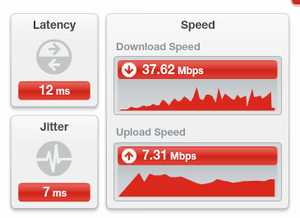
Creating a new thread to focus on this one issue. I don't believe this is a general slow wifi/slow internet issue, but is clearly Circle related. All tests done on wired connection via my Net...
juched
Dec 23, 2017Apprentice
Working with support. I have tested 1.0.9.18 and downgraded to 1.0.9.15 beta to test circle performance. I can confirm that al firmwares tested have the same speed degredation. I am hopeful Netgear continues to investigate and I am trying to help them figure out the issue.
juched
Dec 26, 2017Apprentice
Testing 1.0.9.13 beta. It is still reproducible.
- juchedDec 29, 2017Apprentice
Tested 1.0.9.20 with Circle On, but this time IPv6 Off. 24 hours and I didn't have any slowdown, and circle seems to be working. I then configured IPv6 and rebooted the router. Within 6 hours speeds was down (190 download to 80 download). I collected some results (as I am working with tech support) and have now disabled IPv6 and rebooted again, will keep on eye on this, but IPv6 may be invovled from what I am seeing.
- juchedJan 04, 2018Apprentice
So, after days of running with IPv6 disabled and Disney Circle Enabled, the speed remains full. So my slowdowns were completely related to the usage if IPv6 on my network.
That being said, I orderd a Disney Circle Device, the $6 a month charge will soon be saved by buying the device.
Interesting to note, it seems Disney Circle Device stops IPv6 traffic, so this may be a Circle Limitation regardless.... Hope they fix that.
 billcrowleyJan 12, 2018Guide
I am having the same problem. I am using the built in cirle functionality in the router...with Circle turned on, I am only getting about 125mbps down wirelessly and the web page loading lag is just awful . With a wired computer, I have the same issue.
When I turn Circle off, I get 275 wirelessly and 900+ on the wired and the lag virtually disappears. My router is updated to the latest firmware so I don't know what to do next. I have been searching the net but no one seems to have an answer. I tried turning off IPv6 on my computers and the router but it makes no difference.
This is really frustrating. I could understand some slowdown but this much degredation is just unacceptable.
- billcrowleyJan 23, 2018Guide
After trying every solution I could find on the net, I gave up and turned off Circle. Luckily, I have a 5 device Bitdefender subscription which includes thier own parental controls. It isn't as easy as Circle but at least it works without causing everything to come to a crawl.
- evil_mikeFeb 05, 2018Apprentice
I have Netgear Orbi and was running into the same issues you described. I'll turn off IPv6 and see if that resolves the issue. Thanks for the heads up on this!!