NETGEAR is aware of a growing number of phone and online scams. To learn how to stay safe click here.
Forum Discussion

solxrx25
Jul 31, 2025Aspirant
Please Help: RBE771 - Orbi 770 Unable to Set Up
Hi All Just recently purchased the Orbi 770 and have been attempting to get the router set up and configured using PPPoE on my full fibre FTTP ISP provided broadband with no luckk. I'm follow...
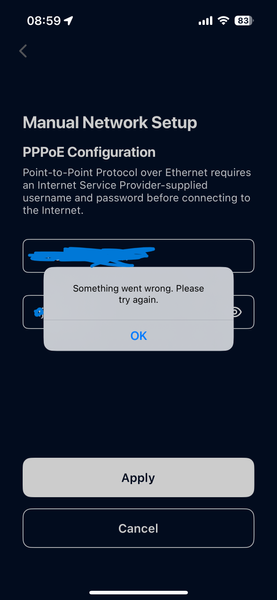
- Jul 31, 2025
Managed to resolve with Netgear Support. Hard reset of the router helped me get access to 192.168.1.1 and then followed the web UI to set up the router and then the satellites. Took about 45 mins on the phone but managed to get it resolved.

FURRYe38
Jul 31, 2025Guru - Experienced User
What firmware version is loaded on the 770 series system?
What is the Mfr and model# of the Internet Service Providers modem/ONT the NG router is connected too?
Be sure your using a good quality LAN cable between the modem and router. CAT6A STP is recommended.
If there is a router at the ISP level, This would be a double NAT (two router) condition which isn't recommended. https://kb.netgear.com/30186/What-is-Double-NAT
https://kb.netgear.com/30187/How-to-fix-issues-with-Double-NAT
Couple of options,
1. Configure the modem for transparent bridge or modem only mode. Then use the Orbi router in router mode. You'll need to contact the ISP for help and information in regards to the modem being bridged correctly.
2. If you can't bridge the modem, disable ALL wifi radios on the modem, configure the modems DMZ/ExposedHost or IP Pass-Through for the IP address the Orbi router gets from the modem. Then you can use the Orbi router in Router mode.
3. Or disable all wifi radios on the modem and connect the Orbi router to the modem, configure AP mode on the Orbi router.
New: https://community.netgear.com/kb/en-orbi-knowledge-sharing/static-ip-address-configuration-for-ap-mode/2456256
https://community.netgear.com/t5/Orbi-WIFI-6-AX-AND-Wi-Fi-6E-AXE/Procedure-for-Factory-reset-of-RBS850/m-p/2367505/highlight/true#M53985
https://kb.netgear.com/31218/How-do-I-configure-my-Orbi-router-to-act-as-an-access-point and https://www.youtube.com/watch?v=H7LOcJ8GdDo&app=desktop
Try option #2 first...
If a factory reset is needed, keep this for reference: Orbi Systems Manual Factory Reset Process | NETGEAR Communities