NETGEAR is aware of a growing number of phone and online scams. To learn how to stay safe click here.
Forum Discussion

neoeksOr
Feb 26, 2019Follower
RAX80 - AX6000 Nighthawk AX8 8-Stream Wi-Fi 6 Router
TL;DR: Everything remaining the same. Changed router to RAX80; requires modem restart upon internet drop
I recently changed my router to the RAX80 after my old router burned out. I was already ...

michaelkenward
Feb 27, 2019Guru - Experienced User
What firmware version do you have on the RAX80?
A number is more useful than "the latest". (It may not be by the time people read this.) There can also be newer versions, or "hot fixes", that do not show up if you check for new firmware in the browser interface.
neoeksOr wrote:
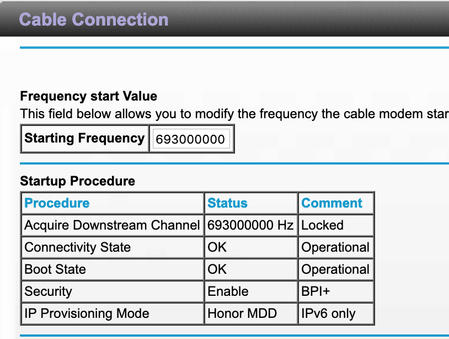
Whenever the internet drops, I try to look at the logs on the modem. When I try to connect to the modem to "http://192.168.100.1", I cannot connect at all and get a time out.
My experience is that you can't get at the modem through the router. Then again I have a DM200.
The address "http://192.168.100.1" is outside the DHCP range of the router's "http://192.168.1.1" to "http://192.168.1.254" address.
There is support for the RAX80, including a manual, at the end of this link:
>>>RAX80 | Product | Support | NETGEAR<<<
- antinodeFeb 27, 2019Guru
> [...] When I try to connect to the modem to "http://192.168.100.1", I
> cannot connect at all and get a time out. This leads me to think whether
> RAX80 is somehow making my modem crash.Or, if the RAX80 isn't passing any data to/from anything. What
happens if you connect your computer directly to the modem in such a
situation?
> The address "http://192.168.100.1" is outside the DHCP range of the
> router's "http://192.168.1.1" to "http://192.168.1.254" address.Which is relevant why? You should get access to a DOCSIS cable-TV
modem(+router) (or some documentation for one), and see what
"192.168.100.1" does before getting too excited about any (perceived)
wrong-subnet "problem". (Google's address is ouside that DHCP range,
too, but that doesn't mean that Google is unreachable.)
> My experience is that you can't get at the modem through the router.
> Then again I have a DM200.Have you tried "192.168.5.1"? Look for "Disable the Modem's Routing
Features and Use the Modem as a DSL Modem Only" in the DM200 User
Manual.Hint: Think about what a router will do with a message which is
addressed to a foreign ("wrong-subnet") address, and what a clever modem
might be able to do if it could intercept such a message.- myerswMar 06, 2019Master
My Netgear cm500v modem is at IP address 192.168.100.1. Have never had an issue accessing when I had a r8000 and r8000p, nor do I have an issue now. As was noted, being out of the DHCP range means nothing.
