NETGEAR is aware of a growing number of phone and online scams. To learn how to stay safe click here.
Forum Discussion

Scuttlebutt
Mar 25, 2017Tutor
+++++++++++ NETGEAR N450 Disconnects Once every hour on the dot - DHCP ISSUES +++++++++++++
Model: NETGEAR N450 (CG3000Dv2) N450 WiFi Cable Modem Router Firmware: V3.01.06 OS: Windows 7 Enviroment: Single Modem, no router, direct wired connection My n450 was working fine for a couple...
Scuttlebutt
Apr 08, 2017Tutor
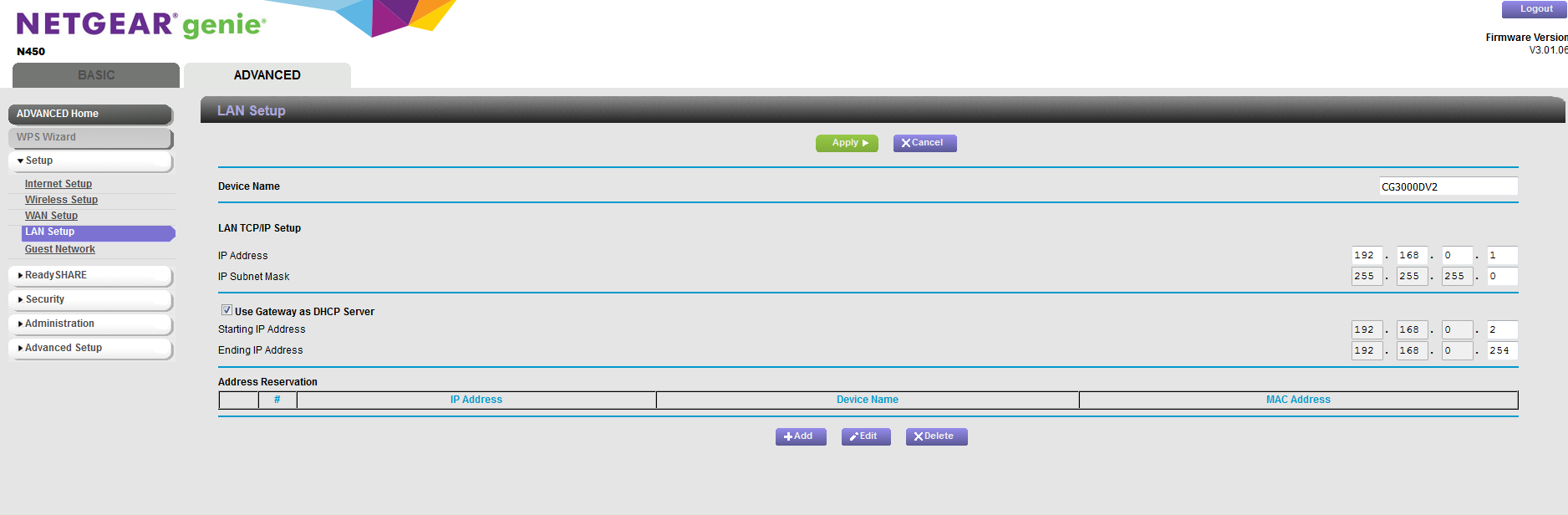
This image is similar to the screenshot you linked but you can see the lease timer option is missing.

TheEther
Apr 08, 2017Guru
Ahh, that's the modern GUI. The manual you have been using doesn't apply. AFAIK, it's not possible to change the DHCP lease time with the modern GUI.
We still have not established whether the DHCP issues are between the ISP and your router or between your router and your devices. Let's try this. On your Windows machine, open a Command Prompt and type ipconfig /renew, then ipconfig /all. What is the DHCP lease time for the interface connected to your network?
- ScuttlebuttApr 08, 2017Tutor
When I type ipconfig /renew I get this error message:

When I type ipconfig /all this is the lease time

- TheEtherApr 08, 2017Guru
Ok, it's 1 hour. :smileyhappy:
It's troubling that ipconfig /renew didn't work. I Googled this symptom and there are some reports that the firewall on your Windows machine could be interfering with DHCP. Are you using the Windows Firewall or a third-party firewall? Try disabling it.
- ScuttlebuttApr 08, 2017Tutor
No firewall, or anti virus.
- TheEtherApr 08, 2017Guru
You can try running a packet sniffer, like Wireshark, to see what's going on in your network. By convention, a DHCP client will attempt to renew its lease approximately halfway through the lease, so 30 minutes into a 1 hour lease.
You can also consider enabling DHCP Client Events in the Windows Event Viewer. This may also shed some light into what's going on with DHCP from the point of view of Windows. This link appears to show how to enable them.
- schumakuApr 10, 2017Guru - Experienced User
As per the screenshot (you could have posted it after the HTML code was stripped...), the issue you are facing is a DOCSIS (CableTV netork side) thing. Double check with your cable ISP for potential issues between the Cable Modem and the ISP DOCSIS cable head end. This could be a simple RF problem, a failing amplifier in the cable network distribution network, or the cable modem. Talk to your CableTV provider to check the signal levels and quality, the provisioning, and the logs form the device.
No clue why playing DHCP on the local network side ... of course there will be side effects on the (W)LAN devices ... when the device cable modem does have connectivity problems - dead end.
