NETGEAR is aware of a growing number of phone and online scams. To learn how to stay safe click here.
Forum Discussion

John00
Jun 15, 2019Aspirant
AC1750 Smart WiFi Router(R6700v3) - Port Forwarding Not Working
For the AC1750 Smart WiFi Router(R6700v3)
Port forwarding is still not working.
I wish to create an open port to run a game from my computer.
Application: Fantasy Grounds
Port: 1802
Operation System: Windows 10
External IP: 73.50.200.XXX
Static IP Set Up: (results from ipconfig)
Connection-specific DNS Suffix . :
IPv4 Address. . . . . . . . . . . : 10.0.0.10
Subnet Mask . . . . . . . . . . . : 255.255.255.0
Default Gateway . . . . . . . . . : 10.0.0.1
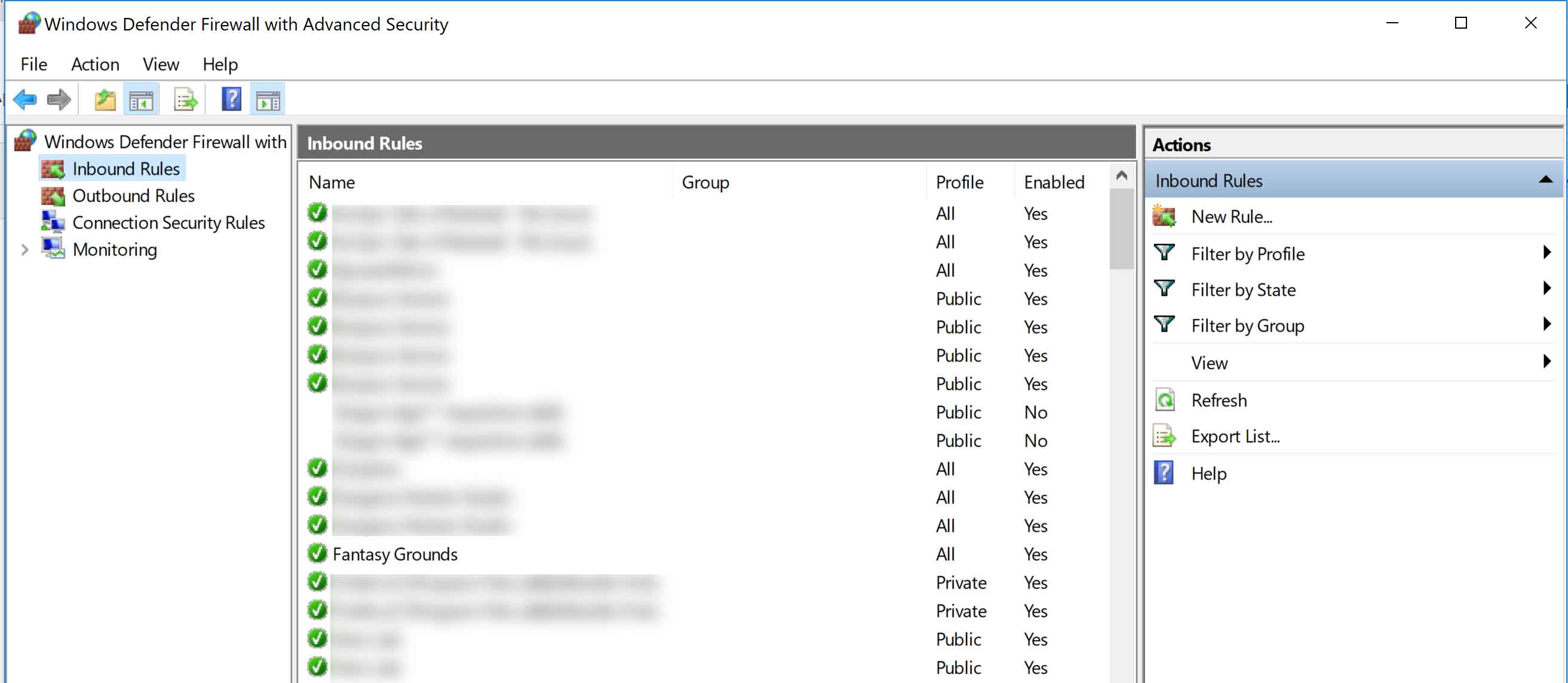
Exception made in Windows Defender Firewall: (see attachment)
In the NETGEAR Genie (http://www.routerlogin.com)
Advanced Tab > Advanced Set Up > Port Forwarding / Port Triggering
Selected : Port Forwarding
Added a custom service:
Service Name: Fantasy Grounds
Protocol: TCP
External Port Range: 1802
Internal Port Range: 1802
Internal IP address: 10.0.0.10
Clicked Apply
Service shows up on the list
With the "Fantasy Grounds" application running...
Went to: https://canyouseeme.org/
Error: I could not see your service on 73.50.200.XXX on port (1802)
Reason: Connection timed out
Outside users can not connect.
3 Replies
> For the AC1750 Smart WiFi Router(R6700v3)
Firmware version? Connected to what?
> External IP: 73.50.200.XXX
Is that the IP address of the WAN/Internet interface of the R6700v3?
ADVANCED > ADVANCED Home: Internet Port : Internet IP Address?> IPv4 Address. . . . . . . . . . . : 10.0.0.10
> [...]
> Default Gateway . . . . . . . . . : 10.0.0.1Use of the "10.0.0.*" subnet suggests that you have another NAT
router between the R6700v3 and your ISP (and that other router has your
public address, "73.50.200.XXX"). The resulting "double NAT" would
defeat your attempts at using port forwading on the R6700v3 to allow
incoming connections from the outside world.
The usual solutions to such problems involve using only one router
(hence only one LAN subnet), perhaps with a wireless access point, and
with any port forwarding configured on the one/only router. Details
would depend on your actual equipment inventory, configuration, and
goals.- John00Aspirant
Thank you for your reply and time.
Firmware Version: V1.0.3.66_10.0.50
Path: Dell (Alienware) Laptop Wireles > Router > Netgear CabLEModem CM1000 > Coaxial Cable - just one router
WAN/Internet (Advanced > Setup > Internet Setup):
Internet IP Address: Get Dynamically from ISP - Selected
Down further on the screen and unchecked:
Use Static IP Address: IP Address: 73.50.200.XXX ( matches )
> Use Static IP Address: IP Address: 73.50.200.XXX ( matches )
That looks good. Why your R6700v3 is using its alternate LAN subnet
("10.0.0.*") instead of its usual default ("192.168.1.*") remains a
mystery, but that's not fatal in itself.The usual problems with this stuff are:
1. Wrong external IP address (different from the port-forwarding
router's WAN/Internet IP address). (An intermediate NAT router, for
example, could cause this.)2. Bad port-forwarding rule (wrong port(s), wrong target address --
including a wandering target).3. Server not listening on the port-forwarding target system.
4. External influences: ISP blocking, other firewalls, ...
You seem to have eliminated "1". So long as the target/server system
stays at "10.0.0.10", "2" should be ok. (An address reservation on the
R6700v3 for that system would be a good idea.)> With the "Fantasy Grounds" application running...
That should cover "3", but an actual test would be reassuring. Can
you connect to the (game) server from some other (game client) system on
your LAN using the LAN IP address of the server (10.0.0.10:1802)? If
not, then port forwarding won't enable a connection from the outside
world.If the router feature called "NAT loopback" is working on your
R6700v3 (which it should be), then you should also be able to connect to
the (game) server from some other (game client) system on your LAN using
the WAN/Internet IP address of the server (73.50.200.XXX:1802).If all that works, then you get down to "4".
> Exception made in Windows Defender Firewall: (see attachment)Does Windows know that "Fantasy Grounds" means port 1802?
Presumably, Windows thinks of your R6700v3 as a Private connection, so
Profile:All should be more permissive than you need. But that's only a
security risk, not something which would stop function.If local access to "73.50.200.XXX:1802" works, but outside-world
access fails, then you may need to ask your ISP about it.Or, of course, the R6700v3 firmware could be defective, but I don't
recall seeing oodles of similar reports for that model, which I'd expect
if it had such a defect.