NETGEAR is aware of a growing number of phone and online scams. To learn how to stay safe click here.
Forum Discussion

tunes10590
Dec 30, 2018Tutor
C6250-connected to internet but cannot load any web pages
Hello All,
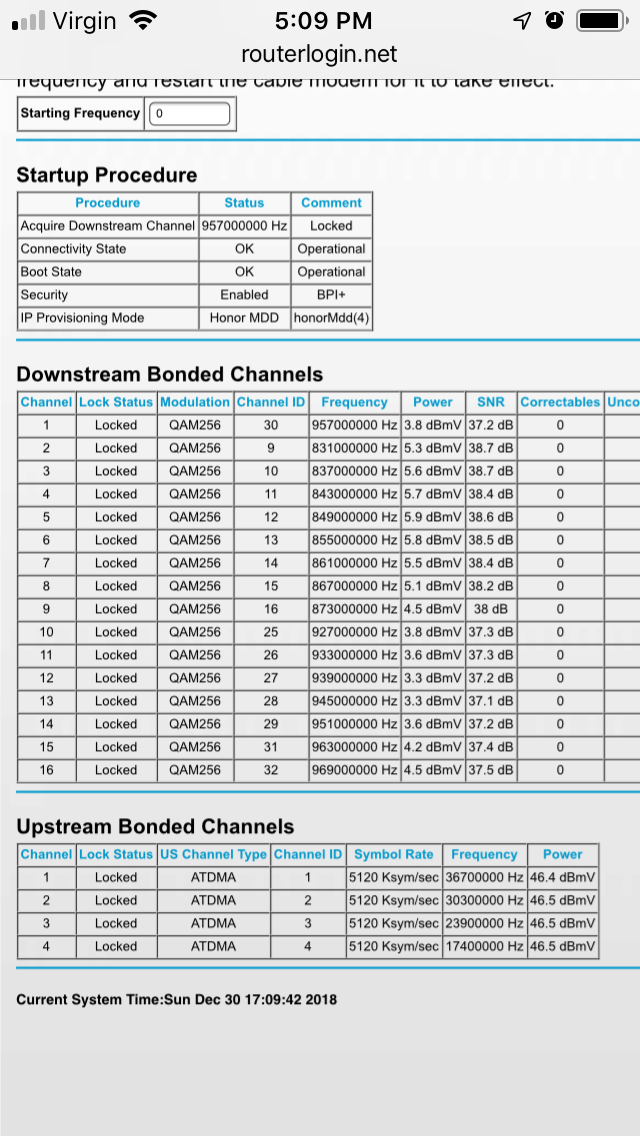
This is my last ditch effort to get my C6250 router/modem working before I have to toss it and get something new. I just got a new account with Cox and setup my modem with them. Despite working on this for 3 days, I cannot get any device connected to the internet. I’ve tried to connects phones, tablets, and PCs. Apple, Android, and Windows. WiFi and Ethernet connections. All the devices connect to the router/modem and all say that no internet is available. Cox however, can see that the modem is connected to their network and is sending and receiving information. The information from the Routerlogin.net seems to show that everything is fine (as best I can tell. I don’t know how to read all of the information. I have done countless reboots of the modem and restored to factory defaults 3 times. I’m at my wits end, but I hate to throw away a device that is just over a year old. Any help or advice would be much appreciated.
This is my last ditch effort to get my C6250 router/modem working before I have to toss it and get something new. I just got a new account with Cox and setup my modem with them. Despite working on this for 3 days, I cannot get any device connected to the internet. I’ve tried to connects phones, tablets, and PCs. Apple, Android, and Windows. WiFi and Ethernet connections. All the devices connect to the router/modem and all say that no internet is available. Cox however, can see that the modem is connected to their network and is sending and receiving information. The information from the Routerlogin.net seems to show that everything is fine (as best I can tell. I don’t know how to read all of the information. I have done countless reboots of the modem and restored to factory defaults 3 times. I’m at my wits end, but I hate to throw away a device that is just over a year old. Any help or advice would be much appreciated.
2 Replies
I am posting a reply in case anyone run across this thread in the future. The only resolution I can find at this point is to buy another device. I am not an IT person, but am generally pretty tech savvy. I have spent days searching online for assistance and gotten nowhere. Someone on the COX forums mentioned that new Netgear products will not allow you to connect to the internet until you go to the admin site. I have been to the admin site over and over, looked at every setting i could think of and made no progress. I did a factory reset and changed the password, thinking that might help, but no luck. I've no idea why this device is blocking access, but it appears to be doing so very throughly.
I am going now to buy a new modem/router. I will give this one to goodwill with a note about the problems I had. Maybe someone else will be able to figure it out. Honestly, this is the worst experience I've ever had with a device. I've setup countless phones, routers, laptops, modems, smart tvs, tablets, etc for myself, friends, and family. I've never hit a brick wall with a problem like I have here. I should have know that this was a poor product when Netgear was only willing to offer support for 90 days. I will never own another netgear product again. This is my very expensive lesson. Please learn from my mistake and return your product as soon as you can, if you experience problems.
> [...] I have been to the admin site over and over, looked at every
> setting i could think of and made no progress. [...]
> [...] The information from the Routerlogin.net seems to show that
> everything is fine (as best I can tell. [...]
Swell, but the non-psychics in your audience can't see any of that.
> [...] I don't know how to read all of the information. [...]
Then show it to someone who might know more?
Your first attachment shows what looks to me like a good link between
the modem and the ISP. It shows nothing about the router side of the
C6250.
> [...] I cannot get any device connected to the internet. [...]
Apparently, you can get some device(s) with web browser(s) to talk to
the C6250 management web site. What does it say there?
Visit http://netgear.com/support , put in your model number, and look
for Documentation. Get the User Manual. Read?