NETGEAR is aware of a growing number of phone and online scams. To learn how to stay safe click here.
Forum Discussion

SteveCole
Dec 18, 2015Aspirant
C6300 Block Sites not working
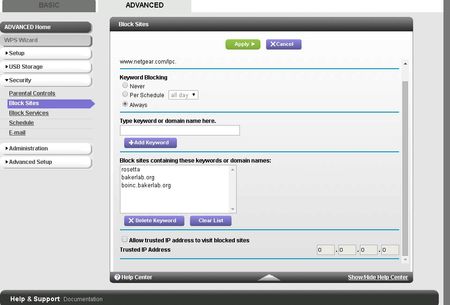
Does this feature work? I've added several keywords, including full host name, but the router won't block access to it. Here's the settings...
SteveCole
Dec 18, 2015Aspirant
:\
Is there a firmware update planned soon to fix this?

TheEther
Dec 18, 2015Guru
https is encrypted, so it's fundamentally impossible to fix this. I suggest you try parental controls, either using Netgear's or OpenDNS directly.
- SteveColeDec 18, 2015Aspirant
Jeez! Why didn't they include a simple IP address/address range to block? And Parental Controls doesn't work. The built in http app only opens a pop-up where you can download apps. If you download, install the PC app and use it, when you click the Parental Controls button, it can't find the router. It just sits there on a "Checking router firmware" page.
- TheEtherDec 18, 2015Guru
Then use OpenDNS directly. They have two Home Internet Security services:
- OpenDNS Family Shield, which is a curated set of filters that OpenDNS manages
- OpenDNS Home, where you can manage domain names to block (requires a free account signup)
Either option requires you to configure their DNS servers into the C6300.
Note: OpenDNS works by filtering DNS lookups. It cannot filter by URL keywords. It can block, for example, everything from foo.com, but it can't block anything with naughty in the URL.