NETGEAR is aware of a growing number of phone and online scams. To learn how to stay safe click here.
Forum Discussion

Co2Outbr3ak
Jun 15, 2019Aspirant
C7000 nas-100
So, we had a storm pass through on Wednesday that messed up my internet. I already took the initial troubleshooting steps and am almost certain my modem is no longer functioning as it should. My ISP (MediaCom) already came out and tested all lines, cables, etc with no issues.
My problem is that my download speeds are fine, but my upload speeds are fluctuating extremely bad, mostly to the point of unusability. I'm supposed to get 200mbps down with a 20mbps upload. I average about 258down/18up which is fine, but now my upload fluctuates between 1mbps and 25mbps constantly. By constantly, I mean every minute. The upload speed craps out but my download is unaffected.
Could the storm have messed my modem up in such a way it doesn't handle upload data how it should? What could be a likely cause of the lines and cables are good? We've tried eliminating all splitters and factory resets with no change in behavior. Our ISP tech DID say our cable outside was NOT grounded but he fixed that.
I'm at a loss, and it makes our internet unreliable, as anything upload related (Xbox services) are unusable in this state.
My problem is that my download speeds are fine, but my upload speeds are fluctuating extremely bad, mostly to the point of unusability. I'm supposed to get 200mbps down with a 20mbps upload. I average about 258down/18up which is fine, but now my upload fluctuates between 1mbps and 25mbps constantly. By constantly, I mean every minute. The upload speed craps out but my download is unaffected.
Could the storm have messed my modem up in such a way it doesn't handle upload data how it should? What could be a likely cause of the lines and cables are good? We've tried eliminating all splitters and factory resets with no change in behavior. Our ISP tech DID say our cable outside was NOT grounded but he fixed that.
I'm at a loss, and it makes our internet unreliable, as anything upload related (Xbox services) are unusable in this state.
4 Replies
- plemansGuru - Experienced User
Storms/power surges from them can wreak havoc on electronics. this could have messed with something on the upload side quite easily.
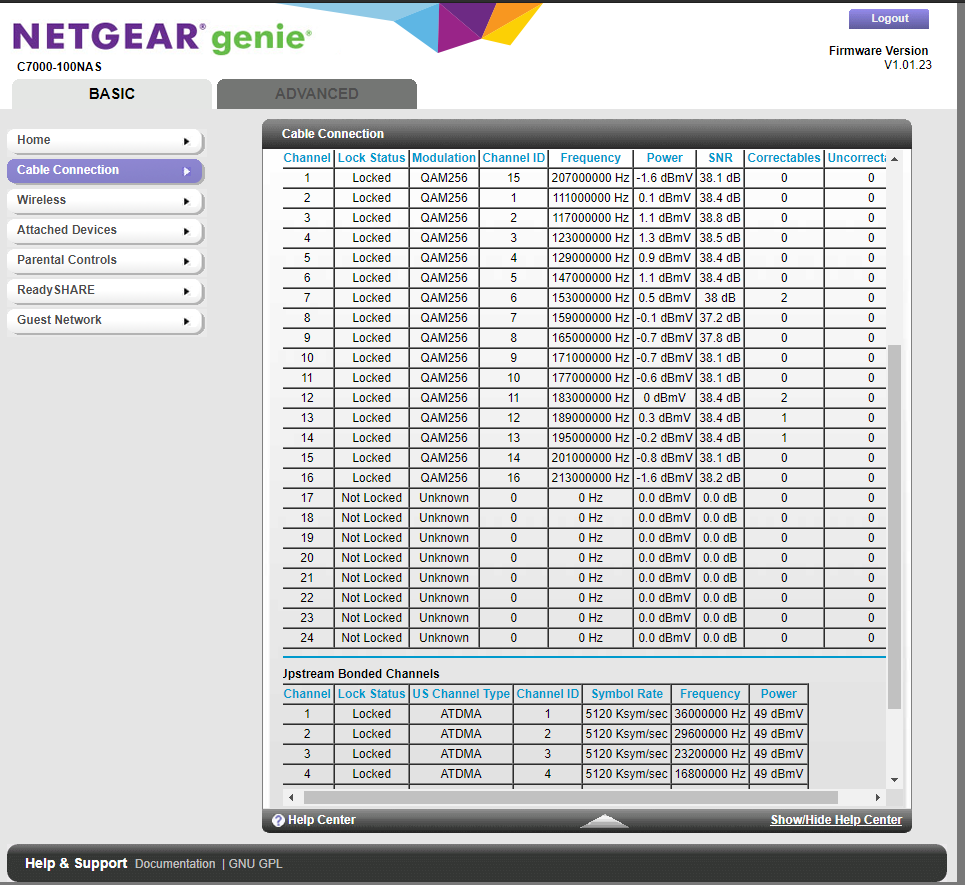
1. Do you have a screen shot of your connections page (upload and download) and the logs? These can help us.
2. do you have a spare modem you could hook up to test with at all? If this fixes the issues, i'd indeed bet on the storm winning that round.
3. I know you state that the tech tested all the lines and cables but moisture in a line, corrosion on the adapters, can create intermittent problems. You've stated you removed all splitters so you're saying its directly connected where the coax enters the house?
- Co2Outbr3akAspirant
I attached the screenshot.
I don't currently have a spare modem to test, so my next step is renting a modem from my ISP for a month to troubleshoot further.
The tech tested for moisture and corrosion. The only issue he found was the ground for the cable line outside wasn't connected, which he fixed. I think this may have caused the problem with the modem itself, but the damage is probably already done. My ISP has already tried everything on their end, so the next step I have is swapping modems to see if it fixes. Upload speed is still bouncing constantly between 1mbps and 20mbps.- plemansGuru - Experienced User
Did you have the logs as well?
How old is it? If its within the year warranty, you could open a support ticket with netgear.