NETGEAR is aware of a growing number of phone and online scams. To learn how to stay safe click here.
Forum Discussion

Mstaps
Mar 30, 2020Guide
C7000v2 Not transmitting usable speeds
I have spent several hours on the phone with Xfinity, and over an hour on the phone with Netgear (with someone i could barely understand!). Xfinity has confirmed that I have full speed to the router, and sent the highest reset possible yet my speeds are still at 0.79 Mbps wired and 0.6Mbps wireless. I should be seeing about 200Mbps.
This router is a week old, purchased to be able to work from home during state wide shut down, right now I have to tether my cell phone to the PC to get a usable connection. Between the poor connection and the lack of a understandable person on the phone for customer support I am getting extremely frusturated.
Anybody have a "magic" setting or fix?
C7000v2
Firmware Version
V1.03.01
Windows 10 Pro - Dell 3630 workstation (wired)
Windows 10 Home - Acer ASPIRE E5-573G (wireless)
15 Replies
- plemansGuru - Experienced User
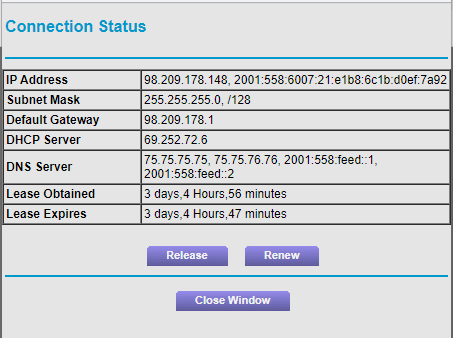
do you have a screen snip of your modem's connection page and the modem logs? That's key.
Also, if you have any splitters, attenuators, or amplifiers in line. remove them.
Preferably, directly connect the modem to where the coax enters the home. this prevents wiring within the home from being the issue.
- MstapsGuide
Coax comes direct from the Comcast splitter box outside, through the garage, through the wall then into the modem. Only split is the pass through wall plate. I wasn't 100% on which connection page you needed to see, I grabbed two. Hopefully one of them is the right one... Please let me know if there is a different screen grab you need.
Connection status
- MstapsGuide