NETGEAR is aware of a growing number of phone and online scams. To learn how to stay safe click here.
Forum Discussion

Jay1134
Jan 24, 2024Tutor
Cm1000 intermitten packet loss
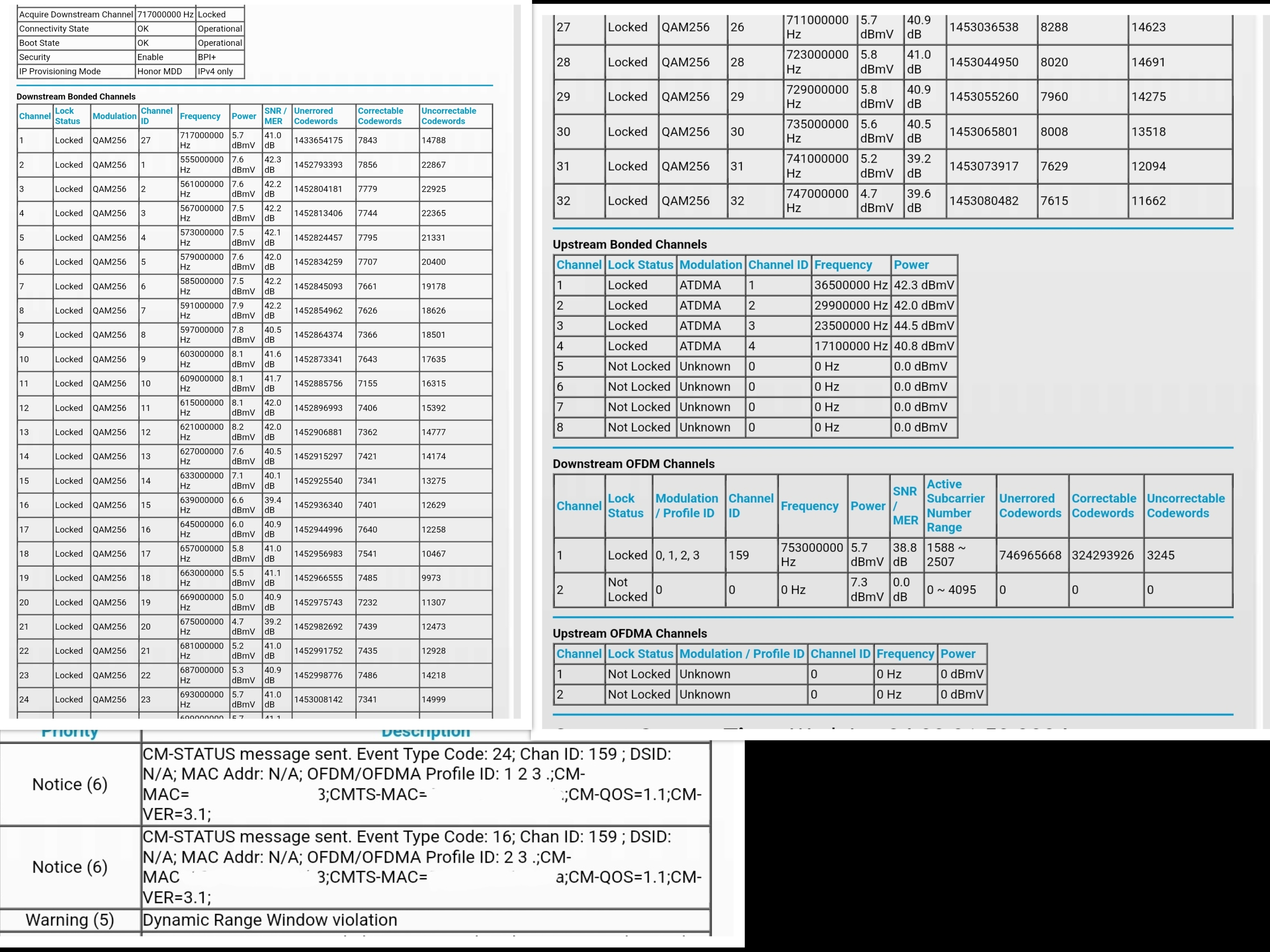
Cm1000 modem experiencing errors causing packet loss.
CM-STATUS message sent. Event Type Code: 24; Chan ID: 159
CM-STATUS message sent. Event Type Code: 16; Chan ID: 159
Dynamic Range Window violation
What has been tried:
New coax from drop on pole
New connectors throughout
All splitters eliminated
2 pass thrus replaced.
CM-STATUS message sent. Event Type Code: 24; Chan ID: 159
CM-STATUS message sent. Event Type Code: 16; Chan ID: 159
Dynamic Range Window violation
What has been tried:
New coax from drop on pole
New connectors throughout
All splitters eliminated
2 pass thrus replaced.
7 Replies
- Jay1134Tutor
- Jay1134Tutor
- FURRYe38Guru - Experienced User
Power levels are too high:
https://kb.netgear.com/24311/Power-level-guidelines-for-a-NETGEAR-cable-modem-router
Lots of correctables and un-currectables that should be zero across the channels.
Any Criticals, Errors or Warnings seen in the event logs needs to be reviewed and resolved by the ISP. Indicates a signal issue on the ISP line up to the modem.
Be sure your using a good quality LAN cable between the modem and router. CAT6 is recommended.
Be sure to test the modem for issues with out a wifi router in the mix.
Have the ISP check the signal and line quality UP to the modem. Be sure the ISP provisions the modem correctly.
Be sure there are no coax cable line splitters in the between the modem and ISP service box.
Be sure your using good quality RG6 coax cable up to the modem.
Start with removing any amplifiers, signal attenuators, or splitters from the coax.
From there check the line for kinks, damage, moisture in the line.
Check the connectors for improperly made ends, foil touching the copper coax line, loose connections, bad/old/cheap connectors, or corroded connections. Replace them if you do.
Be sure to power OFF the modem for 1 minute then back ON.
https://community.netgear.com/t5/Cable-Modems-Routers/General-info-and-Troubleshooting-for-Cable-Modems/m-p/1530376#M12853
https://www.duckware.com/tech/solving-intermittent-cable-modem-issues.html
https://highspeed.tips/docsis-events/- plemansGuru - Experienced User
Take a look through duckware's post on troubleshooting cable modem issues. Its quite involved but goes through checking quite a few things and potential issues you can run into.
https://www.duckware.com/tech/solving-intermittent-cable-modem-issues.html
- Jay1134TutorI have seen his page before coming here. I tried most of the beginning steps in double checking all lines and eliminated all uneeded / old splitters. I guess I'll have to do a deep dive into all values and cross check. Any other tips are appreciated specifically from those of you who have experienced the same errors.
Isp is optimum formerly suddenlink gig service.