NETGEAR is aware of a growing number of phone and online scams. To learn how to stay safe click here.
Forum Discussion

Bliztik
Feb 21, 2018Aspirant
CM1000 Modem Connection Issues
Quick overview of location, setup, and versions: Comcast 250mbs internet Seattle, WA Netgear cm1000 modem connected to netgear r7500v2 router Modem firmware version v3.01.04 Modem model version ...

vkdelta
Feb 21, 2018NETGEAR Employee Retired
Hi,
Please upload your screenshots again. Need to check power and BER info.
also, upload DOCSIS event logs.
If you trouble uploading here, post them on IMGUR.com and give us the links..
what is your performance when you connect directly to the modem? Are you seeing same or different performance?
how often and how fast can you reproduce this?
Bliztik
Feb 21, 2018Aspirant
Thanks for the response.
When i connected directly, i am getting the exact same performance which is that the device says "connected" yet i have zero internet connection. This is reproduced constantly right now, everytime i connect.
Here are the imgur links to modem information
- vkdeltaFeb 21, 2018NETGEAR Employee Retired
you cannot directly remove the Router and connect your laptop. CM will not provide Internet in that case because ISPs put a MAX_CPE=1 in the config file. you will need to reboot the modem.
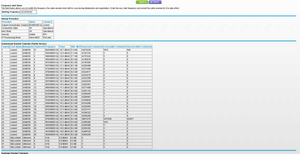
Just saw your connection table. You have lot of noise on the RF line either caused by your home wiring or ISP directly.
you can see in the logs, you have provided there are over 400,000 uncorrectables on QAM channels and close to 100K uncorrectables on OFDM channels. This will have impact on your performance.
also, you power levels are way off. Ideally, it must be 0dBmV but Comcast has their spec with -7 to +7 dBmV.
but you have -20dB in some cases which is surprising that modem is even able to work in such bad RF conditions.
your OFDM DS power -27 !! that is way too low.
I suggest you immediately call your ISP and get the line fixed.
if you get 16ch modem, these issues may not be that bad since it will not use higher channel and OFDM channel.
Either way, your line needs to be fixed since power levels are low and too many uncorrectables.
If you want second opinion, you are welcome to post on DSLREPORTS forum with these power levels screenshots and there will lot of folks saying same as my comments:
http://www.dslreports.com/forum/comcast