NETGEAR is aware of a growing number of phone and online scams. To learn how to stay safe click here.
Forum Discussion

pghkatrina
Oct 06, 2017Aspirant
Connecting router to external USB drive
I'm trying to add my external USB HD to the router and am running into a few problems: 1) I don't know if I can use it to backup via Time Machine or only for additional storage? I followed the Ti...

antinode
Oct 06, 2017Guru
> 1) I don't know if I can use it to backup via Time Machine or only for
> additional storage?
What's the difference? Time Machine backup files are only files.
> I followed the Time Machine guide to partition the USB drive.
Which "the Time Machine guide" was that? How, exactly, did you
"partition the USB drive"?
> I'd like to be able to store backups on it. Is this possible?
The existence of "the Time Machine guide" would suggest that. Given
the number of complaints in these forums and my own (very limited)
experience, I wouldn't trust it until I'd tested it myself.
> 2) I attached the USB drive to my router and reach the point to
> connect to server and keep getting an error that my MacBook cannot
> connect.
Are you talking about using the Finder's Go > Connect to Server...?
If so, then what did you do with it? Browse? Specify something like
"afp://readyshare" or "smb://readyshare"? Or System Preferences > Time
Machine > select Disk...? Or what? Did you provide any name and
password credentials when requested? What was the actual error message?
> I opened Genie and everything is good, [...]
Ever helpful, Netgear uses the name "Genie" for more than one thing.
I'll assume that you're using the web interface, not some application
program.
Define "everything". Define "good". As usual, showing actual
actions with their actual results (error messages, ...) can be more
helpful than vague descriptions or interpretations.
 pghkatrinaOct 06, 2017Aspirant
1) There is a big difference: if I can connect the USB to the C6300 and run Time Machine backups to it wirelessly or if that isn't possible and I'm only able to store media files.
2) The issues you refer to (complaints, etc) is why I'm asking the question. This guide: Time Machine Setup for Routers I what I used to partition. Yet it refused to connect at the point of "Connect to Server" in the instructions in previously mentioned guide... which does include the steps you mentioned.
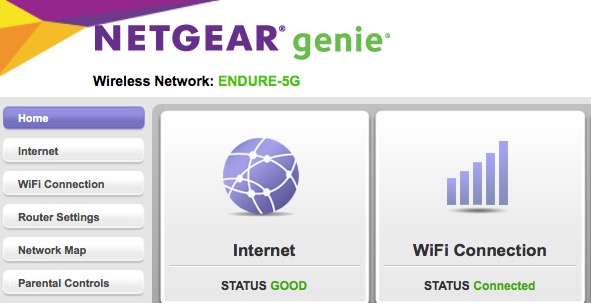
4) I referred to my MacBook so I thought that would be clear enough as to where I was using Genie... Guess not. And GOOD was what the app said in STATUS. See screenshot.
- antinodeOct 06, 2017Guru
> 1) There is a big difference: [...]
Not really. Files are files. Network access is network access (give
or take).
> [...] This guide: [...]
As I read that, you have some USB-connected disk or other with a
normal Mac OS Extended (Journaled) partition. While it was connected to
the Mac, did you copy some files to it, and verify that you could
recover them?
> Yet it refused to connect at the point of "Connect to Server" in the
> instructions in previously mentioned guide... which does include the
> steps you mentioned.
What, exactly, does "refused to connect" mean? Did you get any
actual error message(s)?
Which "the steps"? I mentioned many possible steps. I assume that
you didn't try all of them.
> [...] Did you provide any name and password credentials when
> requested? [...]
Still wondering.
> 4) I referred to my MacBook so I thought that would be clear enough as
> to where I was using Genie... Guess not.
The question was not where, but what. Netgear routers have a
web-browser interface called "Genie", and Netgear offers application
programs for various computers/pads/phones, which are also called
"Genie". Are you using a web browser or one of the apps? (Which?)
> And GOOD was what the app said in STATUS.
That shows that your "Internet" status is good, which means that
you're connected to the Internet. It says little or nothing about your
ReadySHARE storage.
> [...] As usual, showing actual
> actions with their actual results (error messages, ...) can be more
> helpful than vague descriptions or interpretations.
Still true. When your audience comprises non-psychics, things which
you can see easily may remain obscure to your audience. Unless, of
course, you reveal what you're actually doing, and what actually happens
when you do it.- pghkatrinaOct 06, 2017Aspirant
I'm here for help... not to be belittled. This is supposed to be the support community... I'm not getting it. I'll find help elsewhere or figure it out on my own.