NETGEAR is aware of a growing number of phone and online scams. To learn how to stay safe click here.
Forum Discussion

HeadPhoneJack
Aug 21, 2023Aspirant
Security Concerns. C7000v2
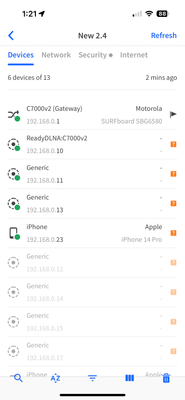
Hi All, the past 8 months i have been monitoring something strange on my network. As a tech illiterate, it has been an evolution in trying to understand what is happening. Hopefully there is eithe...

HeadPhoneJack
Aug 22, 2023Aspirant
This is great info. thanks so much for sharing!

Kitsap
Aug 22, 2023Master
By chance do you have anything connected to the USB port on your C7000v2?
- HeadPhoneJackAug 23, 2023Aspirant
HI,
Thanks for hanging in there with me.
This is getting to a point where it is a little scary. As I have been really trying to find out what's happening on my network, I noticed that my admin page, does not have all the options shown on any tutorials i have watched on the C7000v2. There is no option for Parental controls. JPG attached.
To answer your question, no, there is no USB attached. Confirmed and documented as far as picture from my FING app page and photo of the Gateway at the same time.-My Admin page is missing an option. Anything I have watched regarding Netgear products, have QOS or parental controls on the basic tab of the admin page, mine does not have anything of the sort. Similarly to the above questions, a photo, taken 6/22/22, has the menu option available. has there been an update since 6/22/22 that would have removed this from my basic tab? could someone spoof a log in page and keep this option off?
-It is clear there is something not right here. Is this something to contact Law enforcement about? My ISP? Netgear? who would care about this sort of anomaly?
- KitsapAug 23, 2023Master
Based on your attached jpg, it appears you are configuring your router with a long depreciated Netgear Genie application.
You should be logging in to your router user interface via a web browser using the router's IP address.
Doubtful anyone would go to the effort to spoof a login page. Unless you have some high value information on your network, law enforcement would not be concerned. What general area of the US are you located?
For reference, review this knowledge base article:
https://kb.netgear.com/119/How-do-I-set-up-and-install-my-NETGEAR-router
Go to the section on using a web browser. AVOID, I repeat, avoid the mobile application.
- HeadPhoneJackAug 23, 2023Aspirant
Yes Sir,
-I use a computer and ethernet cable plugged into ethernet port on the back.
-Launch Crome
-Type in URL bar 192.168.0.1
-Admin name (default cannot change)
-Password (very Strong) 16-22 Char, Multiple Cap, Number, symbol, and lowercase.
(never saved digitally, only written in notebook kept with me at all times)
-then Net gear Genie loads
For the record, what was screen shot, was from a wireless connection, but i have videoed the admin page after log in from secure laptop with ethernet cable and i am immediately directed to NETGEAR genie on that, confirmed.
what should it be?
i do have the app but do not use it for anything but looking at devices on the network.
confirmed this morning it to lacks options that are presented on the information page on IOS app store.
should i delete the App from my phone? is it susceptible to anything?I live in southern New Hampshire.
Agreed, my network and devices do not hold anything worth monetary or informational value.
My household does have members who are likely hiding communication with what appears to be someone who is rather savvy and motivated. (Background story checks out, which is what has led me here this week).
