NETGEAR is aware of a growing number of phone and online scams. To learn how to stay safe click here.
Forum Discussion

Ma2schka
Aug 13, 2021Aspirant
Troubleshooting a issue with home network
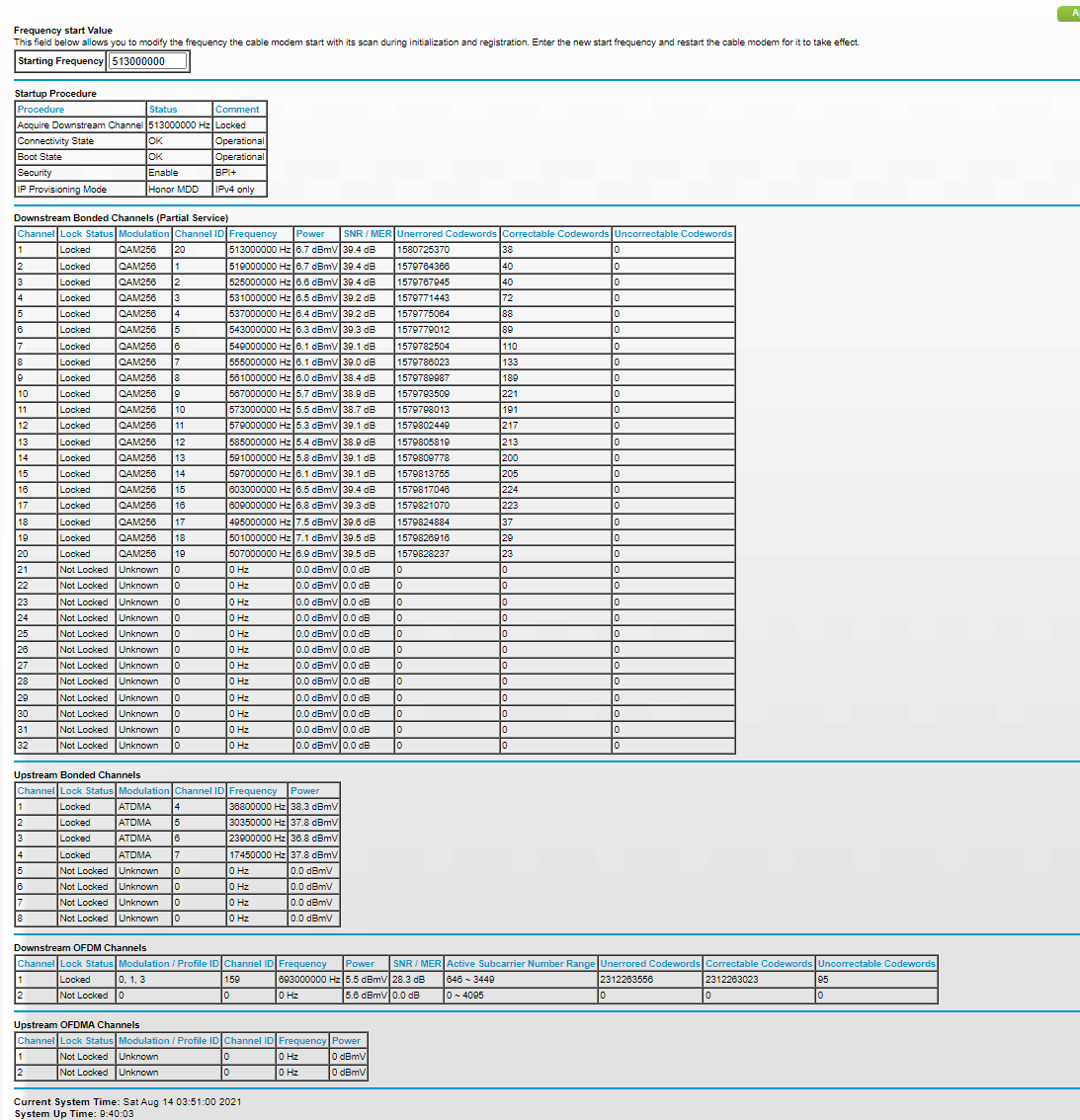
Hello helpful people. I have been having some issues with my home internet. My ISP has been useless in giving me any sort of meaningful data, and while I do understand general networking, modems are out of my realm of knowledge. After running some diagnostics it appears that my network is suffering from OFDM impairment and that my modem is only operating in partial mode. I am trying to figure out why. Here is a screenshot of my modems connection dashboard. Could anyone help figure out what is wrong here and what the best solution is?
3 Replies
- FURRYe38Guru - Experienced User
Have the ISP check the signal and line quality UP to the modem. Be sure the ISP provisions the modem correctly.
Be sure there are no coax cable line splitters in the between the modem and ISP service box.
Be sure your using good quality RG6 coax cable up to the modem.
Be sure to power OFF the modem for 1 minute them back ON.
https://community.netgear.com/t5/Cable-Modems-Routers/General-info-and-Troubleshooting-for-Cable-Modems/m-p/1530376#M12853- Ma2schkaAspirant
ISP came out and checked the Signal all the way up to the modem and everything is in the green. The technician who came out said that he was "bafflled" by what was causing the issues. Everytime he would re-provision the modem, the speeds would kick back to regular speed (about 900 down) but then go back to the same issue - router would report operating in partial mode and the speeds would drop back to 30. He also checked with a different modem with the same results. There are also mutliple people in my building expereincing the same thing. No splitters, all the connections and coax cables are good.
What other types of things would cause this?- FURRYe38Guru - Experienced User
Thats someting the ISP needs to take a deep dive into to find out. If others is same building are experiencing same thing, then they need to figure that out.