NETGEAR is aware of a growing number of phone and online scams. To learn how to stay safe click here.
Forum Discussion

JerradP
Sep 19, 2022Aspirant
Upstream Solid Orange Light - 16x4 DOCSIS 3.0 Cable Modem (CM500)
My modem has recently changed to where my Upstream LED indicator is a solid orange color. I've talked to my ISP (Xfinity) and they said everything on their end (power, connection) looks fine and it's...

FURRYe38
Sep 19, 2022Guru - Experienced User
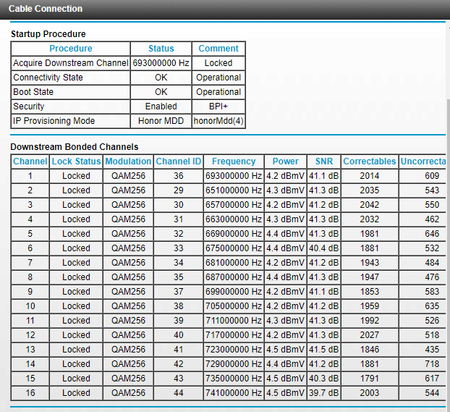
You have lots of Correctables and Un-Correctables that should be mostly zeros.
Have the ISP check the signal and line quality UP to the modem. Be sure the ISP provisions the modem correctly.
Be sure there are no coax cable line splitters in the between the modem and ISP service box. Be sure all fittings are snug and screwed on well.
Be sure your using good quality RG6 coax cable up to the modem.
Be sure to power OFF the modem for 1 minute then back ON.
https://community.netgear.com/t5/Cable-Modems-Routers/General-info-and-Troubleshooting-for-Cable-Modems/m-p/1530376#M12853
https://www.duckware.com/tech/solving-intermittent-cable-modem-issues.html
Please post the Event Logs page output as well.
JerradP
Sep 19, 2022Aspirant
- FURRYe38Sep 19, 2022Guru - Experienced User
You have lots of criticals that the ISP needs to review and help resolve.
- JerradPSep 19, 2022Aspirant
They said they can send a tech out, but if the issue isn't with Xfinity I'll be charged $100. In your opinion is this an issue on their end, meaning I should schedule the appointment? It's a big risk.
- FURRYe38Sep 19, 2022Guru - Experienced User
The line up to the modem needs to be checked by you or someone as suggested in earlier posts. Kinks and fittings and Splitters can cause the correctables and un-correctables to be seen here.
Try the modem at a firends, nieghors or families place to see if the problem follows, if not, then the issue is with the lines up to the modem and ISP responsbility.