NETGEAR is aware of a growing number of phone and online scams. To learn how to stay safe click here.
Forum Discussion

JerradP
Sep 19, 2022Aspirant
Upstream Solid Orange Light - 16x4 DOCSIS 3.0 Cable Modem (CM500)
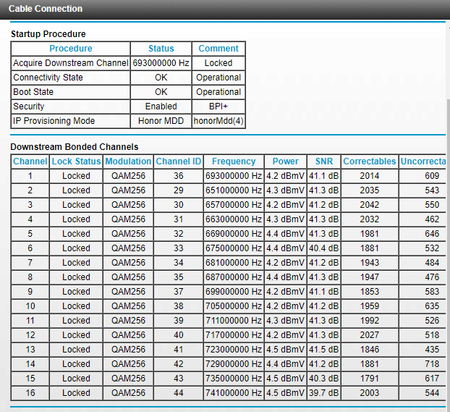
My modem has recently changed to where my Upstream LED indicator is a solid orange color. I've talked to my ISP (Xfinity) and they said everything on their end (power, connection) looks fine and it's...
JerradP
Sep 19, 2022Aspirant
They said they can send a tech out, but if the issue isn't with Xfinity I'll be charged $100. In your opinion is this an issue on their end, meaning I should schedule the appointment? It's a big risk.

plemans
Sep 20, 2022Guru - Experienced User
JerradP wrote:
They said they can send a tech out, but if the issue isn't with Xfinity I'll be charged $100. In your opinion is this an issue on their end, meaning I should schedule the appointment? It's a big risk.
Xfinity is responsible for the wiring up to the home. So your best option is to move the modem to right where the coax comes into the home. This limits the potential issues that could be inside the home causing the issues. If its directly connected to that wire with no splitters/amplifiers/anything else and is still having those issues/errors, then its on the isp to check them. And if it doesn't have the issues, then you know its the wiring in the home that is the issue.