NETGEAR is aware of a growing number of phone and online scams. To learn how to stay safe click here.
Forum Discussion

Wallou
Oct 25, 2016Aspirant
A6210 no AC connection , only N
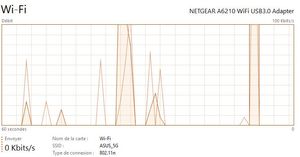
Hi, My A6210 does not connect to my router in AC mode. Only in N. I am on Windows 10 x64. I notice it now because i just got a 1Gb fiber connection and the bandwich is not as it should be. ...
Retired_Member
Nov 18, 2016I have the same issue and I would like the download to the patched version of the driver. Even if it is a PreTest version.
- WallouNov 23, 2016Aspirant
I come back here to give a few feedbacks after some tests i have made.
Despite seeing 802.11n in task manager , i think my a6210 is in fact connected in AC mode as i can see in the wifi network details that i am connected at 866mbits to my asus router.
But there is one thing i don't understand is why i can't go faster than 300mbits when testing my connection speed with online tools.
I read that it could be related to my a6210 running in usb2, but it is not the case.
With usbtreeviewer i see it is connected to a usb3 port.When i connect through ethernet to my router i get speed tests above 700mbits, i have a 1Gb fiber connection.
I would expect to have better speed in wifi with the a6210.
But still i find it disturbing as 300mbits is the 802.11n max speed rate.
Anyone can help me to go faster than 300mbit please ?