NETGEAR is aware of a growing number of phone and online scams. To learn how to stay safe click here.
Hardware
174 Topics
Netgear A8000 getting 50 Mb/s in same spot my phone gets 490 Mb/s (firmware is up-to-date)
I just moved into an apartment. In my folk's house, my netgear A8000 adapter was pulling about 160-350 Mb/s, depending on who else was using the wifi. Now, I'm the only person using the wifi, and my phone, sitting underneath the netgear adapter, runs a test speed of 450-490 Mb/s, but my PC only pulls 30-50Mb/s on a speed test. I have updated the firmware. I have made sure it was in a USB 3.0 slot (even though I should be getting way more speed out of a 2.0). My modem is a Calix GigaSpire Blast, model u6x GS4227. My OS is Windows 10. It's dumb, but I've gotten used to downloads taking 10-15 minutes rather than 3-5 hours. I can't find any advice that doesn't involve updating firmware. Help?1.5KViews0likes6CommentsConnection Issues with Wifi USB Adapter Model A7000
Hi, I have two "WiFi USB 3.0 AC1900 (A7000)" which I have been using for a long time on two different PCs with Win11. Before "Win11" latest update, my Wi-Fi speed was about 650mbs in download, and 310mbs in upload. Besides, "Netger Genie" was working correctly detecting automatically my Wi-Fi. After Win11 update of 11/22/2024, the two WiFi Adapters USB 3.0 AC1900 (A7000) stopped working properly, and Netger Genie started showing a red flag in the notification area (i.e. it couldn't manage any more the adapter, on both computers). I have tried everything possible, even reinstalling the OS and Netgear Genie, but up to now with my adapters I only reach a maximum of 330mbs in download. Is there something more specific I can try? Is there any chance to download a Win11 driver specific for WiFi USB 3.0 AC1900 (A7000)? Many thanks in advance for your help. M #WiFiUSB3.0AC1900(A7000) #Win11 #NetgearGenie3.4KViews0likes12CommentsNetgear A6100 Wifi adpaters dropping out
I have a client that has approx 12 desktops all running Windows 10 and connected to their Wireless via Netgear AC600 USB adapters. They report and I have experienced them devices frequently dropping the connection, with a number of events in the event log each time the network connectivity is lost. I have tried: reinstalling the drivers from NG,(V 1030.25.701.2017) checked for firmware updates, uninstalled the drivers to see if Windows native drives help but nothing has so far worked. tried different driver versions to see if there are specifics to each machine Are there any known issues with these? Given the number of these adapters the client owns and the fact all are dropping connectivity at different times and duration's suggests there are.1.1KViews0likes2CommentsA7000 USB Adaptor cannot see or detect any network SSID after SLEEP Mode
I was able to install the Netgear Genie and drivers for the A7000 on my Toshiba i7 laptop. My Toshiba is an older but reliable laptop and I wanted faster connectivity. The initial installation went find without a problem and I finally experienced high speed internet at 900+ Mbps. However, when I put my laptop to sleep (and me sleeping of course), the A7000 adapter seems to be unavailable when I get out of sleep mode. In Netgear Genie, there would be ZERO/nada/zilch SSIDs. I would normally be able to see all my 2.4 G and 5G SSIDs and my neighbors SSIDs as well. I have followed suggestions in other posts - like unchecking the power management options. In theory, if I run Netgear Genie, the software should "awaken" the A7000 adapter, but it does not. Any suggestions, please. My setup: A7000 Nighthawk AC1900 Dual Band Wifi USB 3.0 Adaptor | Toshiba P775-S7320 i7 laptop running Windows 7. | Cox GigaBlast Panoramic Router4.8KViews0likes3CommentsLooking For Something Similar
I purchased the AC1900 USB for my PC since it doesn't have anything for a wi-fi connection and it has been great! There's no lag and great connection speed. My boyfriend is looking for something similar that can be plugged into a PS5 to help receive the wi-fi signal and make it strong. Does anyone know of any sort of plug-in that can go into a PS5 to do these? We've tried the extenders, powerlines, moca things, etc etc. I'm strictly looking for a device that plugs into the PS5. Thanks!2.1KViews0likes2CommentsAC19000 USB Adapter constantly getting high ping spikes
I have a AC1900 USB adapter for 2 months now and it has been acting up for the last two weeks. Started out by dropping connection at random times, but I fix that with CMD. Now it shows I getting 200 mbps and it does not feel like that. I will be playing a MP match in video games and my ping will go from 40 to 300 then 90 and back to 40. It is pretty hard to play with a stutter in the WiFi. I tried using my old tp link adapter and it works fine. Is there any fix because it's very annoying paying $90 for a high speed adapter that is being outperformed by a $10 adapter.2.5KViews0likes5Comments- 5.3KViews0likes3Comments
Netgear ac 1900 a7000 random significant ping spikes
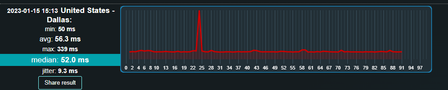
My a7000 adapter randomly gets these ping spikes. I ran a test online where I usually got around 50ms and sometimes it would go up by 6x to 300. I'm using windows 11 and the standard software. This has been going on for a while. For the most part, it usually works but then it would just start acting up for weeks until it calms down. I'm getting around 300-370 Mbps and no other devices have problems like this. Any help would be appreciated thank you.1.8KViews1like0Commentsnet gear R-NZ
So new bee hear the Wi-Fi adapter says R-NZ is this the model number or the long number that I can't read? Also trying to connect a TV to it to stream what does it come up as in the network section of my TV? I have several to choose from keep's dropping out trying to troubleshoot.4.6KViews0likes1CommentUSB Wifi Adaptor A6210 connection issues
I purchased this adaptor on Oct. 2, 2021 and didn't really have any issues with it. After a little while I noticed whenever I booted my pc, it would keep connecting and disconnecting from my school's wifi. As well, this would happen during my use with the computer and when I clicked the internet symbol on the bottom right of my screen, it would switch from showing all the available networks to none. As I began to explore, sometimes when the adaptor wouldn't show available networks at all, I would look in my windows settings under the "Bluetooth & other devices" tab and it would show it as connected but say the setup was incomplete and to please connect to the internet. If I unplugged and plugged it back in it would work but still connect and disconnect from networks for at least a minute before holding a connection. As well, I would keep hearing the windows connection and disconnection sound and looked at the same tab of my windows settings and see that the message under the adaptor would switch back and forth with every connection sound between "Connecred to usb3.0" and "Device can perform faster when connected to usb3.0" which is surprising and makes no sense. My motherboard is an Asus STRIX B-350-F Gaming motherboard. On the back panel the motherboard has 2x USB 3.1 Gen 2 port(s), 4x USB 3.1 Gen 1 port(s), and 2 x USB 2.0 port(s). I had it plugged the usb 3.1 gen ports. I did at one point switch it to the front panel of my tower that had a usb 3.0 port and it rapidly switched between "connected to usb 3.0" and "Device can perform faster when connected to usb3.0" every second if not faster. I now have to let me pc sit for 5 minutes after I boot it up to let it run its course of connecting and disconnecting to networks and then let it get a stable connection, if it doesnt give me a message saving driver error. When I am connected and observe my wifi tab under performance in task manager, there are spikes where no data is sent or received for 5-10 seconds and then it resumes for a little bit, all while saying I am connected to internet. The best solution I have found for this, is to have a Twitch stream open and the connection always has a constant feed of sending and receiving data in the wifi tab of task manager. So far, what I have done to try and help: 1. Gone to device manager, clicked on the adaptor under "Network Adaptors" and turned off "Allow the computer to turn off this device to save power" under "Power Management." 2. Repeated this for my USB ports in device manager 3. Changed "Max USB Speed" to USB 3.0 and USB Auto and changed "Channel; Mode" to "2.4G + 5G" and "5G Only." 4. Plugged the adaptor into different USB ports. None of these have produced any notable results. I wanted to submit a ticket but my support expired a couple months ago. I'm done trying my own solutions and need help. My specs: CPU: AMD Ryzen 7 1700X Eight-Core Processor 3.40 GHz RAM: 32gb at 2400mhz GPU: NVIDIA GeForce GTX 1080 Motherboard: ASUS STRIX B350-F GAMING (motherboard doesn't have most recent bios update)3.9KViews0likes7Comments