NETGEAR is aware of a growing number of phone and online scams. To learn how to stay safe click here.
Forum Discussion

Denno
Nov 03, 2015Aspirant
Antenna scheduling on WiFi extenders
Hi, I'm have a netgear router but I need a range extender. Now, I'm very interested in the wall AC plugin wifi extenders, but I feel I'm missing a feature. In my router I've setup the Wif...
 Nov 09, 2015
Hi Denno,
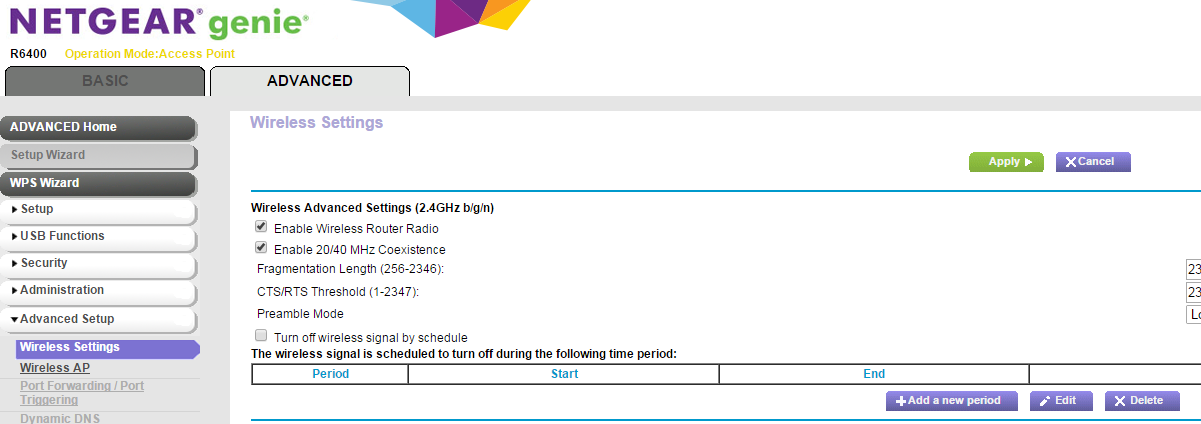
Yes, please see the following screenshot (in this example is the NETGEAR R6400 router):
For more on wireless scheduling:
TheEther
Nov 03, 2015Guru
Using the Wi-Fi scanner in my smartphone app, I measured the signal strength of my R7000 router from about 2 feet to be -26 dBm. That's a little over 2.5 µW (microwatts) or 0.0000025 watts. Compare that to a 1000 watt microwave oven (60 dBm), which is approximately 400,000,000 times more powerful. At about 10 feet away, the R7000 signal strength drops to -46 dBm or 25 nW (nanowatt) or 0.000000025 watts or 1/100th of the power at 2 ft. A cell phone radiates between 1 watt to 2 watts, thousands of times more powerful than Wi-Fi.
The upshot? Wi-Fi signals are insignificant. Unless you are living in the middle of nowhere, you are already being bombarded by your neighbor's Wi-Fi signals. One or two more aren't going to make a difference. :smileyvery-happy:
Anyway, to address your question, if there is going to anything that would switch off the radio automatically, it would be the access schedule. Unfortunately, I don't own an extender so I can't tell if the radios can be disabled by the access schedule. I do suspect they would be disabled. Hopefully, somebody can confirm.