NETGEAR is aware of a growing number of phone and online scams. To learn how to stay safe click here.
Forum Discussion

Scheper
Jan 30, 2018Tutor
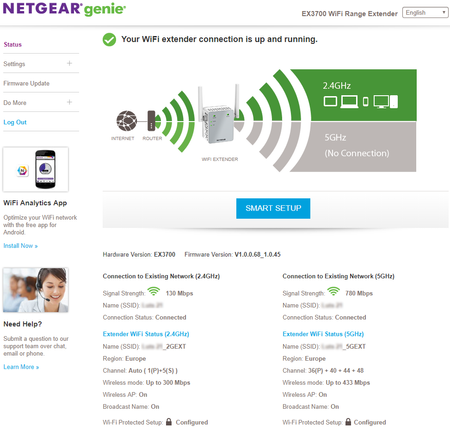
EX3700 5 GHz no connection
Hello, I've bought the EX3700 and installed it via the URL http://www.mywifiext.com After finishing the installation I noticed the 5GHz shows "No connection" on the 'status' tab, as seen below (...
Scheper
Feb 02, 2018Tutor
Well, no, not really. It wasn't the same room, but the router was only 4 meters away, in another room. The signal strenght was 4 or sometimes even 5 of the 5 bars.
Eventually I was able to connect to the 5GHz band of the extender but unable to get an IP. Therefore it looks like a routing problem or DHCP problem of the extender. The 2,4GHz works fine and out-of-the-box, but I didn't get the 5GHz working. I contacted the seller and I'm getting a new extender today, to see if it is perhaps a hardware problem.
Scheper
Feb 06, 2018Tutor
After some contact with Netgear support, the conclusion is as follows. The router can only extend one of the two bands. You can, for example, only connect the extender to the 5GHz band of the router and extend this on 2.4GHz and 5GHz. It is not possible to connect to both 2.4GHz and 5GHz and extend both bands.
I've created a image to illustrate this. There are 4 possibilities, where the green color means it has a connection and red means it doesn't have a connection.
- Retired_MemberMar 06, 2018
I am confused.
Ex3700 basic setting is allowed to connect 2.4GHz and 5GHz at the same time with reduced speed. My currect EX3700 does not extend 2.4GHz anymore. Something wrong in my environmrnt ot the extender is defative(Only a little bit over half year). It used to work fine in both bands.
- ScheperMar 07, 2018Tutor
Apparently it’s not possible to connect to both 2,4 and 5 GHz and extend both channels. So, either connect to 2,4 or 5GHz and extend both channels, or connect to both channels and extend only one channel.
- kimberly4680Mar 23, 2018Aspirant
This is not true. Both my 2.4Ghz and my 5Ghz will work separately, it's just that the administrator console does not see the 5Ghz connection for some reason. This only happened with the latest firmware update (V1.0.0.70_1.0.46). Further, your statement is wrong because there is a "Fast Lane" option in the settings that allows you to leverage both the 2.4Ghz and the 5Ghz at the same time OR utilize the Fast Lane technology for maximum performance but only levaraging one band.
- CLDeakinJun 13, 2018Aspirant
Thank you Sheper after 2 hours of messing this really helped. There is nothing in the documentation that explains this, I am IT savy. How someone that isn't can understand and solve this issue is an example of where consumer electronics should make simpler products.
Thanks
Chris