NETGEAR is aware of a growing number of phone and online scams. To learn how to stay safe click here.
Forum Discussion

Scheper
Jan 30, 2018Tutor
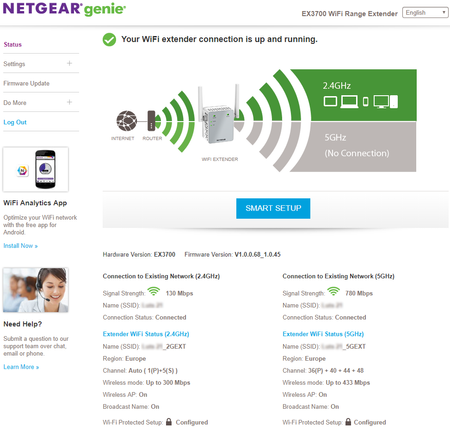
EX3700 5 GHz no connection
Hello, I've bought the EX3700 and installed it via the URL http://www.mywifiext.com After finishing the installation I noticed the 5GHz shows "No connection" on the 'status' tab, as seen below (...
walkerboy1911
Jun 07, 2018Aspirant
Scheper,
Did you receive an answer on this? Or were you able to figure it out? I'm needing help with the exact same issue.
- walkerboy1911Jun 07, 2018Aspirant
So Scheper is correct.
I just walked through the various configurations. If you setup the extender and only check the 5GHZ network, then it only extends the 5GHZ network and works great. If you check both boxes, 2.4 and 5, then it picks the 2.4 GHZ as the network to extend and the 5GHZ does not work. This seems to be a bug in the most recent firmware V1.0.0.72_1.0.47. But Scheper is correct... Maybe I should not have upgraded my firmware. This worked fine prior to the firmware upgrade. I had both networks extended with no issues. Oh well...I'll replace this extender very soon.
- ScheperJun 07, 2018TutorPerhaps it's the firmware version, I don't know. In my case the 2.4 and 5gHz babe have the same SSID and password, so it's not really an issue for me to only extend one band. I only extend the 5gHz band to 2.4 and 5.