NETGEAR is aware of a growing number of phone and online scams. To learn how to stay safe click here.
Forum Discussion

Suntop_Kinseeke
Oct 04, 2015Aspirant
Issues with the 2.4 GHZ side of my Netgear WNDR-3400V2
There is an issue as of late when I had the oldest firmware I had 150 MBPS connection when I upgraded to the previously latest firmware it dropped down to 72MBps and now with the current firmware it ...
 Oct 27, 2015
I have and I determined it is the card. Not the netgear. I get 300 MBP/s on 5 GHZ and 144 on 2.4 I cannot get 40 MHZ to work but that would be unneighbrorly of me to use so much bandwidth. And since 5 GHZ is basically empty around here I will use it.
Suntop_Kinseeke
Oct 11, 2015Aspirant
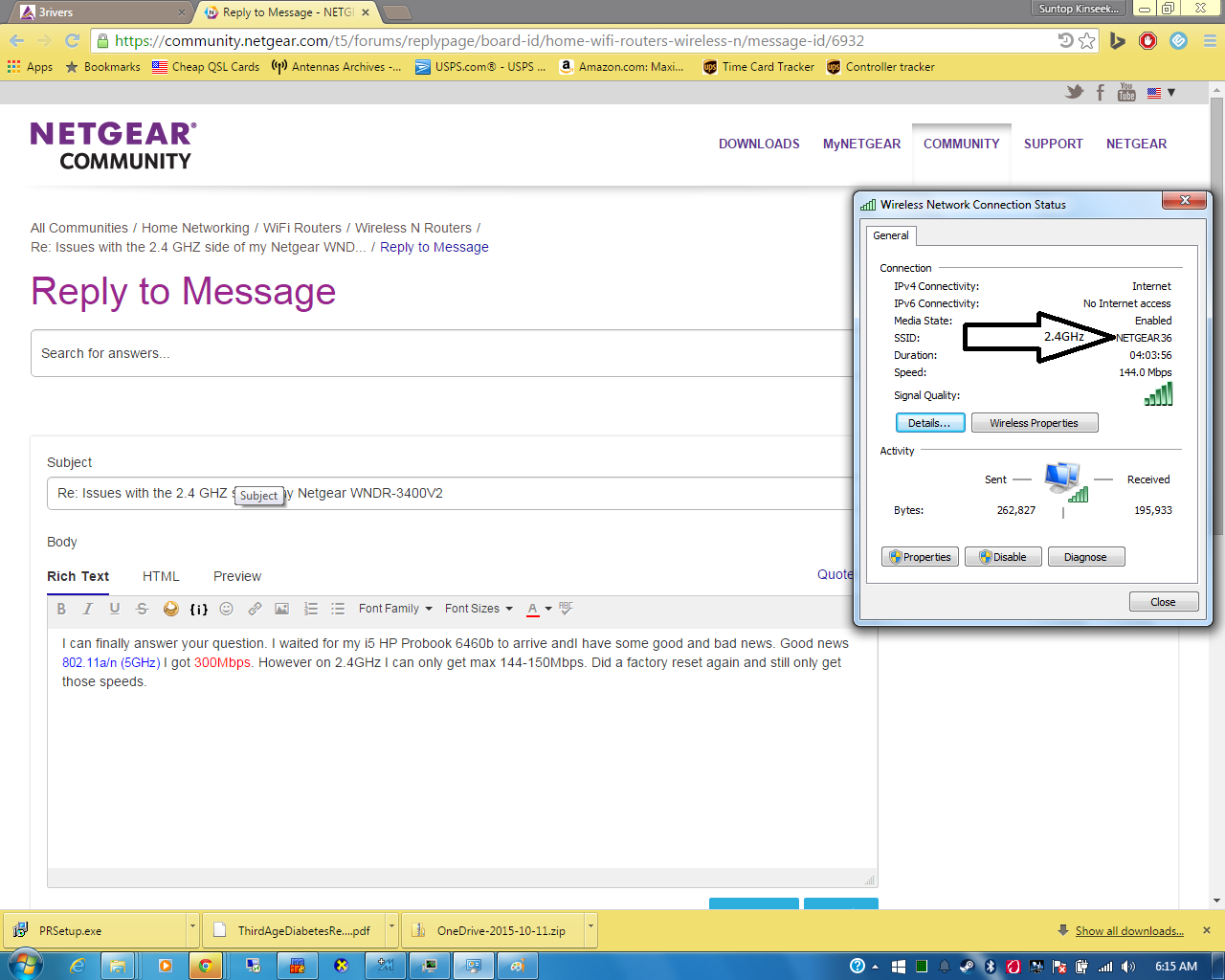
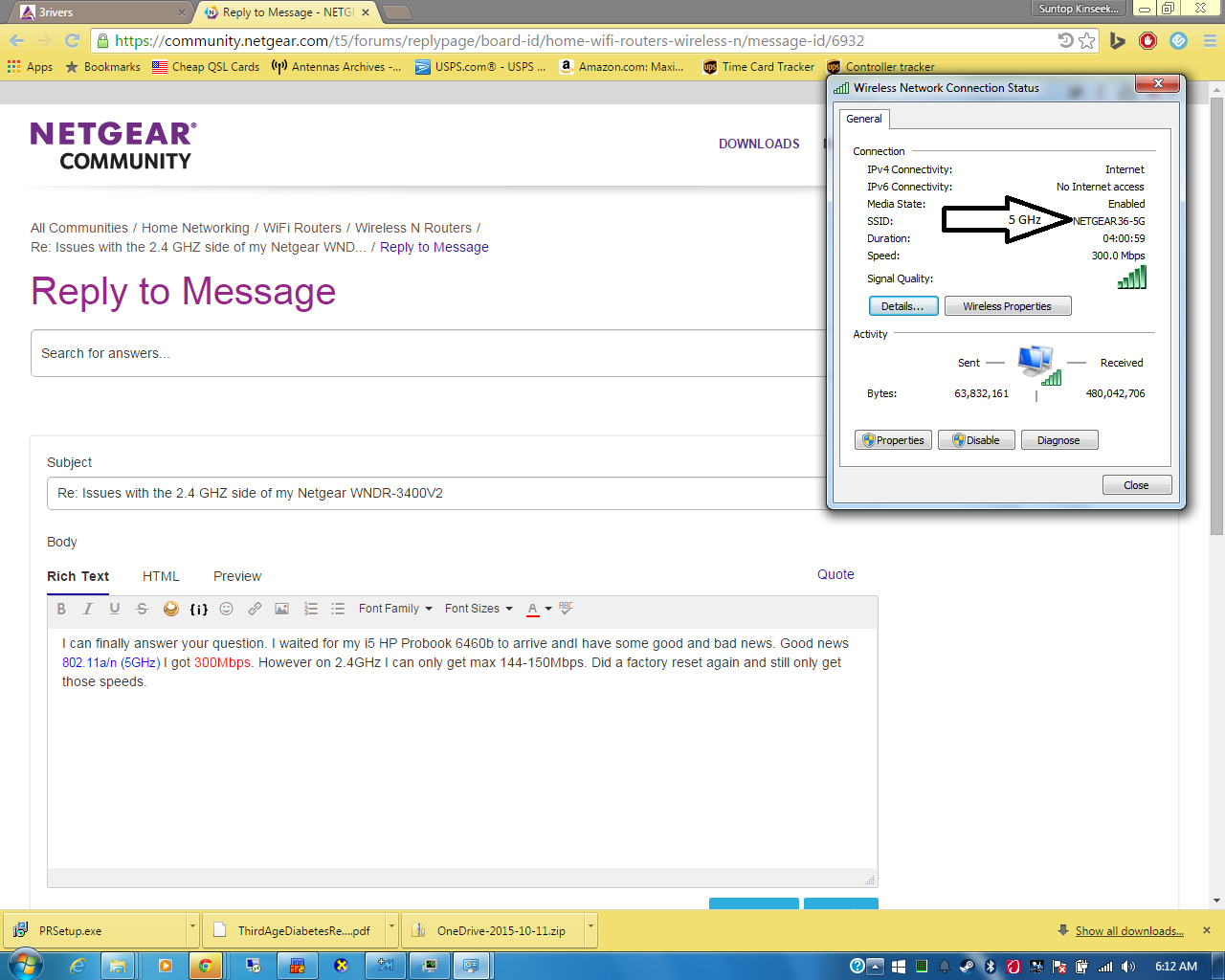
I can finally answer your question first of all I am in the same room and about 5 or so feet away from the router. I waited for my i5 HP Probook 6460b to arrive andI have some good and bad news. Good news 802.11a/n (5GHz) I got 300Mbps. However on 2.4GHz I can only get max 144Mbps. Did a factory reset again and still only get those speeds.Howeve on my Netgear WNR1000 V3 I can get the full 150Mbps that it is specified to run. The radio is turned off when I use the WNDR 3400. So I really do not know why the 2.4 GHz band is byorked on this one. There is only 1 other netgear that shows up but it is 2 bars. Mayhaps I should change My SSID. I think I will but I doubt it will have an effect. If it does I will reply if not then no reply with the resulting speed. If not responce means no change. I also think it a hardware issue too since the 802.11 abgn nework adapter in this laptop is an Intel® Centrino® Advanced-N 6205 802.11 abgn adapter (Up to 300 Mbps) and the other one is a RALINK cheap SMAK adapter (b/g/n) and the other laptop has a 802.11 (1X1) bgn card that has bletooth built on.
I hope that changing the SSID will help but doubt it. I do not recall the firnware number but it may of been the one prior to 1.0.0.52 I think it was 1.0.0.38 but uncertian.
David
PS here is some IMAGES of connection speed on this laptop 1 is on the 2.4 side 2 is on the 5 ghz side and if I connect to my WDR 1000 v3 I get 150 so I am uncertaian of the issue

ElaineM
Oct 14, 2015NETGEAR Employee Retired
Thanks for this.
Can you go ahead and send me a copy of your configuration file?
Upload it in a sharing site like dropbox or something and send me the link in order for me to download it.
By the way, set the admin password of the router to the default settings of admin and password.
- Suntop_KinseekeOct 14, 2015Aspirant
I did a factory reset and only changed 2 settings. It is automatically set up with WAP2 I changed the 2.4 and 5 GHz to "Up To 300 MBPS" An DMZ for one of my machines. I get 144 MBPS on 2.4 and 300 MBPS on 5GHZ on my Intel Core i5 laptop with the Intel Centrino 6205 ABGN card in here I think it is the USB wireless adapter I am using on the other machine. But I should get 300 on 2.4 unless the other networks are causing interference.
David
- TheEtherOct 14, 2015Guru
Unless you live in the middle of nowhere, you will never see 300 Mbps on the 2.4 GHz network. 300 Mbps requires 40 MHz wide channels to be used. But the Wi-Fi standard requires that devices drop down to 20 MHz channel widths whenever competing Wi-Fi networks are detected. With 20 MHz channel width, the maximum link speed is 150 Mbps. Your link speed is 144 Mbps because your router is using Long Preamble. Change it to Short Preamble to get 150 Mbps.
- Suntop_KinseekeOct 14, 2015Aspirant
Changing to short preamble didnt do any good and 20/40 mhz co-coexsistance checked didnt help..... It has to be the firmware...
- TheEtherOct 14, 2015Guru
You may need to make the same changes on the client side. Unfortunately, some drivers may not offer controls to change them. I have 2 Windows laptops and I can change the preamble mode on only 1 laptop. I can force 20 MHz channels but not 40 MHz channels on both.
Frankly, you should give up on getting 300 Mbps at 2.4 GHz. It's very unneighborly because a 40 MHz channel overlaps about 70% of the Wi-Fi channels. Performance also deteriorates significantly in busy environments.
 storm1985Oct 18, 2015Prodigy
Suntop_Kinseeke set the adapter channel width to auto (not really recommended) - see more info on this link.
- Suntop_KinseekeOct 19, 2015Aspirant
The Centrino isnt the issue the problem is on the wifi usb dongle, I have given up on trying to fix it because I just decided to connect the ethernet cable to it so I can get 100MBPS. I cannot get it to do any more than it is because apparently if it sences any other units near by it wont do fulls speed..... There is no 5GHz routers around except mine and that is why I get 300MBPS. :(
- ElaineMOct 19, 2015NETGEAR Employee Retired
Does this mean that the main problem is with the USB dongle and not the router?
- Suntop_KinseekeOct 20, 2015Aspirant
Until I got the Laptop with the CENTRINO Wifi card I thought it was the router, but now I determined it is the usb chip. I get the full 300 on the Centrino 802.11 n on 5GHz and it shows 2 channels on 5Ghz being used but on 2GHz it don't show me 2 channles being used.
Wireless Settings (2.4GHz)
Name (SSID) NETGEAR36
Region North America
Channel Auto (7)
Mode Up to 300 Mbps
Wireless AP On
Broadcast Name On
Wireless isolation Off
Wi-Fi Protected Setup Configured
Wireless Settings (5GHz)
Name (SSID) NETGEAR36-5G
Region North America
Channel 153(P)+149(S)
Mode Up to 300 Mbps
Wireless AP On
Broadcast Name On
Wireless isolation Off
Wi-Fi Protected Setup ConfiguredSo this is the delimia both of the bands have 20/40MHz checked. So I believe that they may of taken out or set it up if it detects other routers within a given area where interference could happen, that it limits itself to 20Mhz I do not know anyone from NETGEAR can answer this?
- ElaineMOct 21, 2015NETGEAR Employee Retired
Have you tried connecting just this pc alone and no other wireless devices connecting to 2.4Ghz signal?
Also, make sure that when you connect, channel width is set to Auto then change the channel to a unique one.
- Suntop_KinseekeOct 27, 2015Aspirant
I have and I determined it is the card. Not the netgear. I get 300 MBP/s on 5 GHZ and 144 on 2.4 I cannot get 40 MHZ to work but that would be unneighbrorly of me to use so much bandwidth. And since 5 GHZ is basically empty around here I will use it.
- ElaineMOct 27, 2015NETGEAR Employee Retired
Thank you for the update.
Let us know if you need further help.