NETGEAR is aware of a growing number of phone and online scams. To learn how to stay safe click here.
Forum Discussion

Wyzard
Jul 21, 2015Aspirant
N600 WNDR3400V2
When I hook up my computer (desktop) to my modem (hard wired) I get about 300mbps. When I hook up my computer to my router (hard wired) I only get around 92mbps. When I log into the netgear genie it says I should be getting up to 300mbps but as I mentioned its only around 92mbps. I have the latest firmware and even tried reverting to an earliar version with the same results. It is set to all the stock settings so I'm sure its a setting. Any sugestions?
Glen
According to the manual for the WNDR3400v3 all ports, both LAN and WAN are rated at 10/100 Mbps.
From Page 108;
LAN
10BASE-T or 100BASE-Tx, RJ-45
WAN
10BASE-T or 100BASE-Tx, RJ-45
So you can not exceed that rate where a wired connection is needed, including from the modem to the router.
You would need a gigabit router to achieve your full ISP throughput, anything from a WNDR3700 upwards in thge range.
10 Replies
 Babylon5NETGEAR Employee Retired
From what I understand, the LAN ports of the router are definitely gigabit capable, and should be flashing green (with activity) if the negotiated rate is gigabit, so check this with the hard wired PC to see if the PC also shows a gigabit connection for that interface.
What I am less sure of is if the WAN port is gigabit, or just fast (10/100)? If you log into the router and go to ‘Advanced’ – ‘Administration’ – ‘Router Status’ – ‘Show Statistics’, what do you see for the WAN port status?
Clearly your PC/Modem are gigabit capable.
 WyzardAspirant
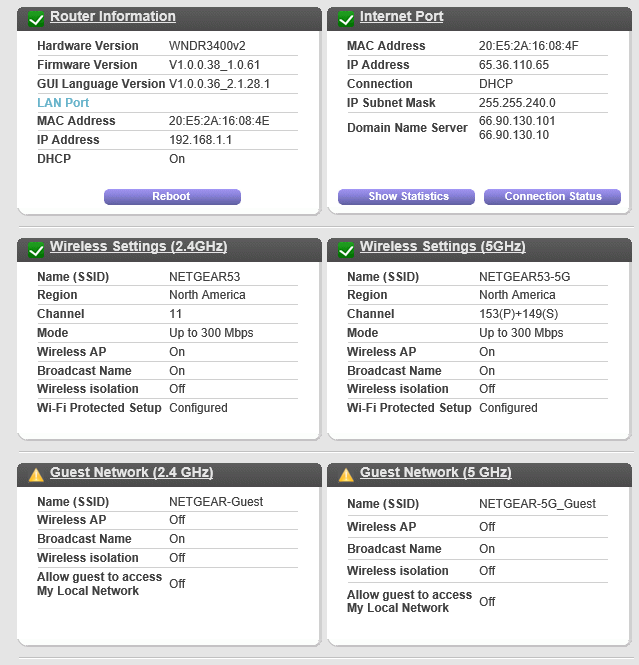
I have a brand new gaming computer so it is set up with all the latest gadgits so it is capable of gig internet. Here is the info you requested in a image.
- Babylon5NETGEAR Employee Retired
You’re close to what I was after. In that screengrab, top left ‘Internet Port’ area, click on the ‘Show Statistics’ button, this should tell you what the WAN (Internet) port is doing.
 vondoom2Tutor
Good morning,
I recently needed to space out the devices currently connected to my home wifi. I have a N600 Dual Band Wireless Router and I have it connected to a AC1750 Mesh Extender. Everything appears to be working fine, however, whenever I try to access my router to look into the settings to get the IP Address for the Mesh Extender I get a page icon with a sad face. And if I try to access my router again it will not allow me to unless I restart it. I figured I would try to update the firmware, but the screen just says "Connecting to Netgear Server, Please Wait....." and then eventually times out. Fortunately it never says internet lost or anything like that. Is this worth really looking into or am I just really overdue for an upgrade? Other than that my internet is fine, it's just that I can't get into my Mesh Extender to make sure everything is absolutely setup the way I want. And I can't stay logged in to my router (for very long) to do what I want.
- michaelkenwardGuru - Experienced User
Rather the hitching a ride on an old discussion that hasn't been touched for seven years, you might do better to start a new discussion.
If you do that, you should also tell people which devices you own. "N600 Dual Band Wireless Router and I have it connected to a AC1750 Mesh Extender" tell us nothing about the equipment you own, beyond them being slightly old. N600 and AC1750 are indicators of wifi technology. Netgear has made dozens of devices with those specifications.
- vondoom2Tutor
Thanks, I'll start a new topic.