NETGEAR is aware of a growing number of phone and online scams. To learn how to stay safe click here.
Forum Discussion

pau11y
Mar 17, 2018Aspirant
R6400 readyshare stopped working
We've been using a seagate ext hdd for over a year (maybe two years?) via the back usb port as a readyshare drive. Had worked without troubles on wife's work computer (work's from home, win10) from d...
- Mar 19, 2018
Hi pau11y,
1. Please make sure that you have done a factory reset after the firmware update.
2. Does the issue persist when using a different storage device (another HDD, flash drive)?
3. Does the issue persist when using the other USB port?
4. Does the USB LED still light up if the issue occurs?
5. Does the issue persist on your other devices?
Regards,
Dex


schumaku
Apr 24, 2018Guru - Experienced User
djhurlburt wrote:Operating System: Windows 10 64bit Working before: yes - about 3-5 mo ago
About the time Microsoft started to remove the CIFS/SMB 1.0 feature if it was not used for a while.
djhurlburt wrote:Hyperlink provided: I tried that before posting to the community; it did not work.
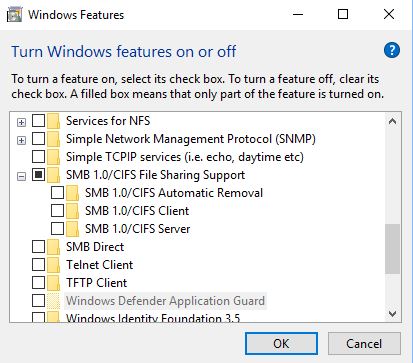
Have the CIFS/SMB 1.0 Client feature installed and enabled on your WIndows 10 system? And the CIFS/SMB 1.0 Automatic Removal feature disabled to avoid the unexpected?
djhurlburt
Apr 25, 2018Apprentice
From my read, the SMBv1 needs to be disabled; here is a screen shot of my system's features:
- michaelkenwardApr 26, 2018Guru - Experienced User
Another discussion on the same theme:
Solved: Re: New data computer can't find the Ready-share d... - NETGEAR Communities
- schumakuApr 26, 2018Guru - Experienced User
djhurlburt wrote:
From my read, the SMBv1 needs to be disabled
Potential reasons to stop using CIFS/SMB 1.0 would be vulnerabilities - multiple on Windows systems, and one on SAMBA. That much about the theory.
1. Most Netgear routers only support SMB 1.0. So without an SMB 1.0 client, there won't be any luck.
1a. I would assume Netgear has patched the vulnerability on older routers where they have not added SMB2.x/3.0 support - no idea. Only Negear could answer this. For how long do we request more complete release notes dear Netgear?
2. While Microsoft has migrated from the NetBIOS host discovery and name resolution to WDS, there is no more need for CIFS/SMB 1.0 and NetBIOS when only Microsoft systems are in the play. So they had a wonderful idea for automatically phasing it out and implement an Automatic Removal feature. If SMB 1.0 is not used for a certain time, the Automatic Removal feature does automatically remove the SMB 1.0 Client and Server feature.
2a. Microsoft dos not tell the user that this feature removal does also remove the NetBIOS name resolution.
2b. Netgear has updated SAMBA on some Nighthawk router models, and added also SMB 2.0/3.0 support (admin selectable). With the Windows CIFS/SMB 1.0 Client feature removed ("...no longer required blah..."), the access would be possible only by IP address, not by conveniently clicking on the "ReadySHARE" server or use the \\readyshare name. This is because of Netgear has still not added WDS to the routers.
2c. The CIFS/SMB 1.0 Automatic Removal feature should be disabled, especially when using on ReadySHARE routers (and NAS, and Linux SAMBA, ...) even if their servers support SMB 2.0 or 3.0. Because the feature does only look for SMB 1.0 usage - not for the continued NetBIOS name resolution. Microsoft "logic".That's all - now everybody should understand why and under what conditions the CIFS/SMB 1.0-Client feature might have to remain in place. And at the same time it's advised to disable the CIFS/SMB 1.0 Automatic Removal feature.
- djhurlburtMay 20, 2018Apprentice
I am sorry, but you have to realize that I am a program manager who knows a little about computers, but networking isn't part of that knowledge; that response didn't really help me.
For what it is worth, the readyshare does not work. I don't know the steps to make it work.
And now I have to create another thread because I can't make my netgear R6400 work with OpenDNS. Sigh.
- djhurlburtMay 20, 2018Apprentice
yep, tried that; didn't help for me :(
- TonySC2000May 29, 2018Aspirant
What's your router's wan ip address? 192.168.1.0/24?
- djhurlburtMay 29, 2018Apprentice
where do I find this?
- TonySC2000May 29, 2018Aspirant
login to the router,click the advanced tab, you can find the wan ip address in internet port tab.
disconnect the internet cable connected to your router, then restart router, you may find that readyshare should work properly.
- djhurlburtJun 25, 2018Apprentice
This is marked as solved, but it is not solved. I still cannot get the readyshare to work, NOR can I get the OpenDNS functionality to work. I've tried calling the "backdoor number" but no one ever picks up --- and when I try to click on a response to the open ticket, I get "invalid token" in the netgear website.
- michaelkenwardJun 26, 2018Guru - Experienced User
djhurlburt wrote:
This is marked as solved, but it is not solved.
Perhaps it is solved for pau11y, the person who first asked for help.
Rather than joining in on a raft of old discussions, you might do better to stick to the one that you started:
Can't log into OpenNDS from Genie - NETGEAR Communities
In that way you stand a better chance of catching the attention of someone from Netgear. They may not have time to check on a discussion from three months ago, especially when it is marked solved.
- schumakuJun 26, 2018Guru - Experienced User
djhurlburt wrote:
This is marked as solved, but it is not solved. I still cannot get the readyshare to work, ...
If you insist having SMB 1.0 disabled on your WIndows system (which does include the NetBIOS host discovery and name resolution), and considering there is no support for anything beyond of CIFS/SMB 1.0 on this router, there won't be any luck for making it work again.
Assuming your USB storage device is recognised, with the CIFS/SMB 1.0 Client feature enabled on a current Windows 10 , you can call \\[Router-LAN-IP-address] like \\192.168.1.1 to see the shared folders available in Windows Explorer.Starting from Windows 10 1803, to get the NetBIOS host announcement and name resolution workable, you have to enable the CIFS/SMB 1.0 Server feature enabled. This should (for me it's a hit and miss) make the router under it's configured name (default is readyshare) visible in the Windows Explorer -> Network. Alternate, typing \\readyshare should bring up the shared folder(s) configured.
Some Netgear routers got updates including SMB 2.0/2.1 and SMB 3.0 protocol support - however the name resolution is still stuck on NetBIOS, so the above feature enabled requirements remain. The Windows system will negotiate to use the highest available SMB version when connecting.
This should give you some guidelines to test explain a little bit more than "can't get it to work" - my crystal ball is on a holiday.
djhurlburt wrote:
I've tried calling the "backdoor number" but no one ever picks up --- and when I try to click on a response to the open ticket, I get "invalid token" in the netgear website.
Whatever number that should be. No idea how it comes the Netgear IT kids are playing and developing on what is supposed to be a live support system. All you can do is retry the same access on the support platform some hours or days later.
- djhurlburtJun 26, 2018Apprentice
Michael,
This is a good question on forum net-etiquette. If someone opens a thread and 5 others say they have the same problem, but then a fix comes out and it fixes the 1st person who asked, but it doesn't solve the other 5 people, should they open up a new thread - especially if it is marked solved?
My readyShare does not work -- AND -- the router does not seem to be utilizing OpenDNS correctly. I think I did add to my OpenDNS thread, but wanted to recheck the ReadyShare problem because that issue still exists for me.
- djhurlburtJun 26, 2018Apprentice
Thank you for your reply shumaku. Let's see:
1. "if you insiste having SMB 1.0 disabled on your Window system...."
I do not insist on this.
2. "Assuming your USB storage device is recognised..."
I can see the USB device in the netgear web-app (and in the Netgear Genie); however I cannot see the USB device through a web browser nor windows explorer.
3. I cannot see \\readyshare when I use windows-explorer
Do you think there is a BIOS issue where I should check to see if I need the latest BIOS for my system? It's just odd that this stopped working (seemingly) randomly.
- michaelkenwardJun 27, 2018Guru - Experienced User
djhurlburt wrote:
Michael,
This is a good question on forum net-etiquette. If someone opens a thread and 5 others say they have the same problem, but then a fix comes out and it fixes the 1st person who asked, but it doesn't solve the other 5 people, should they open up a new thread - especially if it is marked solved?
I would do that. The last thing you should do is turn up and say "Oh no it isn't fixed".
There are several reasons for starting a new discussion. The most important is that the handful of Netgear representatives do not have limitless time so they may well skip over messages in discussions that started three months ago and are marked as "solved".
Some discussions run on for years, with very interesting messages that have nothing to do with problems and answers. Netgear's team isn't paid to chew the fat like that.
A sensible approach would be to start a new discussion and to include links to the "solved" discussions that didn't work. In that way you reduce the risk that someone will point you at that "solved" stuff.
- michaelkenwardJun 27, 2018Guru - Experienced User
djhurlburt wrote:
I can see the USB device in the netgear web-app (and in the Netgear Genie)What is the "netgear web-app"?
And which genie is this? Desktop (for Windows/Mac)? Mobile (Android/iThing)?
The best place to diagnose this issue is in the Readyshare area of the browser interface. That is where you need to check the visibility of the drives and their mapping and share name.
Check page 75 in the manual somewhere at the end of this link:
>>> R6400 | Product | Support | NETGEAR <<<
If that is not right, then other Readyshare stuff will fail.
- schumakuJun 27, 2018Guru - Experienced User
djhurlburt wrote:
2. "Assuming your USB storage device is recognised..."
I can see the USB device in the netgear web-app (and in the Netgear Genie); however I cannot see the USB device through a web browser nor windows explorer.
3. I cannot see \\readyshare when I use windows-explorer
Do you think there is a BIOS issue where I should check to see if I need the latest BIOS for my system? It's just odd that this stopped working (seemingly) randomly.
Several explenation for these points in this thread already.
What happens if using the IP address, type in \\192.168.1.1 in Windows Explorer? - djhurlburtJun 27, 2018Apprentice
Okay, so I went into "add / remove programs" and I made sure the SMB 1.0 client is turned on:
I had to reboot and after I did, I pulled up Windows Explorer and typed "\\readyshare" but it did not see this device.
Logging into the router through routerlogin.net, here is what I see:
If I click on "edit' I see this view:
clicking "edit" I get this window:
If I hit "apply" it says "share name cannot be NULL" so I typed in "backupDrive"
and then I see this:
but I still cannot see \\readyshare\... anything from Windows Explorer.
- schumakuJun 28, 2018Guru - Experienced User
Again, as I said before: NetBIOS discovery and name resolution is packed with the CIFS/SMB 1.0 Server feature (what makes some sense, think about it!) since Win 10 18xx.
Instead of \\readshare you can use ie. \\192.168.1.1 (the router LAN IP).
- djhurlburtJul 02, 2018Apprentice
if I type in "\\192.168.1.1" I get:
Your file was not found
It may have been moved or deleted.
ERR_FILE_NOT_FOUND - michaelkenwardJul 02, 2018Guru - Experienced User
djhurlburt wrote:
if I type in "\\192.168.1.1" I get:
Your file was not found
It may have been moved or deleted.
ERR_FILE_NOT_FOUNDIs that before or after you get asked for the password?
- djhurlburtJul 02, 2018ApprenticeIt never prompted me for one.
- michaelkenwardJul 02, 2018Guru - Experienced User
It should ask you for the login details for your router. It does here.
- TonySC2000Jul 03, 2018Aspirant
r6400 is incompatible with some devices, such as fiber modem, so disconnect the wire connection and then restart it
- djhurlburtJul 03, 2018ApprenticeI just have a standard Motorola modem with copper cat 5 plugged in.