NETGEAR is aware of a growing number of phone and online scams. To learn how to stay safe click here.
Forum Discussion

pau11y
Mar 17, 2018Aspirant
R6400 readyshare stopped working
We've been using a seagate ext hdd for over a year (maybe two years?) via the back usb port as a readyshare drive. Had worked without troubles on wife's work computer (work's from home, win10) from d...
- Mar 19, 2018
Hi pau11y,
1. Please make sure that you have done a factory reset after the firmware update.
2. Does the issue persist when using a different storage device (another HDD, flash drive)?
3. Does the issue persist when using the other USB port?
4. Does the USB LED still light up if the issue occurs?
5. Does the issue persist on your other devices?
Regards,
Dex

djhurlburt
Apr 25, 2018Apprentice
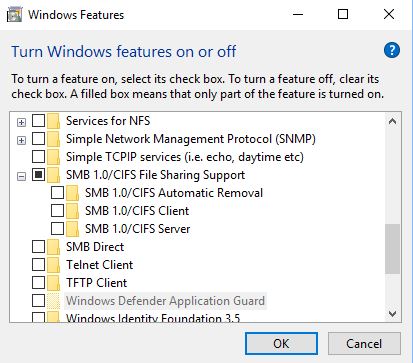
From my read, the SMBv1 needs to be disabled; here is a screen shot of my system's features:

schumaku
Apr 26, 2018Guru - Experienced User
djhurlburt wrote:
From my read, the SMBv1 needs to be disabled
Potential reasons to stop using CIFS/SMB 1.0 would be vulnerabilities - multiple on Windows systems, and one on SAMBA. That much about the theory.
1. Most Netgear routers only support SMB 1.0. So without an SMB 1.0 client, there won't be any luck.
1a. I would assume Netgear has patched the vulnerability on older routers where they have not added SMB2.x/3.0 support - no idea. Only Negear could answer this. For how long do we request more complete release notes dear Netgear?
2. While Microsoft has migrated from the NetBIOS host discovery and name resolution to WDS, there is no more need for CIFS/SMB 1.0 and NetBIOS when only Microsoft systems are in the play. So they had a wonderful idea for automatically phasing it out and implement an Automatic Removal feature. If SMB 1.0 is not used for a certain time, the Automatic Removal feature does automatically remove the SMB 1.0 Client and Server feature.
2a. Microsoft dos not tell the user that this feature removal does also remove the NetBIOS name resolution.
2b. Netgear has updated SAMBA on some Nighthawk router models, and added also SMB 2.0/3.0 support (admin selectable). With the Windows CIFS/SMB 1.0 Client feature removed ("...no longer required blah..."), the access would be possible only by IP address, not by conveniently clicking on the "ReadySHARE" server or use the \\readyshare name. This is because of Netgear has still not added WDS to the routers.
2c. The CIFS/SMB 1.0 Automatic Removal feature should be disabled, especially when using on ReadySHARE routers (and NAS, and Linux SAMBA, ...) even if their servers support SMB 2.0 or 3.0. Because the feature does only look for SMB 1.0 usage - not for the continued NetBIOS name resolution. Microsoft "logic".
That's all - now everybody should understand why and under what conditions the CIFS/SMB 1.0-Client feature might have to remain in place. And at the same time it's advised to disable the CIFS/SMB 1.0 Automatic Removal feature.
- djhurlburtMay 20, 2018Apprentice
I am sorry, but you have to realize that I am a program manager who knows a little about computers, but networking isn't part of that knowledge; that response didn't really help me.
For what it is worth, the readyshare does not work. I don't know the steps to make it work.
And now I have to create another thread because I can't make my netgear R6400 work with OpenDNS. Sigh.