NETGEAR is aware of a growing number of phone and online scams. To learn how to stay safe click here.
Forum Discussion

Sid-R8500
Aug 27, 2017Tutor
Help with OpenDNS setup for Nighthawk X8 R8500
Hi Gurus
I need some help with setting up my new router wirh OpenDNS (for parental controls).
I wanted to use the easiest way using this post (this is how I set it up for my older router):
https://support.opendns.com/hc/en-us/articles/228007927
But I cant find where is the "setting for Domain Name Server (DNS) Addresses" as mentioned in above post:
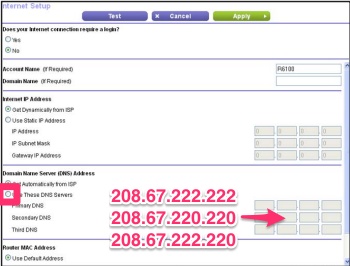
WAN Setup opton is disabled:
If I login to Genie, I do not see the option to setup this either.
The other option I tried is via Genie. I had an existing OpenDNS account - but I deleted its settings. And logged into same OpenDNS account via Genie, configured the filtering, etc but the changes via Genie do not take effect. For example, facebook or social-networking sites are not being blocked.
I am a bit frustrated. I thought this would be a simple five-min thing (just like I did this with my older D-Link router) but so far I have been proved wrong.
Please help.
Thank you!
- After disabling AP mode on the R8500, it usually necessary to force all of your devices to obtain new IP addresses. If you don't know how to do that, then rebooting them will work.
If you log into the R8500, does it say that the Internet connection is up?

11 Replies
- It looks like your R8500 is running in AP mode. If true, then you aren't supposed to put DNS settings here. They should go on your main router.
Thank you so much for your response. I think that's the problem.
How do I change the operation mode of the R8500? This is my main (and only) router so I must have confgured it to run in AP mode incorrectly. What do I do now?
Please advise!
Thank you!
- Go to ADVANCED > Advanced Setup > Wireless AP. Uncheck the Enable AP Mode box and click Apply.
But if this is your only router, how have you been accessing the Internet with multiple devices?