NETGEAR is aware of a growing number of phone and online scams. To learn how to stay safe click here.
Forum Discussion

Wheeler1080
Mar 28, 2021Aspirant
Minecraft Server XR500
I am trying to run a Minecrafte server from my desktop PC connected Hardwired from the XR500 tot he PC. I have followed every video on youtube about setting one up. I can get into it locally but when I try using my public IP on my other PC connected to my business internet line (so they are not on the same network) or any of my friends they can not connect. I have the port forwarding listed as 25565 on the advanced settings but when I use a site to check to see if the port is open on my public IP it says that port is closed. I am at my wits end as I have been working on this for weeks and can not find an answer to getting this thing to work. Any help would be great.
steps on what i took for greater detail :
First I did CMD and ipconfig to get my local IP address and other address info, I put the local address in the server config file for Minecraft. I went into my router config setting, did seting, then advance settings, then port forwarding. From there I did add custom service, named it Minecraft, did both TCP/UDP, 25565 as both the port #s, and from the list of IPs I picked the one I saw from the ipconfig. went ti whatsmyipaddress.com and got my local IP# and tried to access that from the PC its running from and no luck. I also tried a PC connected frpm a business internet line seperate from my home line so its not even using the same network and I can not connect to the server there either.
I looked online for what the issue could be as nothing on making a minecraft server helped after these steps. I did fone one pages that suggested the following:
suggested I make a static IP by going into my control panel, network charing center, then change adapter settings. I then right clicked my ethernet and hit proerties. found the IPv4 higlighted it and clicked on the properties button. I then checked use the following IP address and use an unused address from my local IP 192.1 blah blah, put in my subnet mask from the ipconfig from earlier as well as default gateway. The DNS I used from a google search on what Netgear uses which was 208.67.222.222 and 208.67.220.220. I then redid the portforward and edited my mincraft info so it now matched the new local IP which was in the list of IPs and was still my desktop but the IP digits at the end were the ones I picked in the making static IP directions. I updated the server config file to match the new local IP and tested the port with yougetsignal.com....and the port is STILL closed on my puplic IP address.
9 Replies
> [...] I have followed every video on youtube about setting one up.
> [...]Sincere thanks for not including the links.
> First I did CMD and ipconfig to get my local IP address [...]
Where "my" means "my server's"? Did you also fix that address using
ADVANCED > Setup > LAN Setup : Address Reservation, so that your server
wouldn't wander away from your port-forwarding rule?> [...] I did fone one pages [...]
Thanks for the helpful link. (Less sincere, this time.)
> suggested I make a static IP by going into my control panel, [...]
I'd suggest using (dynamic) Address Reservation, instead of
configuring your server with a static address. Careless use of static
addresses can cause more problems than it solves.
> [...] whatsmyipaddress.com and got my local IP# [...]
And got what, exactly? If you're worried about revealing secrets,
then the top half of the address, "a.b" out of "a.b.c.d", would satisfy
most of my curiosity.What's the IP address of the router's WAN/Internet interface?
ADVANCED > ADVANCED Home : Internet Port : Internet IP AddressFor the usual problems with port forwarding, see:
- Wheeler1080Aspirant
Very sorry for not including links, Im not 100% sure how detailed I needed to be. for the youtube videos there were many and all really the same steps but one I used as it was 100% for the type of version of minecraft I was trying for is this :
the address reservation under tha LAN option in set up to use the static IP I picked which is also listed in the list the router menu shows as well.
As far as what I saw for my local IP when I used the whatsyouripaddress it was 98.5.A.BCD
As for the reason I did the static IP this is the site I followed after I couldnt find anything else different from what I had done already :
www.portforward.com/spectrum/rac2v1
Your last question, " What's the IP address of the router's WAN/Internet interface? ADVANCED > ADVANCED Home : Internet Port : Internet IP Address"
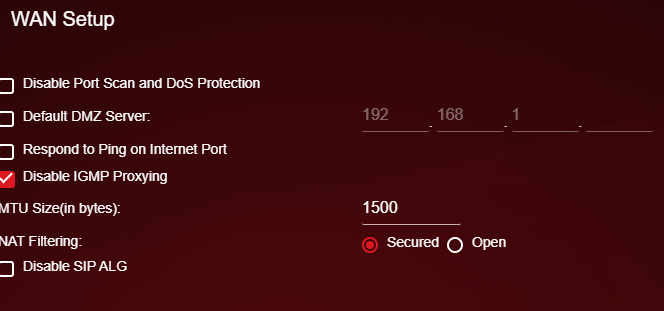
I do not have a path like this for a setting such as this. Ithe only WAN setting I see is under settings, setup, WAN setup and it looks like this :
\
I thank you for the help and appolgise if I didnt include everything you would require to best assit me in my problem.
- Wheeler1080Aspirant
ok forgive me if this is a double post as I replied and it doesnt seem to have saved.
There was many youtube videos I used to set up the server and many of them were all really the same steps, however the one I used the most is this one "https://youtu.be/bljisWyxU-8
I do have the server address (local) as set up from the static IP (which I will remove as you mentioned that it causes more problems then it solves) which is also the same one in the list when I set the port forwarding.
as far as my local IP it was 98.5.1**.***
And for your last Q "What's the IP address of the router's WAN/Internet interface? ADVANCED > ADVANCED Home : Internet Port : Internet IP Address" :
I do not have that path to provide you the answer to your question. The only thing with WAN I can find in all my settings and options is under SETTINGS>SETUP>WAN SETUP and it looks like this:
I thank you for lending me assistance in my issues, and I appolgise for not including enough information, I am not 100% how much detail I need to provide.
> I do not have that path to provide you the answer to your question.
> [...]Sorry. I was thinking of a non-Pro-Gaming model, which is organized
differently. Does Settings> Setup > Internet Setup show the router's
WAN/Internet IP address? Settings > Setup > WAN Setup is too much
fine-print. (And, of course, Netgear no longer includes useful screen
shots in its manuals.)
- michaelkenwardGuru - Experienced User
You have posted your message in the section of this community given over to Nighthawk WiFi Routers. (This is easily done, given Netgear's complicated community structure.)
Many questions apply to different types of device, so you may get responses here, but you might get more help, and find earlier questions and answers specific to your hardware, in the appropriate section for your device. That's probably here:
Nighthawk Pro Gaming Routers - NETGEAR Communities
This is especially important for the gaming routers because they have their own DumaOS firmware with a specialist support team. They won't see messages in this section.