NETGEAR is aware of a growing number of phone and online scams. To learn how to stay safe click here.
Forum Discussion

Andarc777
Feb 28, 2022Aspirant
R7000 - Unable to update firmware
Evening all,
I'm having a little trouble with a Netgear R7000 Router.
I purchased this a couple of years ago, but it was never actually used. In a nutshell, it would appear that the router is operating fine, I have no problems logging into Netgear Genie but it's running a very old Firmware version, with I simply cannot update.
Current version is V1.0.1.48
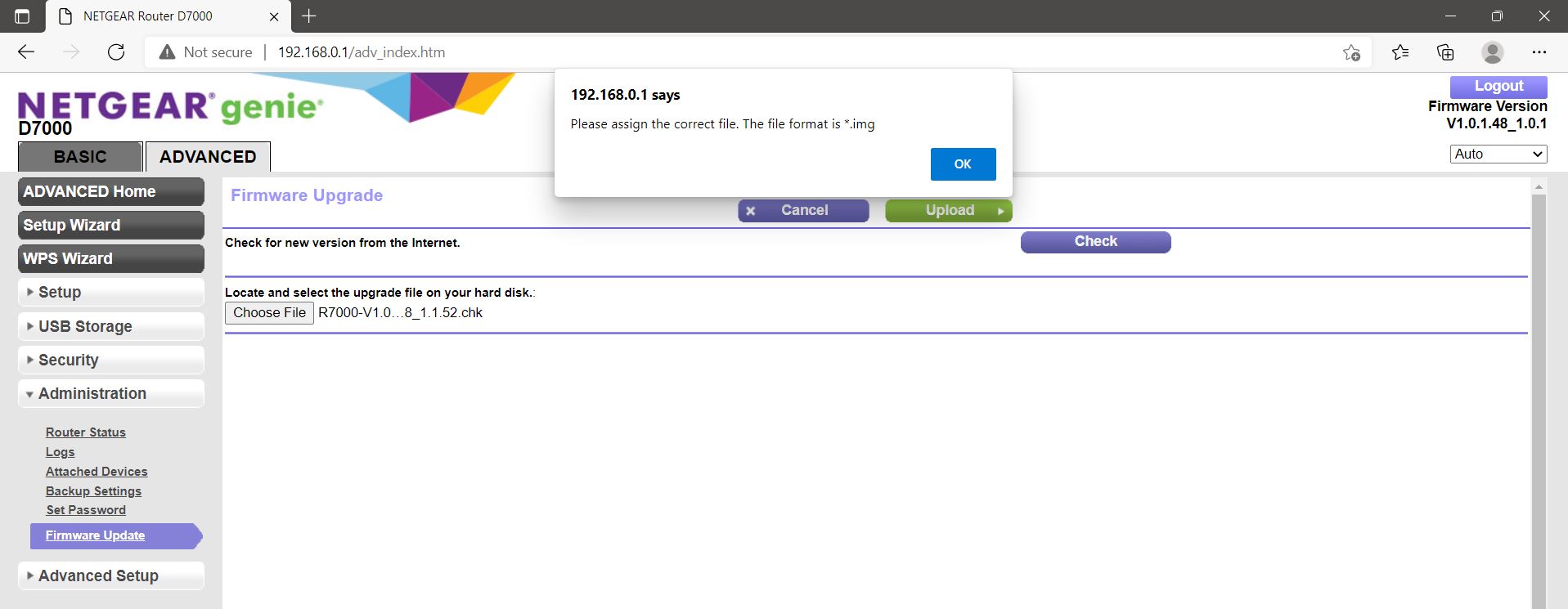
I have downloaded various different updated versions, extracted the .chk file from the ZIP file. When I attempt to upload the Firmware through Genie, I get an error stating it's an incorrect format and that it needs to be an .img file.
All of the firmware updates from Netgear's support pages are .chk format, but this router simply will not accept them and asks for a .img format.
Could anybody shed some light?
Thanks in advance.
7 Replies
- FURRYe38Guru - Experienced User
Are you using the routers web page to update FW?
What browser are you using? Try MS Edge or FireFox?
.CHK is the correct file extension...
Your on a verson that isn't listed on NGs download page for this model router.
You might try 1.0.2.164 or some middle ground version of FW to see if you can get the router past v1.0.1x