NETGEAR is aware of a growing number of phone and online scams. To learn how to stay safe click here.
Forum Discussion

Fragglecasper
Nov 30, 2019Aspirant
cannot connect to readynas nvx RNDX4210
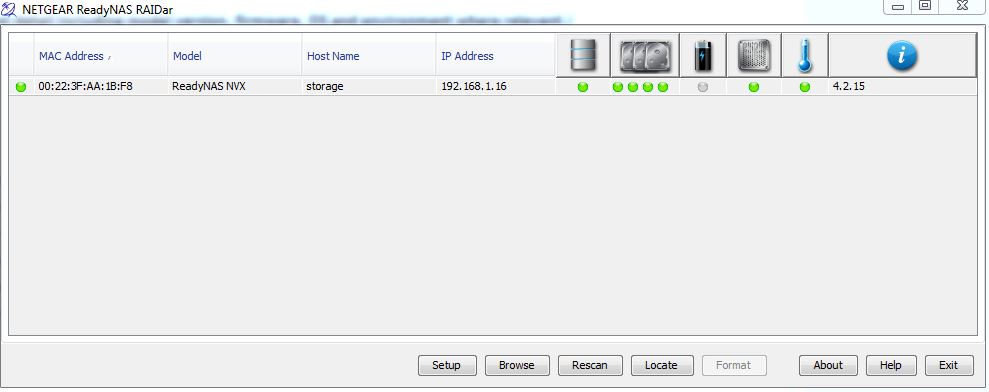
IN DIRE !! need of help, so my operating system which is windows 7 pro, was corrupted and acting up and was restarting and shutting down and was just causing me all troubles, so i decided to start fr...

StephenB
Nov 30, 2019Guru - Experienced User
Fragglecasper wrote:
i have logged into ReadyCloud
Not an option. ReadyCloud only works with OS-6 NAS (which run 6.x firmware, not 4.2 firmware).
What happens when you enter \\192.168.1.16 into the file explorer address bar? Be care to use the correct slash - // will launch your browser, which isn't what we want.
Also, do you recall the admin password for your NAS? I am wondering, because you seem to be confused on screenshot 3. That normally gets you into the NAS web UI (called frontview), and you are supposed to enter admin as the username, and the NAS admin password when you see that pop-up.
- FragglecasperNov 30, 2019Aspirant
\\192.168.1.16 when i enter this into my browser it asks for name and password, which i have tried now every combination i have known, i have taking that address bar futher by entering the recovery of this also and tried sending me a reset option to my email, as of today this address recovery option has not sent me a reset option....
- FragglecasperNov 30, 2019Aspirant
also thank you for contacting me back so soon man, honestly
- FragglecasperNov 30, 2019Aspirant
i also believed that by using the OS reinstall option on the device, by holding the backup button and getting into the meun option and reinstalling the Os that it would have reset the settings,,
- StephenBNov 30, 2019Guru - Experienced User
Fragglecasper wrote:
i also believed that by using the OS reinstall option on the device, by holding the backup button and getting into the meun option and reinstalling the Os that it would have reset the settings,,
It does, but your description on the steps isn't quite right. See pages 20-21 here: http://www.downloads.netgear.com/files/GDC/RNDU2000/ReadyNAS_Ultra_UltraPlus_NVX_Pro_HW_en_8July11.pdf
That will reset the admin password to netgear1 and will also reset the network configuration to use DHCP (which it likely already is). After you regain access, you should change the admin password to something else.
Overall -
- if you only rarely use the ReadyNAS password, then I suggest writing it down and putting it inside the door of the NAS. The security risk isn't substantial, since anyone who knows how can do the OS reinstall to reset it.
- Your data is critical to your business, and RAID isn't enough to keep your data safe. The only way to do that is to back it up to at least one other device - ideally two. After you regain access, you should put a backup plan in place. USB drives are cost effective way to back up your data. You can also get a new ReadyNAS, and use your current NVX as a backup.
- A NAS isn't a set up and forget device. You really should log in periodically and at least check the disk health.
- After you restore access and back up the NAS, you might also want to update your firmware (the current firmware version is 4.2.31; 4.2.15 is very old. Don't skip the backup step - applying 4-5 years worth of updates in one jump is a lot, so it is prudent to make sure you have a backup in hand.
- SandsharkNov 30, 2019Sensei
It sounds as if you may have both NIC ports plugged in, thus have two addresses. That's not usually a good idea. If one of those addresses is out of the subnet of your router, you must have set it as static at some point before changing something else in your network configureation, like the router.
You likely stored some user name and/ot password information into the Windows Credential Manager in you previous set-up, and have since forgotten them because you didn't need to type them. If you didn't write them down somewhere, doing the OS re-install to re-gine admin access will allow you to reset user information as well and get you back where you were.
You said you typed the IP address into your browser. StephenB stated you needed to do that into a Windows Explorer address window, not Internet Explorer. You can still try what was suggested before you move to the point of a re-install. Note if you put in the slashes wrong, it will re-direct to the browser, also.

Related Content
NETGEAR Academy

Boost your skills with the Netgear Academy - Get trained, certified and stay ahead with the latest Netgear technology!
Join Us!