NETGEAR is aware of a growing number of phone and online scams. To learn how to stay safe click here.
Forum Discussion

Fragglecasper
Nov 30, 2019Aspirant
cannot connect to readynas nvx RNDX4210
IN DIRE !! need of help, so my operating system which is windows 7 pro, was corrupted and acting up and was restarting and shutting down and was just causing me all troubles, so i decided to start fr...
Fragglecasper
Nov 30, 2019Aspirant
i also believed that by using the OS reinstall option on the device, by holding the backup button and getting into the meun option and reinstalling the Os that it would have reset the settings,,

StephenB
Nov 30, 2019Guru - Experienced User
Fragglecasper wrote:
i also believed that by using the OS reinstall option on the device, by holding the backup button and getting into the meun option and reinstalling the Os that it would have reset the settings,,
It does, but your description on the steps isn't quite right. See pages 20-21 here: http://www.downloads.netgear.com/files/GDC/RNDU2000/ReadyNAS_Ultra_UltraPlus_NVX_Pro_HW_en_8July11.pdf
That will reset the admin password to netgear1 and will also reset the network configuration to use DHCP (which it likely already is). After you regain access, you should change the admin password to something else.
Overall -
- if you only rarely use the ReadyNAS password, then I suggest writing it down and putting it inside the door of the NAS. The security risk isn't substantial, since anyone who knows how can do the OS reinstall to reset it.
- Your data is critical to your business, and RAID isn't enough to keep your data safe. The only way to do that is to back it up to at least one other device - ideally two. After you regain access, you should put a backup plan in place. USB drives are cost effective way to back up your data. You can also get a new ReadyNAS, and use your current NVX as a backup.
- A NAS isn't a set up and forget device. You really should log in periodically and at least check the disk health.
- After you restore access and back up the NAS, you might also want to update your firmware (the current firmware version is 4.2.31; 4.2.15 is very old. Don't skip the backup step - applying 4-5 years worth of updates in one jump is a lot, so it is prudent to make sure you have a backup in hand.
- SandsharkNov 30, 2019Sensei
It sounds as if you may have both NIC ports plugged in, thus have two addresses. That's not usually a good idea. If one of those addresses is out of the subnet of your router, you must have set it as static at some point before changing something else in your network configureation, like the router.
You likely stored some user name and/ot password information into the Windows Credential Manager in you previous set-up, and have since forgotten them because you didn't need to type them. If you didn't write them down somewhere, doing the OS re-install to re-gine admin access will allow you to reset user information as well and get you back where you were.
You said you typed the IP address into your browser. StephenB stated you needed to do that into a Windows Explorer address window, not Internet Explorer. You can still try what was suggested before you move to the point of a re-install. Note if you put in the slashes wrong, it will re-direct to the browser, also.
- FragglecasperDec 01, 2019Aspirant
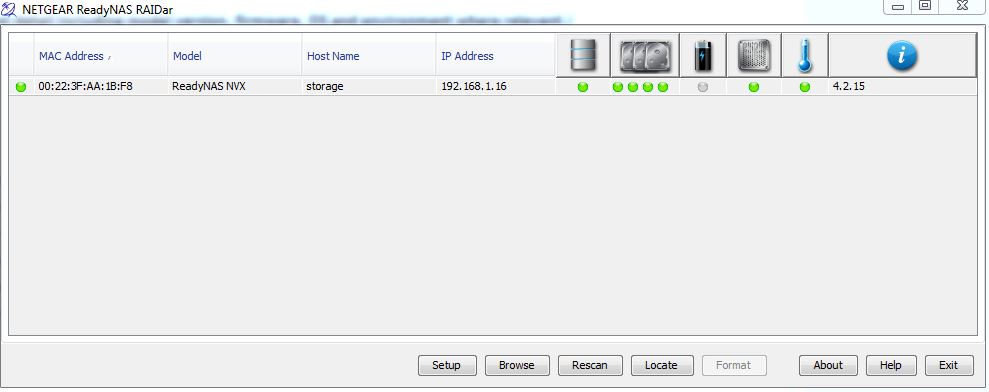
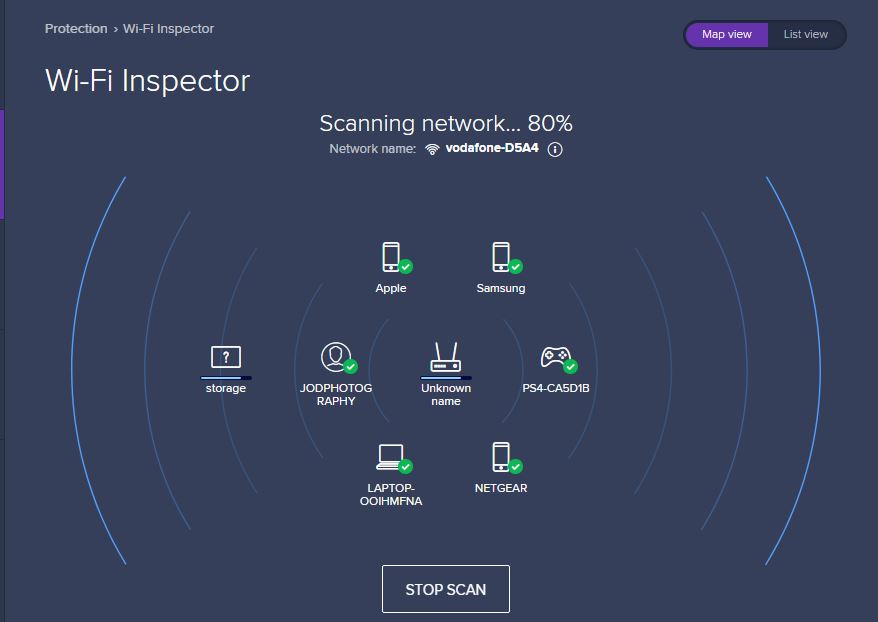
using avast to scan my network i can see everything connected to my wifi,,, heres the thing, i am trying to get to Netgear and get in there and get to my files,,, my also on this scan networ i can see storage, this is a folder i created using raidar to set up, when i click raidar to scan for devices it sees storage and when i open storage there is nothing in there,
storage is created with the new operating system install,
netgear is the old operating system and the one i was able to get into a few days ago,
so when i click browse on raidar it takes me straight to storage which is empty, netgear itself holds all my files and this is indicated in raidar when you hoover over the drives,,,
on setting it up i changed the name to JOD'Photography and the folder to storage,
it is different from what it was a few days ago which was just James and the folders inside where called home, and another folder called user..
dont know where the problem is, i have tried and tried to re install the OS on the netgear using the tips above, it does the whole boot cycle, then it boots back up and when i click raidar to find it or to browse it takes me back to storage folder and not back directly into the netgear,
its like the path to the data has changed and i am only been taking to the new folder i create when setting up raidar 3 days ago, and not back into the path of my orginal files
- FragglecasperDec 01, 2019Aspirant
i will add three images here,, of that wireless scan and show the ip addresses, maybe there is something going on there between the different ip addresses location with storage and netgear and router ?..
i really dont know i am clutching at straws here
- FragglecasperDec 01, 2019Aspirant
images 2
- FragglecasperDec 01, 2019Aspirant
on page 21 it states this
Factory default. Initiates a short disk test that takes approximately 5 minutes, then
begins a 10-minute time-out period waiting for RAIDar. During the 10-minute time-out
period, the system can be powered off safely without causing any data loss. After 10
minutes, or if you select the factory default option with RAIDar during the time-out period,
the factory default process begins.without causing any loss to data,
then right under it it says factor default will wipe the drives and format them..
i have already chosen OS Reinstall twice yet i still cannot get in
- StephenBDec 01, 2019Guru - Experienced User
Fragglecasper wrote:
if you select the factory default option with RAIDar during the time-out period,
the factory default process begins.without causing any loss to data,
No matter how you start the factory default, it will reformat the disks. You will lose all data, and you'll also have to reconfigure the NAS from scratch.
Fragglecasper wrote:
i have already chosen OS Reinstall twice yet i still cannot get in
That will reset the NAS admin password to netgear1 and reset the network configuration to use DHCP. It won't destroy data.
What happens if you enter \\192.168.1.16 in windows file explorer (be care to use the right slash)?
Fragglecasper wrote:
i removed the ssd and bought a new one, installed windows 7 again
Do you still have the old SSD? One option is to shut down the PC, and then install the original SSD. That should restore access (assuming you didn't actually do a factory default).
Then copy off your data to a USB drive, and look in the windows credential manager to see the username/password you were using with the NAS.
- FragglecasperDec 01, 2019Aspirant
i have the old ssd, but because it was giving problems, i bought another and what i did with the old one was tried to reinstal onto that ssd creating the previous windows install to be pushed to windows.old folder.. so i have access to windows.old
i have entered the address into windows explorer and as the picture shows it send me to network/jodphotography/storage which is empty..
let me try and ask this from a different angle,
can i connect by cable or any other way to the nas and remove my files, i have 2 storage hubs coming, that will maybe suit my needs better...
if i could cable up somehow to the nas and just connect between laptop and the netgear and transfer the files off it ?

Related Content
NETGEAR Academy

Boost your skills with the Netgear Academy - Get trained, certified and stay ahead with the latest Netgear technology!
Join Us!