NETGEAR is aware of a growing number of phone and online scams. To learn how to stay safe click here.
Forum Discussion

dcheitel
Jan 16, 2025Aspirant
Firmware update Readynas 102
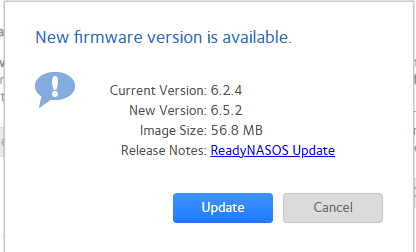
I am trying to update firmware on my readynas 102. I get the shown error when attempting the update using check for updates function. please advise if able. Thank you
dcheitel
Jan 18, 2025Aspirant
Did a factory reset same result

Sandshark
Jan 18, 2025Sensei
The update instructions expressly state:
- ReadyNAS 102, 104, and 2120 systems must not be updated directly to 6.10.x from 6.3.x or older firmware. They must first be updated to either 6.2.5 or 6.3.5, then to 6.5.2, and then to 6.10.x.
You are updating from 6.2.4, so you need to go to 6.2.5 next. (6.3.5 is for 200 series only, so I'm not sure why they list it for the 100 series).
- dcheitelJan 19, 2025Aspirant
Hi and thanks. no, im not trying to go to 6.10.x. I am on 6.2.5 currently and trying to go to 6.5.2 and its not working.
 StephenBJan 19, 2025Guru - Experienced User
dcheitel wrote:
Hi and thanks. no, im not trying to go to 6.10.x. I am on 6.2.5 currently and trying to go to 6.5.2 and its not working.
The screenshot in your first post showed 6.2.4, so you have made some progress (since you are now on 6.2.5).
Did you notice when the first firmware upgrade worked?
I suggest trying the manual install again, and then rebooting when you see the error. Then double-check the firmware version. The zip is here:
- dcheitelJan 19, 2025Aspirant
TBH i have no idea how I got it to 6.2.5 from .4 because I have yet to see a success. but I keep trying and cannot get it to 6.5.2 no matter what. when I try the manual install I get unrecognized server error everytime. sometimes it says it will update on reboot but on reboot it is still 6.2.5. very frustrating.
- dcheitelJan 19, 2025Aspirant
Ive even gotten this far and doesnt get me to upgraded state.
- StephenBJan 19, 2025Guru - Experienced User
dcheitel wrote:
TBH i have no idea how I got it to 6.2.5 from .4 because I have yet to see a success.
You aren't the first to see the server error. But most of the time when people run into this, the reboot installs the firmware anyway.
That must have happened with 6.2.5, but apparently not with the 6.5.2 step.
Is it still stuck in the "updating" state now?
- dcheitelJan 19, 2025Aspirant
no, its not stuck. its back to offering 6.5.2 and currently on 6.2.5.
- dcheitelJan 24, 2025Aspirant
many times
- StephenBJan 24, 2025Guru - Experienced User
Have you downloaded the log zip file?
- dcheitelJan 24, 2025Aspirant
i have but wouldnt know what to look for
- StephenBJan 24, 2025Guru - Experienced User
dcheitel wrote:
i have but wouldnt know what to look for
If you like, you can send me a PM with a download link (dropbox, google drive, etc). Make sure the permissions allow anyone with the link to download.
No idea if I'll find anything useful, but happy to take a look.
- StephenBJan 24, 2025Guru - Experienced User
Just to follow up, the firmware install is trying to access archived debian repositories. So the next step is to apply the fixes in post 37 here: https://community.netgear.com/t5/Using-your-ReadyNAS-in-Business/How-I-got-apt-update-and-install-to-work-with-Debian-Jessie/td-p/2306772
There are also some errors in accessing apt.readynas.com (Netgear's repository). Not sure if they will still happen after apt is updated (or if the errors will prevent the firmware update).
- NXIXNFeb 06, 2025Apprentice
Not sure but this might help: https://kb.netgear.com/29974/ReadyNAS-OS-6-RN100-RN2120-cannot-update-due-to-invalid-checksum

Related Content
NETGEAR Academy

Boost your skills with the Netgear Academy - Get trained, certified and stay ahead with the latest Netgear technology!
Join Us!
