NETGEAR is aware of a growing number of phone and online scams. To learn how to stay safe click here.
Forum Discussion

Gruncle1
Dec 15, 2016Guide
PRJNAME
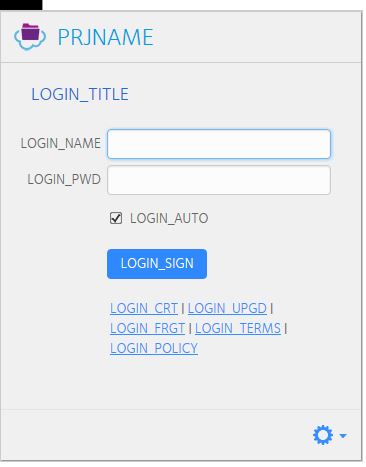
I'm getting this funny little popup that wants me to log onto something called "PRJNAME". My regular logon doesn't work. What is this? And what do I do about it?
Gruncle1
Dec 28, 2016Guide
I still can't get your system to accept my screenshot, so I can't show it to you. Your add image menu only wants some kind of image file. I've tried .doc file and .html and your system won't allow them.
It is a Netgear popup, because I clicked on one of the buttons near the bottom of the page and it took me to your web site.
What can I do to show it to you? If I gove you more of what's on the popup will that help?

StephenB
Dec 30, 2016Guru - Experienced User
Gruncle1 wrote:
I still can't get your system to accept my screenshot, so I can't show it to you. Your add image menu only wants some kind of image file.
Use png
- Gruncle1Dec 30, 2016Guide
Okay, I think I finally got it. After discorvering the Windows Snipping Tool. ALso, when I click on the "Login Policy" link, it takes me to a page on the Netgear website.
- JennCDec 30, 2016NETGEAR Employee Retired
Hello Gruncle1,,
That seems to be a window of ReadyCloud but with a PRJNAME title instead of ReadyCloud. Is it popping up on the bottom right corner of the screen? Please check what version as well by clicking its small settings icon on the bottom corner then click Settings, then General tab.
Regards,
- bedlam1Dec 30, 2016Prodigy
A google of PRJNAME returns issues with Java, maybe an update or re-install of Java on the PC could fix the problem???
- Gruncle1Dec 31, 2016Guide
Thaks, I'll do that and get back to you.
Happy New Year.
- Gruncle1Dec 31, 2016Guide
Yeah, I noticed that when I did a search. My Java is up to date as of 12/28, but I got another occurrence this am.
As I mentioned, clicking the links takes me to the Netgear site, so this would appear to be a Netgear problem.
- bedlam1Dec 31, 2016Prodigy
Well it was worth a try
Happy New Year to you too
- ChristianSTApr 18, 2017Aspirant
Hello,
same problem here for a few days now. Only on 1 Windows 10 PC the Redaycloud App looks like the screenshot, it's not saving the login details anymore - and tells me the NAS ist online, but disconnected...
I've updated Java (no change) and reinstalled the Readycloud App several times.Ans suggestions?
Thanks
Christian - JennCApr 19, 2017NETGEAR Employee Retired
Hello ChristianST,
This is an old thread. Please create your new thread and post some screenshots too with information of the issue you have.
Regards,


Related Content
NETGEAR Academy

Boost your skills with the Netgear Academy - Get trained, certified and stay ahead with the latest Netgear technology!
Join Us!
