NETGEAR is aware of a growing number of phone and online scams. To learn how to stay safe click here.
Forum Discussion

tomiaurednik
Mar 29, 2017Tutor
User has been Auto deleted - all data lost
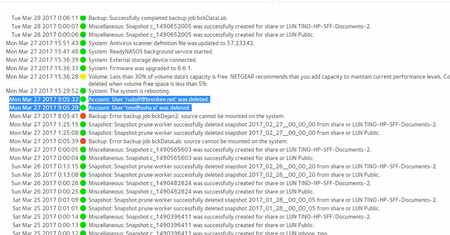
Netgear RN10400 , fw: 6.6.0, 2 x 1TB, RAID 1. User has been Auto deleted - all data lost. Can not acces local user home dir?!? Can someone check this? Or tell me, in which log can I check th...
- Apr 11, 2017
Please if you haven't already. Have a read of Having ReadyCLOUD problems since 3/30/17?
This announcement has been updated over time.
I'm going to mark this as the solution to make sure those visiting this thread see this post.


Tore1
Mar 30, 2017Tutor
Hi
When i go to https://readycloud.netgear.com/client/en/welcome.html i click signin.
That mostly works - but not allways..
When it works:
When i then click the nas in the Home tab, it says the nas is offline.
I have restarted the nas ½ hour ago, its working fine. I can acces files from it, from windows file explorer or from my TV.
What should i do?

jak0lantash
Mar 31, 2017Mentor
There is no backdoor. If you bother reading the previous messages, I tried to bring some light on what happened.
The NAS unjoined ReadyCLOUD service due to a connection issue to the ReadyCLOUD server or something in those lines (this was the trigger). When unjoining from the master ReadyCLOUD account, the ReadyCLOUD users are deleted along with their home folders. Nobody connected to your NAS in order to delete some stuff.
And there is VERY little chance that you can recover any of it.
It shouldn't have happened but it happened.
In the meantime, you can access the NAS using local accounts.
If you want further info or confirmation, then you'll have to wait for communication from NETGEAR. I am.
The NAS unjoined ReadyCLOUD service due to a connection issue to the ReadyCLOUD server or something in those lines (this was the trigger). When unjoining from the master ReadyCLOUD account, the ReadyCLOUD users are deleted along with their home folders. Nobody connected to your NAS in order to delete some stuff.
And there is VERY little chance that you can recover any of it.
It shouldn't have happened but it happened.
In the meantime, you can access the NAS using local accounts.
If you want further info or confirmation, then you'll have to wait for communication from NETGEAR. I am.
Related Content
NETGEAR Academy

Boost your skills with the Netgear Academy - Get trained, certified and stay ahead with the latest Netgear technology!
Join Us!
