NETGEAR is aware of a growing number of phone and online scams. To learn how to stay safe click here.
Forum Discussion

tomiaurednik
Mar 29, 2017Tutor
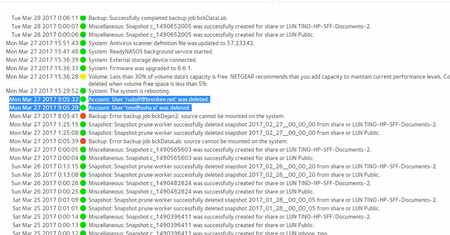
User has been Auto deleted - all data lost
Netgear RN10400 , fw: 6.6.0, 2 x 1TB, RAID 1. User has been Auto deleted - all data lost. Can not acces local user home dir?!? Can someone check this? Or tell me, in which log can I check th...
- Apr 11, 2017
Please if you haven't already. Have a read of Having ReadyCLOUD problems since 3/30/17?
This announcement has been updated over time.
I'm going to mark this as the solution to make sure those visiting this thread see this post.


jak0lantash
Apr 06, 2017Mentor
dnanthony83 wrote:my 2 ReadyCloud accounts were listed under serialized items #5234 and #5047
It looks like those IDs are indeed at the place where you would have seen the name of the account, which means that they reprent BTRFS subvolumes, not "folders". So maybe ReclaiMe is able to reconstruct the file/folder structure but not read the name of the subvolumes. It looks promising, but it could well be that ReclaiMe will just recover the structure without any readable data, though it's often the other way around (getting data file without names and folder structure).
It would be worth a try... if it wasn't for the price of that license.

Tryll
Apr 06, 2017Guide
This is a mess. The issue has apparently affected ReadyNAS Replicate as well, as I can no longer log in to the web service to manage the replication jobs between my NAS devices. I don't really see any mention of this in their comment-locked blanket statement, nor any recommended instruction on how to remedy it, so I'm writing to support directly about it.
- jak0lantashApr 06, 2017Mentor
Tryll wrote:I can no longer log in to the web service to manage the replication jobs between my NAS devices.
Is it that you can't log in, or that you can log in but not see your NAS devices from your account?
- TryllApr 06, 2017Guide
Presently the issue is that I can't log in to the management site.
After entering my credentials it says "To continue, you must be registered as a ReadyNAS Remote user." and stops me there.
- jak0lantashApr 06, 2017Mentor
Weird. If your account was a valid Replicate account, you should be able to log in with or without NASes attached to it (via their replicate feature).
If you can't log in with your username (not email address) and password, then talking to Support is indeed the right to go, as you mentioned earlier.
Related Content
NETGEAR Academy

Boost your skills with the Netgear Academy - Get trained, certified and stay ahead with the latest Netgear technology!
Join Us!
