NETGEAR is aware of a growing number of phone and online scams. To learn how to stay safe click here.
Forum Discussion

AlbertoLD
Mar 09, 2017Aspirant
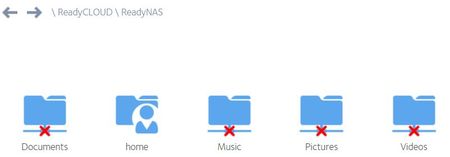
ReadyCLOUD red cross folders
Hi, How I share my folders again? I have a red cross in all folders except 'home' folder and I can't sync this with my PC . Look at the picture: Could you help me? Thanks.
- Mar 10, 2017
Hello AlbertoLD,
In the admin page, click System then Settings. You should be able to see SMB, make sure it is enabled.
After doing that, click Shares, from here you should see all the shares where you saved your files. Go to the Settings on each one of them and go to Network Access. You should see SMB, make sure it is also enabled.
Regards,

JennC
Mar 10, 2017NETGEAR Employee Retired
Hello AlbertoLD,
Are the shares' SMB or any file protocol enabled? This red "x" mark appears when the share does not have any protocol enabled.
Regards,
JennC
Mar 10, 2017NETGEAR Employee Retired
Hello AlbertoLD,
In the admin page, click System then Settings. You should be able to see SMB, make sure it is enabled.
After doing that, click Shares, from here you should see all the shares where you saved your files. Go to the Settings on each one of them and go to Network Access. You should see SMB, make sure it is also enabled.
Regards,
Related Content
NETGEAR Academy

Boost your skills with the Netgear Academy - Get trained, certified and stay ahead with the latest Netgear technology!
Join Us!
