NETGEAR is aware of a growing number of phone and online scams. To learn how to stay safe click here.
Forum Discussion

dschwartzer
Jul 06, 2016Luminary
Sync Home Folder in ReadyCloud Desktop App
I have a ReadyNAS 202 running OS 6.5.1 and am using the ReadyCloud Desktop Client version 1.3 for OS X (Mac). I have created a folder in my private Home Directory that I would like to sync to my Mac...

StephenB
Jul 06, 2016Guru - Experienced User
Did you create a folder in home manually? You shouldn't have.
The folders in home are created by the system for each user account. Only the folder named XYZ is visible to user XYZ, and home itself isn't visible (though of course the admin user sees both home itself and all folders in it).
Similarly you shouldn't add folders to the data volume, instead you should create shares on from the admin web ui.
 dschwartzerJul 06, 2016Luminary
Stephen:
Thanks for your prompt reply.
I did not create my own home folder. It was created by the system the first time I signed in to ReadyCloud using the email address I used to set up my master MyNetgear / ReadyCloud account. I see the Home folder in the ReadyCloud web access and in the Admin Web interface but not in the desktop client.
The subfolder I created was created in my Home folder using the ReadyCloud Web site. Isn't taht acceptable given that a reuylar user would not have access to the Admin UI?
Regards,
David
- StephenBJul 06, 2016Guru - Experienced User
dschwartzer wrote:
I did not create my own home folder. It was created by the system the first time I signed in to ReadyCloud using the email address I used to set up my master MyNetgear / ReadyCloud account.
Thx for clarifying. I thought you might have accessed \\nasname\data\home and as administrator and created a folder there - which is possible, but not a good idea.
dschwartzer wrote:
The subfolder I created was created in my Home folder using the ReadyCloud Web site. Isn't taht acceptable given that a reuylar user would not have access to the Admin UI?
Yes that is perfectly fine.
dschwartzer wrote:
I see the Home folder in the ReadyCloud web access and in the Admin Web interface but not in the desktop client.
If the desktop client is using the same user credentials, then you should be seeing the home folder (and its subfolders) there.
- dschwartzerJul 06, 2016Luminary
Stephen:
I should be but I'm not.
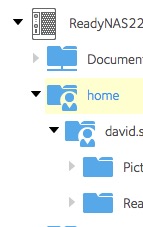
Here is a screen shot of the ReadyCloud Web interface (not the Admin page). This shows you that the Home folder and subfolders exist.
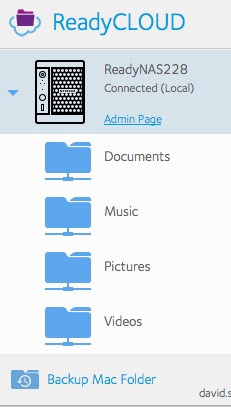
Herre is a partial screen shot of the Mac Desktop Client. As you can see, the Home folder does not exist.
I am using the same email address and password for both logins.
Thoughts?
Regards,
David
Related Content
NETGEAR Academy

Boost your skills with the Netgear Academy - Get trained, certified and stay ahead with the latest Netgear technology!
Join Us!
