NETGEAR is aware of a growing number of phone and online scams. To learn how to stay safe click here.
Forum Discussion

monolith77
Jul 21, 2016Guide
user account says NAS offline RN102 #27207196
I have upgraded a user to readycould and now when trying to login via the readycloud app on PC(win7) I cant as the app says that the NAS is offline with a handshake symbol.
I can log on fine via re...

JennC
Jul 21, 2016NETGEAR Employee Retired
Hello monolith77,
What is the version of the ReadyCloud desktop app? It should be updated too to the latest as that should ask for myNetgear account (upgraded ReadyClloud account) which is in an email address.
Regards,
monolith77
Jul 22, 2016Guide
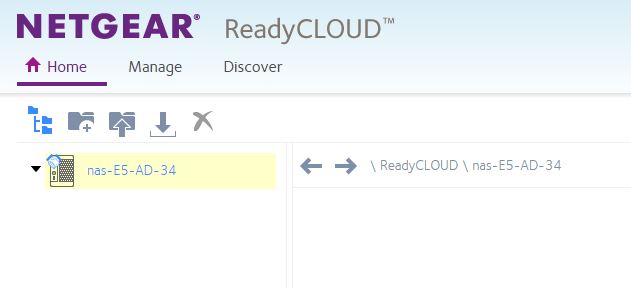
This is all that shows up when in readycloud. The readycloud app also shows the NAS as not connected but it is. I can connect fine with another account.
I need this for business and to take continual backups of files for this user, please help.
- JennCJul 22, 2016NETGEAR Employee Retired
Hello monolith77,
What account are you using to login to the desktop client and ReadyCloud portal? Is this the same account you used in the admin page to turn on the ReadyCloud feature?
It should be in an email address. Under Cloud > ReadyCloud of admin page, you should see "signed in as" followed by the main myNetgear account (upgraded ReadyCloud account).
Regards,
- QuaxWillyJul 24, 2016Aspirant
Hello JennC,
I have exactly the same hardware and software version and nearly the same behavior.
For two migrated users it works fine - two other migrated users can see that endless handshake or the "offline" message only.
It seems to be a systematic problem.
Best Regards
Willy
- monolith77Jul 24, 2016Guide
Hi JennC.
I am logged in as the user that can use and see the NAS perrectly.
A breakdown of how I have it set up:
User 1 = Admin. I can see the NAS and all works fine, including readycloud over the web and desktop app. This is the account used to turn on the readycloud feature in admnpage/cloud page.
User 2. This account is the one I am having problems with (everything worked well until we migrated). I have migrated this account and now all it shows is the handshake icon via readycloud web and via the desktop app it shows the NAS is disconnected. When I go to the adminpage>accounts>cloud users I see this account but it has email listed correctly but the name is listed as the old user name rather than an email address as per higlighted yellow, so it looks like the account didn't migrate properly.
I have tried to re-migrate this account but it says that the account is already migrated.
When I check shares Adminpage>shares>shares, this user is listed but as the old user name (not an email address)
This user is also a user in adminpage>accounts>users
Alerts contacts go to user 2 email address as the NAS would not send to mine for some reason.
- JennCJul 26, 2016NETGEAR Employee Retired
Hello monolith77,
Was this user 2 added before the migration? Does it have home user already that has files? If so, please back up the files of this user 2 (and all other users including the main Cloud user, if possible), then remove user 2 and re-add it. Before re-adding, go to readycloud.netgear.com and click Sign In then select Upgrade to MyNetgear account. Enter the old ReadyCloud account details then let the server detect if it is associated with the email address you have registered with MyNetgear already, if not, it should give you an option to bind it. Once done, re-add to your ReadyNAS ReadyCloud access.
Regards,
- monolith77Jul 28, 2016Guide
Hi JennC
I have done as you have suggested.
I have attempted to delete the problem user from the NAS in the admin page Account>Cloud Users. I highlight them and push remove user but it says this user is joined to readycloud to remove user go to readucloud, so I go to Readycloud.
Readycloud Mange page slect the problem user and push delete.... the user does not delete.
I have unshared all folders from the probelm user and tried to delete, but the user will not delete.
So as per your suggestion to go to remote.readynas.com and delete the user, which the user is now deleted from remote.readynas.com.
I have now reshared a folder with the problem user via readycloud but when I log on with the desktop readycloud app, it says you currently have no registered devises.
So now I have gone to the admin page of the readynas>account>cloud users to invite a user, it says this account is registered with Readycloud please go to readycloud.
So then I go to readycloud and try to invite a user, then go thriough the same thing back 2 lines above and round in circles.
So so far I have spent hours going in circles and still no joy!
I am just about "ready" to send this to the computer "cloud" of garbage. Can I bill Netgear for my hours of work spent on this??

Related Content
- Apr 16, 2020Retired_Member
NETGEAR Academy

Boost your skills with the Netgear Academy - Get trained, certified and stay ahead with the latest Netgear technology!
Join Us!
