NETGEAR is aware of a growing number of phone and online scams. To learn how to stay safe click here.
Forum Discussion

tomiaurednik
Mar 29, 2017Tutor
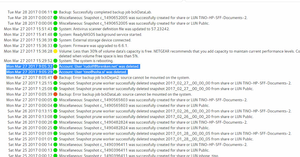
User has been Auto deleted - all data lost
Netgear RN10400 , fw: 6.6.0, 2 x 1TB, RAID 1. User has been Auto deleted - all data lost. Can not acces local user home dir?!? Can someone check this? Or tell me, in which log can I check th...
- Apr 11, 2017
Please if you haven't already. Have a read of Having ReadyCLOUD problems since 3/30/17?
This announcement has been updated over time.
I'm going to mark this as the solution to make sure those visiting this thread see this post.


Tore1
Mar 30, 2017Tutor
Hi
When i go to https://readycloud.netgear.com/client/en/welcome.html i click signin.
That mostly works - but not allways..
When it works:
When i then click the nas in the Home tab, it says the nas is offline.
I have restarted the nas ½ hour ago, its working fine. I can acces files from it, from windows file explorer or from my TV.
What should i do?

HansK
Mar 30, 2017Apprentice
Is there any way to migrate the readynas disks to another, competitive and more reliable NAS?
- jak0lantashMar 30, 2017Mentor
HansK wrote:Is there any way to migrate the readynas disks to another, competitive and more reliable NAS?
The only way would be to access the data from the ReadyNAS, back it up to another storage, purchase another NAS, recycle the disks to setup the new NAS and reimport the data.
There is no way the new NAS would recognize the content of ReadyNAS disks, and if it magically did, it would probably boot as a ReadyNAS (the system and settings are stored on the disks).

Related Content
NETGEAR Academy

Boost your skills with the Netgear Academy - Get trained, certified and stay ahead with the latest Netgear technology!
Join Us!
