NETGEAR is aware of a growing number of phone and online scams. To learn how to stay safe click here.
Forum Discussion

tomiaurednik
Mar 29, 2017Tutor
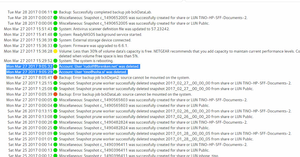
User has been Auto deleted - all data lost
Netgear RN10400 , fw: 6.6.0, 2 x 1TB, RAID 1. User has been Auto deleted - all data lost. Can not acces local user home dir?!? Can someone check this? Or tell me, in which log can I check th...
- Apr 11, 2017
Please if you haven't already. Have a read of Having ReadyCLOUD problems since 3/30/17?
This announcement has been updated over time.
I'm going to mark this as the solution to make sure those visiting this thread see this post.

mdgm-ntgr
Mar 31, 2017NETGEAR Employee Retired
I am a current NETGEAR employee.
We are investigating what has happened here.
If you can you should restore the home folder data for your ReadyCLOUD users from backup. Once the home folders have been deleted the data in them is pretty much unrecoverable.
Due to the nature of why home folders were deleted in this instance we're looking into if anything can be done, but the process to delete home shares is quite destructive. If you want to wait and see if a way to recover the data is possible you should disable volume maintenance and stop writing to the volume or better yet boot to volume read-only mode (so no changes can be made to the volume). Any changes made to a volume after data is deleted would reduce the chances of data recovery however slim those chances may be.

CJDEN
Mar 31, 2017Apprentice
mdgm wrote:I am a current NETGEAR employee.
We are investigating what has happened here.
If you can you should restore the home folder data for your ReadyCLOUD users from backup. Once the home folders have been deleted the data in them is pretty much unrecoverable.
Due to the nature of why home folders were deleted in this instance we're looking into if anything can be done, but the process to delete home shares is quite destructive. If you want to wait and see if a way to recover the data is possible you should disable volume maintenance and stop writing to the volume or better yet boot to volume read-only mode (so no changes can be made to the volume). Any changes made to a volume after data is deleted would reduce the chances of data recovery however slim those chances may be.
My ReadyCloud button is now set to OFF, and will remain so. Will this ensure that Netgear servers will be unable to trigger a deletion of data and users in my home folder?
What happen here is a disaster and should trigger Netgear to review the functionality of the Cloud service/NAS Software. I can not live with the unceatenty that my personal data on a storage and backup device in my private home can be deleted all of a sudden without my concent. I purchased ny NAS to safeguard my data, not delete them.
I hope Netgear will issue software updates shortly with a guarantee that something like this will not happen ever again, otherwise my faith is lost, and a different brand will be on my shelf shortly. A real pity as I loved the thing, just until you ate my data :-(
Related Content
NETGEAR Academy

Boost your skills with the Netgear Academy - Get trained, certified and stay ahead with the latest Netgear technology!
Join Us!
