NETGEAR is aware of a growing number of phone and online scams. To learn how to stay safe click here.
Forum Discussion

tomiaurednik
Mar 29, 2017Tutor
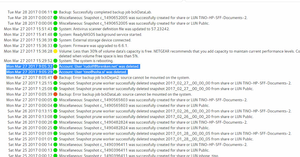
User has been Auto deleted - all data lost
Netgear RN10400 , fw: 6.6.0, 2 x 1TB, RAID 1. User has been Auto deleted - all data lost. Can not acces local user home dir?!? Can someone check this? Or tell me, in which log can I check th...
- Apr 11, 2017
Please if you haven't already. Have a read of Having ReadyCLOUD problems since 3/30/17?
This announcement has been updated over time.
I'm going to mark this as the solution to make sure those visiting this thread see this post.


Geronimo88
Mar 31, 2017Guide
Have you gone into the admin via webbrowser using default name and passwords,(admin & password) navigate to cloud tab then make sure Readycloud is turned on.

aaron921
Mar 31, 2017Aspirant
What a load of crap. Sorry but I'm not happy at all. I went into the admin and the cloud service was off. I turn it back on and had to put my login information. When i went to check the share options, they were all gone. So I'm starting over with the cloud setup. This will be the last netgear product I buy. I wil probably trying convincing the person I need to, to purchase another brand of equipment. These problems on Netgear's side are becoming a real pain.
Related Content
NETGEAR Academy

Boost your skills with the Netgear Academy - Get trained, certified and stay ahead with the latest Netgear technology!
Join Us!
