NETGEAR is aware of a growing number of phone and online scams. To learn how to stay safe click here.
Forum Discussion

tomiaurednik
Mar 29, 2017Tutor
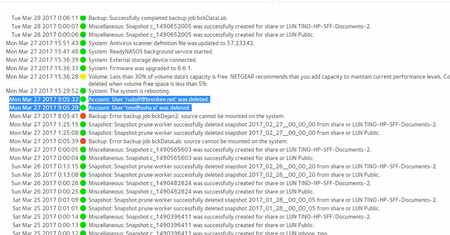
User has been Auto deleted - all data lost
Netgear RN10400 , fw: 6.6.0, 2 x 1TB, RAID 1. User has been Auto deleted - all data lost. Can not acces local user home dir?!? Can someone check this? Or tell me, in which log can I check th...
- Apr 11, 2017
Please if you haven't already. Have a read of Having ReadyCLOUD problems since 3/30/17?
This announcement has been updated over time.
I'm going to mark this as the solution to make sure those visiting this thread see this post.


Tore1
Mar 30, 2017Tutor
Hi
When i go to https://readycloud.netgear.com/client/en/welcome.html i click signin.
That mostly works - but not allways..
When it works:
When i then click the nas in the Home tab, it says the nas is offline.
I have restarted the nas ½ hour ago, its working fine. I can acces files from it, from windows file explorer or from my TV.
What should i do?

Björn_Eberhardt
Mar 31, 2017Aspirant
How big is the chance anyway to recover them from the generation logs? Although I kept only some of the data in the home folders, they're a bit too valuable to just let go and proceed.
I do have two ReadyNAS'es (yes, they back up each other), but the second one has the same folder structure. I will travel to the backup site today and see if the other device is affected as well. I fear it is, and the data is probably lost on both systems. I cannot access it from the web here because it is behind a IPv6 router.
Related Content
NETGEAR Academy

Boost your skills with the Netgear Academy - Get trained, certified and stay ahead with the latest Netgear technology!
Join Us!
