NETGEAR is aware of a growing number of phone and online scams. To learn how to stay safe click here.
Forum Discussion

tomiaurednik
Mar 29, 2017Tutor
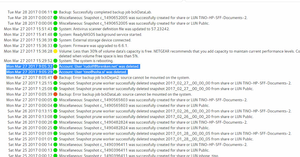
User has been Auto deleted - all data lost
Netgear RN10400 , fw: 6.6.0, 2 x 1TB, RAID 1. User has been Auto deleted - all data lost. Can not acces local user home dir?!? Can someone check this? Or tell me, in which log can I check th...
- Apr 11, 2017
Please if you haven't already. Have a read of Having ReadyCLOUD problems since 3/30/17?
This announcement has been updated over time.
I'm going to mark this as the solution to make sure those visiting this thread see this post.


jak0lantash
Apr 02, 2017Mentor
The system volume, the swap volume and the data volume(s) are all on the disks. But in different partitions. An OS Reinstall writes only to the system volume, so performing this doesn't reduce the chances of recovery (on its own).
To prevent any write on the data volume(s), I'd advise you to boot in read/only via the Boot Menu once the OS Reinstall complete.

trillian796
Apr 02, 2017Guide
I gave up on the restore of my data.
I am fairly fortunate in that I am a home user and I use the NAS system for backing up my computer etc, family computers,
and my music system (which was fortunately in it's own share). So most stuff I can recreate. Its just taken time out of my weekend messing about
backing up stuff all over again :-( and have to get hold of family stuff again.
So I am in a better position than some/most, but angry as this is supposed to be my reliable backup system, and I paid a lot of money (as a home user) for this system.
 coloattyApr 02, 2017Luminary
Sounds as if your disaster recovery system worked for you this time. Stuff happens for whatever reason. Sometimes one has to backup the backup from originals. I too hate to use my time redundantly when I thought that's what my redundant device was there to prevent. I really empathize with those less fortunate who have lost what may not be recovered.
I too am mostly a home NAS user. I have a ReadyNAS 628 (source) with rsync backups to a ReadyNAS Ultra 6 Plus. I also do a manual back up of the source to hard drives in an eSATA external drive. I have configured the rsync backups to delete files and folders on the backup that have been deleted on the source. When I happened to check the status of a backup process last week, I actually saw the cloud user home folder disappear on the backup after it had been deleted on the source during this ReadyCLOUD incident. Fortunately, the cloud user home folder was empty, and I was using ReadyCLOUD only for remote access. I am rethinking some of my backup strategy and will start using snapshots on the backup volumes.
If anyone hasn't read jak0lantash's redundancy advice and strategy, it is recommended:
I'm not prepared to adopt the entire strategy. But I am more informed about risks and avoidances than I otherwise would be and what changes I may want to make.
- ITME-DFApr 03, 2017Star
I posted on this subject in another thread. Fortunately for me I wasn't using the Home folders for my ReadyCLOUD connected users and by default hid them from the staff of my customers. However there are many, many threads on this subject and obviously many hundreds (if not thousands) of NETGEAR customers affected by this 'outage'.
This really is a huge scandal that probably will/should end up in the press. Essentially, the design and infrastructure of the NETGEAR ReadyNAS products is seriously flawed if a fault or 'outage' at NETGEAR has removed/deleted/lost/corrupted user accounts and as a result triggered the hardware to delete the associated user data stores. The administrators of these devices as well as the users didn't cause this and it seems that NETGEAR is slowly 'owning up' to this problem.
It's really not appropriate to blame the users for this issue or for not having a backup. Many users bought this kit to utilise the RAID technology and simply didn't expect user accounts and data to magically disappear. What about the users that are backing up or sychronising their data between ReadyNAS devices?
Until now I was quite confident installing this kit for my clients but that confidence has well and truly gone. We need straight answers as to how and why this has happened. Was this a hack attack, a fire at a NETGEAR datacentre, a member of staff being malicious or a member of staff making changes to systems without fully understanding the consequences? And why hasn't NETGEAR, a company providing data storage and backup solutions not got a readily available backup of the ReadyCLOUD user account database? We need future OS updates to provide safeguards and mechanisms to protect data and 'Home folders' even if accounts are deleted or lost.
I've literally spent the entire weekend rebuilding/recreating user accounts, recreating shares, sending out share invites and configuring FTP access for my customers that cannot be without some method of accessing their data if there's a problem with ReadyCloud. I'm really weary of this and need answers.
- mdgm-ntgrApr 03, 2017NETGEAR Employee Retired
We are working through what changes need to be made.
The outage led the NAS to believe it had been deregistered from ReadyCLOUD so it acted accordingly.I'm already attempting data recovery for some units. There is typically a long wait to see what's able to recovered.
Whether it's a situation like this or something else, regardless of what kit you use it's only a matter of time before you'll need your backup for something. Part of what this community is here for is for advice to be given on what to do in the future. Ultimately whilst we do all we can to protect customer data, it's up to you to implement a backup strategy that you're comfortable balances the cost, risk and complexity of maintenance appropriately. If data is stored on just the one device, no matter what that device is, it's not backed up. - ITME-DFApr 03, 2017Star
I appreciate you're doing what you can to resolve this issue. I've worked in the IT industry for 30 years and I've had to deal with backlash on more than one occasion. But . . .
- A system/infrastructure that deletes a users data, stored on his/her own hardware without that users consent is inherently flawed and not secure.
- What if people are/were synchronising/backing up Home folders between two ReadyNAS devices? In such a scenario both the live data and the backup have been destroyed. Are you suggesting we all buy another manufacturer's storage equipment in order to ensure we have a secure backup of the backup - a backup that cannot be deleted as a result of a fault at NETGEAR?
- Speaking of backups. Many people are using your devices for backups or file sync. Now that their backup has 'vanished' they've probably got an age to wait until they complete a full backup of their files/systems - ouch!
- I really want to know how an 'outage' can cause these problems. Does NETGEAR not have several datacentres with load balancing, server mirroring and redundancy? I can see how an 'outage' could cause a service to be less responsive - but I really can't figure out how, within a company like NETGEAR an 'outage' can cause the loss of hundreds/thousands of user accounts. I also occasionally disconnect my ReadyNAS devices from the Internet - so far my accounts have not been 'delinked' or my data deleted. There's more to this story, I'm sure of it.
- Again, I appreciate you're working on this and trying to find solutions to appease some of your customers. But I'm sure, as I do, many of your customers are using your devices as day-to-day file stores/servers and simply cannot configure the volumes as read only.
- I've read through many of the related threads and seen the word 'outage' used a lot. What I haven't seen is an offical response explaining exactly what happened and trying to instill confidence in NETGEAR kit.
Related Content
NETGEAR Academy

Boost your skills with the Netgear Academy - Get trained, certified and stay ahead with the latest Netgear technology!
Join Us!
